Ansible splunk.itsi Collection: Closed-Loop Remediation with Event-Driven Ansible
By Luca Berton · Published 2024-01-01 · Category: troubleshooting
Learn how the new splunk.itsi collection pairs Splunk IT Service Intelligence with Event-Driven Ansible for automated closed-loop remediation in AAP 2.7.
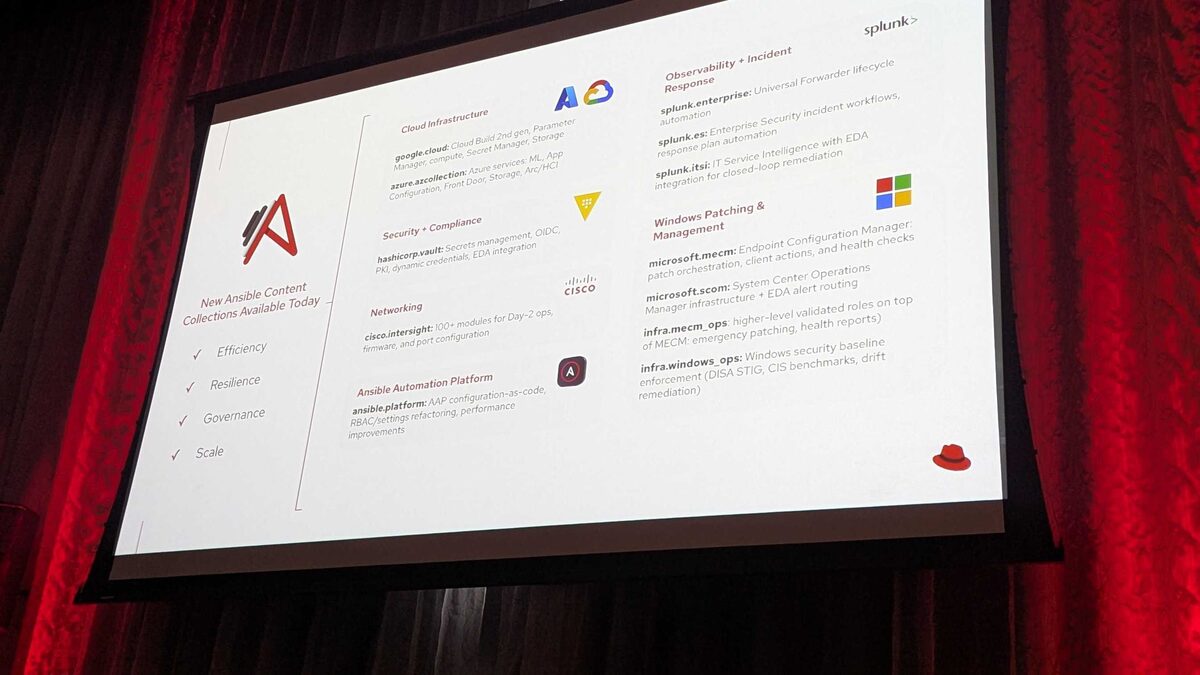
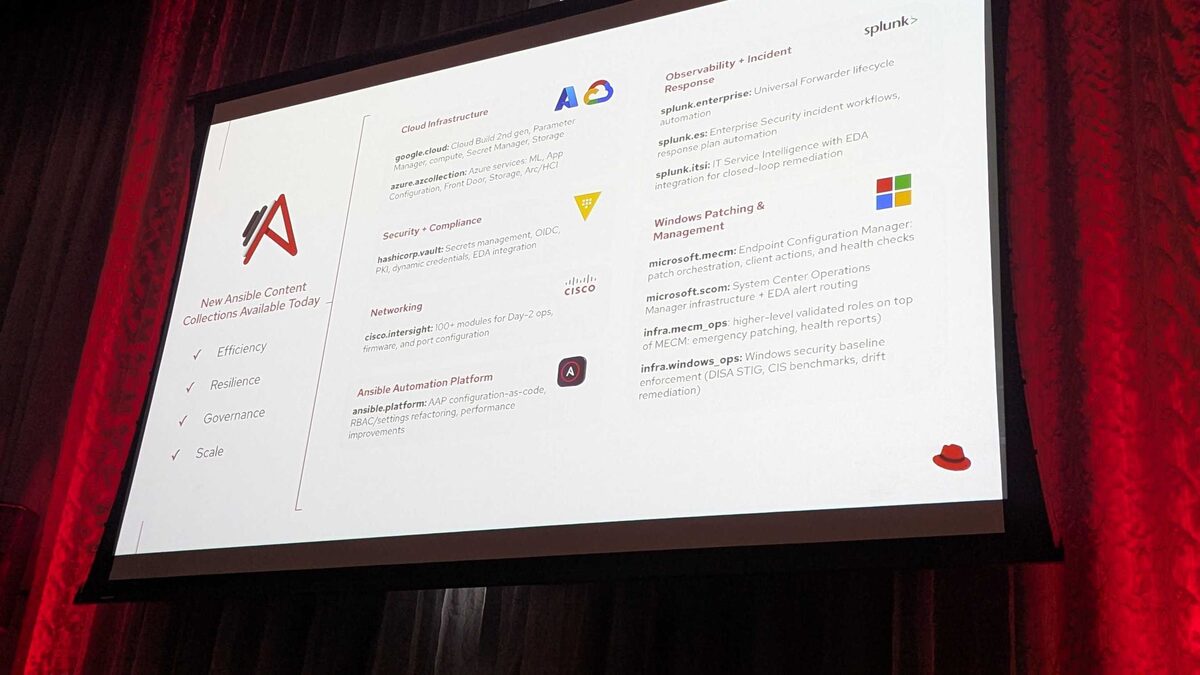
!New Ansible Content Collections Available Today — Red Hat Tech Day Netherlands 2026
What Was Announced
At Red Hat Tech Day Netherlands 2026, held on 3 June 2026 in Bunnik, the Ansible team unveiled 12 new content collections for Ansible Automation Platform (AAP) 2.7, organized around four themes: Efficiency, Resilience, Governance, and Scale. Among them was splunk.itsi, a collection that brings Splunk IT Service Intelligence (ITSI) into the Event-Driven Ansible (EDA) ecosystem to enable closed-loop remediation.
This announcement sits alongside two sibling Splunk collections revealed at the same event: splunk.enterprise (Universal Forwarder lifecycle automation) and splunk.es (Splunk Enterprise Security incident workflows and response plan automation). Together, the three collections extend Ansible's reach across the full Splunk observability and security stack — but splunk.itsi is the one purpose-built for service health monitoring and automated, event-triggered response.
See also: AAP 2.7 EE Builder Step 1: Choosing a Base Image
Why Closed-Loop Remediation Matters
Splunk ITSI correlates raw metrics and logs into service health scores, KPIs, and notable events that reflect the real-world impact of infrastructure problems on business services. Historically, when ITSI flagged a degraded service, a human had to triage the notable event, decide on a fix, and manually execute it — often through a separate runbook, ticketing system, or ad hoc script.
The splunk.itsi collection closes that loop. By integrating with EDA, notable events generated by ITSI become triggers that a rulebook can match against, kicking off an Ansible Job Template automatically. The remediation happens in seconds instead of minutes or hours, and the entire chain — detection, decision, and action — is captured as auditable automation rather than tribal knowledge in someone's head.
This pattern mirrors what Ansible already does well with other monitoring sources, but splunk.itsi is notable because it operates on service-level health scores rather than raw alerts, which means remediation can be tied to business-service impact rather than individual component noise.
How the Pieces Fit Together
At a high level, the closed-loop pattern built on splunk.itsi involves three moving parts:
- Splunk ITSI monitors KPIs and raises a notable event when a service health score breaches a threshold.
- Event-Driven Ansible listens for that notable event via a source plugin from the collection, evaluates it against rulebook conditions, and matches it to a remediation action.
- Ansible Automation Platform executes the matched Job Template — restarting a service, scaling a resource, clearing a queue, or opening a coordinated incident response — and can write status back into ITSI.
| Stage | Component | Responsibility |
|---|---|---|
| Detect | Splunk ITSI | Correlate KPIs, calculate service health score, raise notable event |
| Decide | EDA rulebook (splunk.itsi source/filter) | Match event condition, select remediation action |
| Act | AAP Job Template | Run the remediation playbook against the affected host/service |
| Confirm | splunk.itsi modules | Update or close the notable event, record remediation outcome |
Example: An EDA Rulebook Against ITSI Notable Events
Because splunk.itsi was announced at Tech Day without full published API detail for every module, the example below illustrates the expected shape of a rulebook and playbook based on how EDA source plugins for observability platforms are conventionally structured in Ansible content.
---
- name: Closed-loop remediation for degraded services in Splunk ITSI
  hosts: all
  sources:
    - splunk.itsi.notable_events:
        splunk_host: "{{ itsi_host }}"
        splunk_token: "{{ itsi_token }}"
        poll_interval: 30

  rules:
    - name: Auto-remediate high severity service degradation
      condition: >
        event.severity == "critical" and
        event.service == "checkout-service"
      action:
        run_job_template:
          name: "Restart checkout-service and clear queue"
          organization: "Platform Engineering"
          job_args:
            extra_vars:
              itsi_event_id: "{{ event.event_id }}"
              affected_service: "{{ event.service }}"

    - name: Escalate unmatched critical events
      condition: event.severity == "critical"
      action:
        run_job_template:
          name: "Notify on-call and open incident"
          organization: "Platform Engineering"
A companion remediation playbook would then use splunk.itsi modules to close the loop by acknowledging or updating the notable event once the fix has been applied:
---
- name: Remediate and update ITSI notable event
  hosts: "{{ affected_service }}"
  vars:
    itsi_event_id: "{{ itsi_event_id }}"

  tasks:
    - name: Restart the affected application service
      ansible.builtin.systemd:
        name: checkout-service
        state: restarted

    - name: Clear backlogged message queue
      ansible.builtin.command: /opt/checkout/bin/queue-drain.sh
      changed_when: true

    - name: Mark ITSI notable event as resolved
      splunk.itsi.notable_event:
        event_id: "{{ itsi_event_id }}"
        status: resolved
        comment: "Auto-remediated via AAP Job Template"
These task and module names are illustrative — teams adopting the collection should validate exact parameters against the official splunk.itsi documentation as it becomes generally available, but the structure reflects standard Ansible conventions for EDA source plugins and remediation modules.
See also: AAP 2.7 EE Builder Step 2: Adding Collections from Private Automation Hub
Where splunk.itsi Fits Among the Splunk Collections
| Collection | Primary Use Case | EDA Role |
|---|---|---|
| splunk.enterprise | Universal Forwarder lifecycle management | Not EDA-focused |
| splunk.es | Enterprise Security incident workflows, response plans | Triggered from security incidents |
| splunk.itsi | Service health monitoring, closed-loop remediation | Core EDA integration for notable events |
Governance and Scale Considerations
Because splunk.itsi actions can restart production services autonomously, teams should pair it with the governance capabilities also announced at Tech Day Netherlands 2026, particularly the ansible.platform collection's configuration-as-code and RBAC refactoring. Defining who can author rulebooks that trigger closed-loop remediation, and which Job Templates are eligible for autonomous execution versus requiring approval, is essential before enabling this pattern against critical services.
See also: AAP 2.7 EE Builder Step 3: Destination, Build, and Publish to Git
Key Takeaways
- splunk.itsi is one of 12 collections announced for AAP 2.7 at Red Hat Tech Day Netherlands 2026 (3 June 2026, Bunnik), focused on IT Service Intelligence with EDA integration.
- The collection enables closed-loop remediation: Splunk ITSI notable events trigger EDA rulebooks, which run AAP Job Templates, which can report status back into ITSI.
- It complements splunk.enterprise (forwarder lifecycle) and splunk.es (security incident workflows) as part of a broader Splunk automation strategy on AAP.
- Because it operates on service health scores rather than raw component alerts, remediation can be prioritized by business impact.
- Pair autonomous remediation with the governance improvements in the ansible.platform collection — RBAC and configuration-as-code — before enabling it against production services.
Related Articles
Category: troubleshooting