AAP Automation Orchestrator: Configuring Multi-Source Alert Triggers
By Luca Berton · Published 2024-01-01 · Category: troubleshooting
Learn how AAP Automation Orchestrator ingests multi-source alerts and hands them to an Event-Driven Ansible rulebook to trigger deterministic remediation.
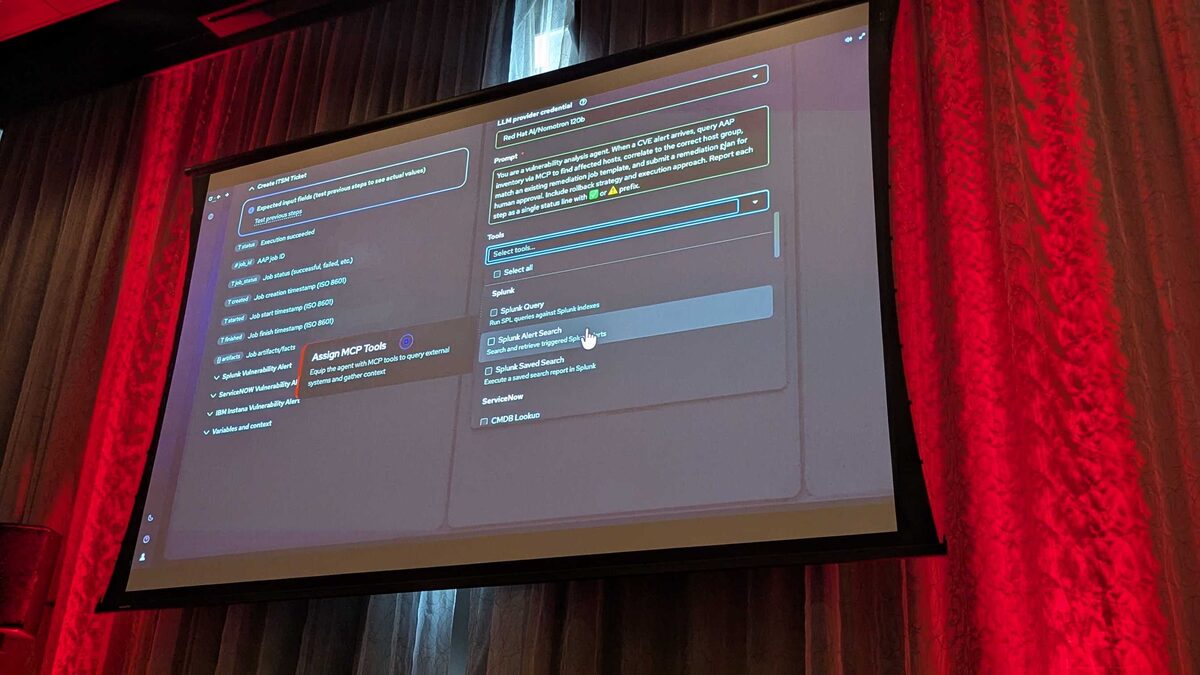
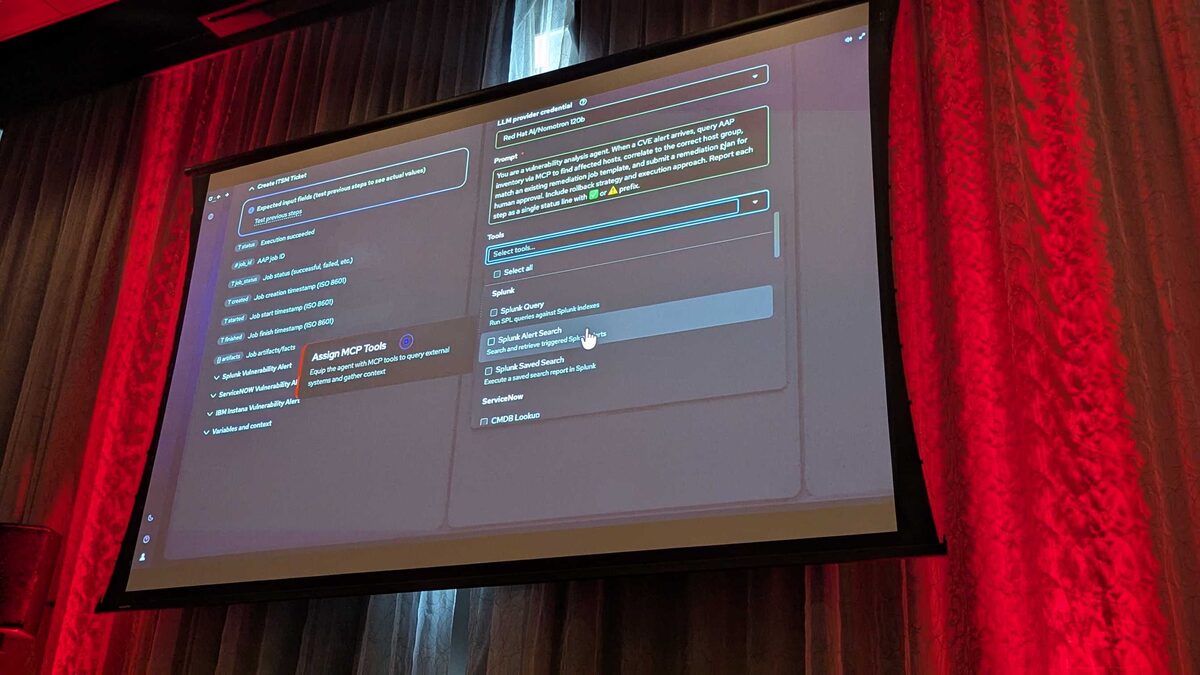
!Automation Orchestrator — assigning MCP tools to the vulnerability analysis agent
Red Hat's Automation Orchestrator, previewed at Red Hat Tech Day Netherlands 2026 in Bunnik and slated to arrive in Q3 2026, reframes Ansible Automation Platform (AAP) as a unified canvas for AI-driven IT operations. It stitches together task-based automation, event-based automation, and agentic reasoning on top of the upstream Temporal durable-execution engine — and it does so under one governing principle stated plainly at the event: "AI isn't improvising against production infrastructure, it's acting through AAP." Every recommendation an AI agent makes still has to pass through the same deterministic, auditable execution path that Ansible has always used.
That pipeline breaks down into five steps: alerts arrive from multiple sources, an Event-Driven Ansible (EDA) rulebook picks them up, an AI agent analyzes and recommends a fix, a human approves it, and AAP executes the remediation at scale. This article focuses on the foundation of that pipeline — Steps 1 and 2 — where raw signals from disparate monitoring and ITSM tools become a single, trustworthy trigger into your automation.
Step 1: Alerts From Multiple Sources on One Canvas
The first design goal of Automation Orchestrator is consolidation. Instead of every monitoring tool, agent, and playbook maintaining its own notification path, alerts land on a single orchestration canvas where they can be correlated, prioritized, and routed consistently. In the Tech Day demo, this was illustrated with a real-world CVE remediation scenario: CVE-2024-6387 ("regresshion"), a critical race condition in OpenSSH's sshd that can lead to unauthenticated remote code execution.
Two independent systems fed alerts into the same orchestrator:
- IBM Instana, an observability platform, which detected anomalous behavior and fired a webhook.
- ServiceNow, which raised a corresponding CMDB/ITSM signal via its own webhook.
| Alert source | Role in the demo | Delivery mechanism |
|---|---|---|
| IBM Instana | Detects the anomaly / vulnerability signal | Webhook → EDA endpoint (Step 2 trigger) |
| ServiceNow | Raises the ITSM ticket and CMDB context | Webhook → EDA endpoint (Step 3 trigger) |
| Splunk (via MCP) | Queried by the AI agent for correlation, not a webhook source | MCP tool calls: Query, Alert Search, Saved Search |
| ServiceNow CMDB (via MCP) | Queried by the AI agent to map hosts to inventory | MCP tool call: CMDB Lookup |
See also: AAP Automation Orchestrator: Automated Remediation Execution Explained
Step 2: The EDA Rulebook Trigger
Once a webhook lands, Event-Driven Ansible is what turns an arbitrary HTTP POST into a deterministic automation action. Each webhook source is registered against an EDA webhook endpoint with an auto-generated API key, so Instana and ServiceNow authenticate independently even though they route to the same rulebook logic. This is the layer that keeps Step 1's chaos from leaking into the rest of the pipeline: no matter how noisy or varied the upstream alert is, EDA evaluates it against explicit conditions and only fires the actions you've defined.
A simplified rulebook for the regresshion scenario looks like this:
---
- name: Handle critical OpenSSH CVE alerts from multiple sources
  hosts: all
  sources:
    - ansible.eda.webhook:
        host: 0.0.0.0
        port: 5000
        token: "{{ eda_webhook_token }}"

  rules:
    - name: Instana anomaly alert for regresshion CVE
      condition: >
        event.payload.source == "instana" and
        event.payload.cve_id == "CVE-2024-6387" and
        event.payload.severity == "critical"
      action:
        run_job_template:
          name: "cve-2024-6387-triage"
          organization: "IT Operations"
          job_args:
            extra_vars:
              cve_id: "{{ event.payload.cve_id }}"
              detected_hosts: "{{ event.payload.affected_hosts }}"
              alert_source: instana

    - name: ServiceNow ticket confirms same CVE
      condition: >
        event.payload.source == "servicenow" and
        event.payload.cve_id == "CVE-2024-6387"
      action:
        run_job_template:
          name: "cve-2024-6387-triage"
          organization: "IT Operations"
          job_args:
            extra_vars:
              cve_id: "{{ event.payload.cve_id }}"
              itsm_ticket: "{{ event.payload.ticket_number }}"
              alert_source: servicenow
A few things matter operationally here:
- One condition per source, one shared job template. Both rules resolve to the same
cve-2024-6387-triagejob template so that, regardless of which system alerted first, the downstream AI-analysis step (Step 3) receives a consistent payload shape. - The rulebook is deterministic, not probabilistic. This is the boundary the Tech Day team was emphatic about: EDA's job is pattern-matching against explicit conditions, not inference. The AI only enters the picture after EDA has already decided a valid, known trigger fired.
- Tokens per source. Each webhook source carries its own auto-generated API key, so you can revoke or rotate Instana's credential without touching ServiceNow's, and you get source-level audit trails in the EDA controller logs.
- Extra vars carry provenance. Passing
alert_sourceand the raw identifiers (ticket_number,affected_hosts) forward means the job template — and eventually the AI agent — always knows which system originated the trigger, which matters when the same job template can be reached from either path.
Designing Your Own Multi-Source Triggers
When you build this pattern for your own environment, a few practical rules carry over directly from the demo:
- Give every alert source its own webhook credential. Don't share API keys across Splunk, Instana, ServiceNow, or any other tool posting into EDA — rotate and audit independently.
- Normalize on job template, not on payload. Different sources will never agree on field names; let your rulebook conditions do the translation and converge on one job template per remediation type.
- Pass provenance forward. Always include the originating source and any ticket/incident identifiers in
extra_varsso downstream AI analysis and human approval steps have full context. - Keep the rulebook boring on purpose. Step 2 should be simple, explicit, and auditable — save the reasoning for Step 3 and the judgment for Step 4.
Key Takeaways
- Automation Orchestrator's Step 1 consolidates alerts from push-based webhooks (Instana, ServiceNow) and pull-based MCP context sources (Splunk, ServiceNow CMDB) onto a single canvas.
- Step 2's EDA rulebook is the deterministic gatekeeper: it evaluates explicit conditions on incoming webhook events and only then triggers a known job template.
- Each webhook source should carry its own auto-generated API key for independent authentication and auditability.
- Multiple alert sources can and should resolve to the same job template, with
extra_varspreserving which system triggered the run. - This foundation — fast, deterministic, and fully logged — is what let the Tech Day demo hand off safely to AI analysis and human approval in the subsequent steps, ultimately remediating CVE-2024-6387 across 12 hosts with zero downtime.
See also: AAP Automation Orchestrator: Building a Human Review Approval Gate
Related Articles
Category: troubleshooting