AAP 2.7 EE Builder Step 3: Destination, Build, and Publish to Git
By Luca Berton · Published 2024-01-01 · Category: linux-administration
How AAP 2.7's EE Builder wizard Step 3 sets name, description, and tags, then publishes your execution environment definition to GitHub and triggers a build.
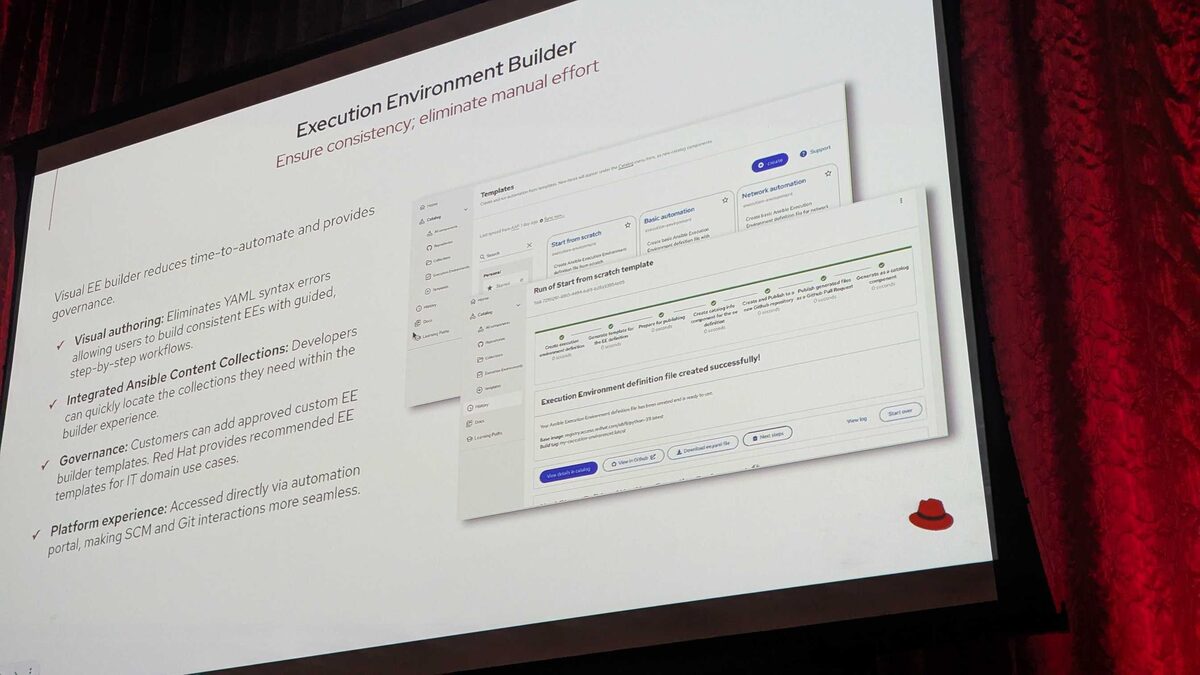
!Execution Environment Builder overview — ensure consistency, eliminate manual effort
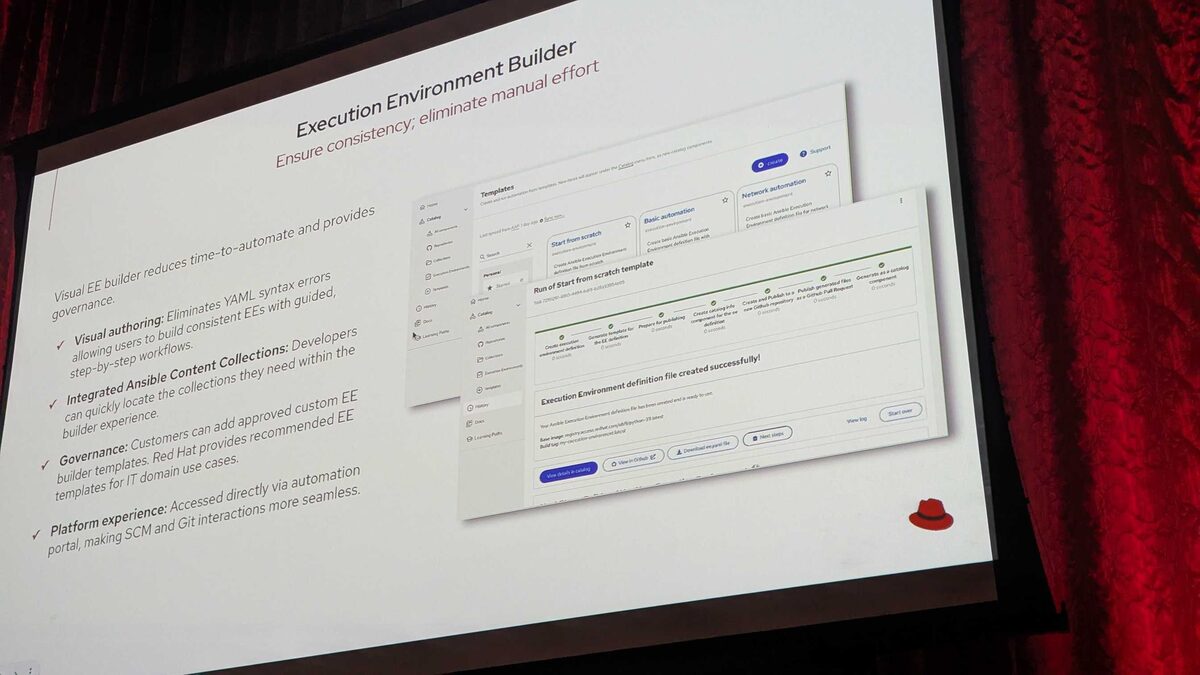
Overview
Red Hat Ansible Automation Platform (AAP) 2.7 introduces a visual Execution Environment (EE) Builder inside the Automation Portal, letting platform engineers assemble execution environments without hand-writing an execution-environment.yml file. The wizard walks through four steps: Base Image, Configuration, Destination and Build, and Review. This article was informed by material presented at Red Hat Tech Day Netherlands 2026 in Bunnik on 3 June 2026, and focuses specifically on Step 3: Destination and Build — the point in the wizard where your EE definition stops being a draft and becomes a versioned, buildable artifact.
If Step 1 answers "what base image am I starting from" and Step 2 answers "what collections and packages go into it," Step 3 answers a different set of questions entirely: where does this definition live, how is it identified, and what happens the moment I hit save?
See also: AAP 2.7 EE Builder Step 1: Choosing a Base Image
What Step 3 Actually Configures
Step 3 of the EE Builder wizard is where you set the metadata and the delivery target for the execution environment definition you just assembled. Concretely, it covers three things:
- Name, description, and tags — the identifying metadata that makes the EE definition discoverable later in the portal's searchable catalog
- Git publish target — pushing the generated definition (and its underlying
execution-environment.yml) to an authenticated GitHub repository - Automatic build trigger — an optional switch to kick off the actual container image build immediately after the definition is published
Naming, Description, and Tags
Every EE definition needs a name that is unique and meaningful enough to survive being one of dozens (or hundreds) of entries in the portal's EE catalog. The wizard requires:
| Field | Purpose | Example |
|---|---|---|
| Name | Unique identifier shown in the catalog and used in image references | network-automation-ee |
| Description | Free-text context for future maintainers | "EE for network automation team, RHEL system roles included" |
| Tags | Searchable labels for filtering the catalog | network, rhel9, core2.18 |
See also: AAP 2.7 EE Builder Step 2: Adding Collections from Private Automation Hub
Publishing to Git
The headline capability of Step 3 is that it treats the EE definition as source code, not just a build recipe living inside the portal's database. Once name, description, and tags are set, the wizard offers to publish the definition to a Git repository — specifically GitHub in the current implementation, using an authenticated connection configured against your GitHub account or organization.
This matters for a few reasons that should be familiar to anyone running Ansible at scale:
- Version control and review — the generated
execution-environment.yml, along with any custom requirements or build steps added back in Step 2, lands in Git where it can go through pull request review like any other infrastructure-as-code artifact. - Reproducibility outside the portal — a Git-hosted definition can be rebuilt independently with
ansible-builderfrom the command line, decoupling the artifact from the wizard that produced it. - Auditability — commit history on the repository answers "who changed the base image" or "when did this EE start including
redhat.rhel_system_roles" without needing to dig through portal logs.
execution-environment.yml produced by the wizard and pushed to Git looks like this:
---
version: 3

images:
  base_image:
    name: registry.redhat.io/ansible-automation-platform-25/ee-minimal-rhel9:latest

dependencies:
  galaxy:
    collections:
      - name: redhat.rhel_system_roles
        version: "1.20.5"

  python:
    package_list:
      - requests>=2.31.0

additional_build_steps:
  prepend_base:
    - RUN whoami
That file, plus a companion bindep.txt or requirements.yml if system packages or extra collection sources were configured in Step 2's Advanced Configuration, is what actually lands in the target GitHub repository when you complete Step 3.
Triggering an Automatic Build
Publishing to Git is optional to combine with building — but Step 3 exposes a toggle to automatically trigger a build immediately after publishing. This is the fork in the road worth understanding clearly:
- Publish only — the definition is committed to Git, and nothing is built yet. Useful when the definition needs a PR review or approval gate before consuming compute on a build job.
- Publish and build — the definition is committed to Git and a build job starts right away, producing a container image you can immediately assign to job templates or an instance group.
See also: AAP 2.7 EE Builder Step 4: Review and Validate Before Build
From Step 3 to Step 4
Whichever combination you choose, completing Step 3 hands you off to Step 4: Review, the final validation screen before the build actually runs. Step 3 is deliberately positioned before that final check so that naming, tagging, and Git destination are all locked in prior to reviewing the full definition — you're not meant to be renaming things or switching Git targets after you've already confirmed the build.
Key Takeaways
- Step 3 of the AAP 2.7 EE Builder wizard sets the EE definition's name, description, and tags, which drive discoverability in the portal's searchable EE catalog.
- Publishing targets an authenticated GitHub repository, turning the generated
execution-environment.ymlinto a version-controlled artifact rather than portal-only state. - An optional automatic build trigger lets you either commit-and-review first or commit-and-build immediately, depending on how GitOps-oriented your workflow is.
- Consistent tagging conventions (team, Ansible Core version, use case) pay off as the number of EE definitions in the catalog grows.
- Step 3 feeds directly into Step 4: Review, the last checkpoint before the build job actually consumes compute.
Related Articles
Category: linux-administration