Ansible microsoft.scom Collection: System Center Operations Manager Automation Guide
By Luca Berton · Published 2024-01-01 · Category: windows-automation
Learn how the new Ansible microsoft.scom collection automates System Center Operations Manager infrastructure and EDA alert routing on AAP 2.7.
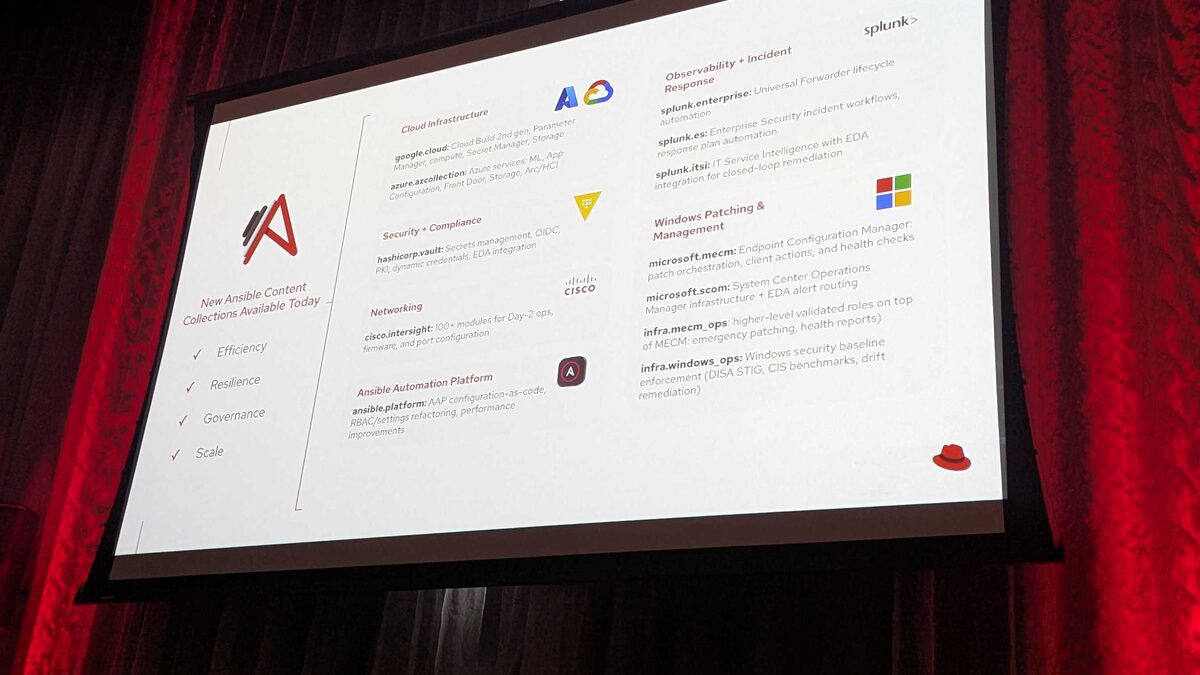
!New Ansible Content Collections Available Today — Red Hat Tech Day Netherlands 2026
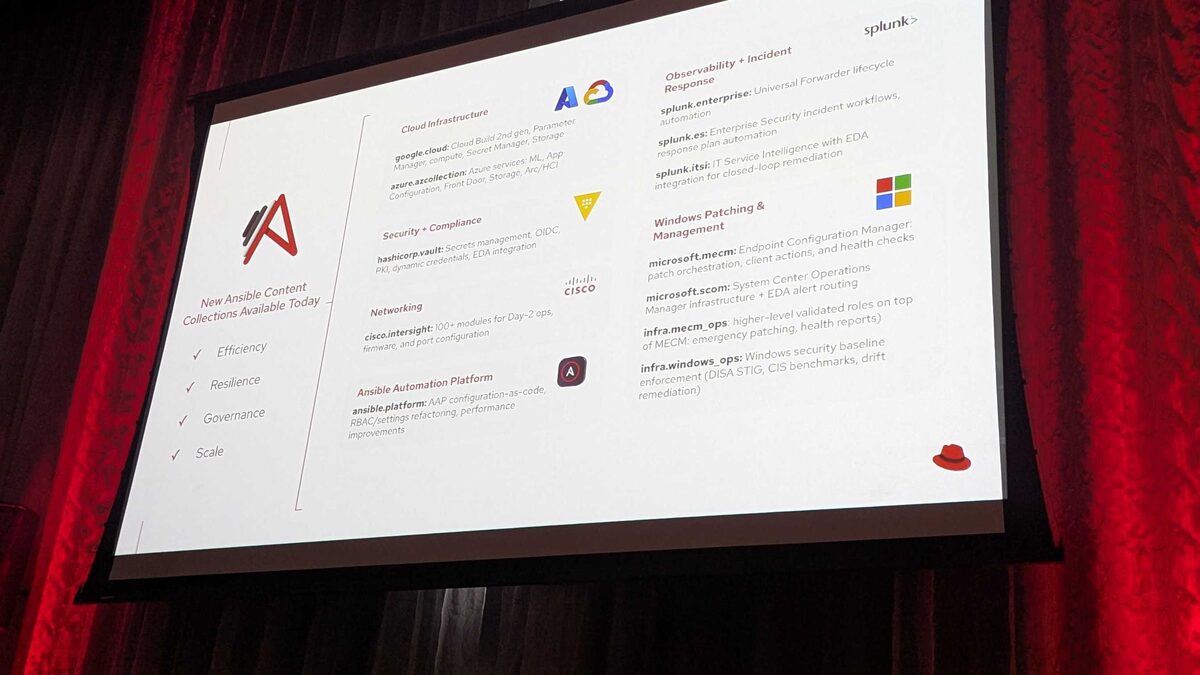
Microsoft System Center Operations Manager (SCOM) remains the backbone of infrastructure monitoring for countless enterprise Windows estates, but manually managing management packs, agents, and alert triage doesn't scale in modern hybrid environments. At Red Hat Tech Day Netherlands 2026 in Bunnik (3 June 2026), Red Hat's Ansible team announced the microsoft.scom collection as part of a wave of 12 new content collections landing with Ansible Automation Platform 2.7. This guide breaks down what microsoft.scom does, why it matters, and how to start automating SCOM operations today.
What Is the microsoft.scom Collection?
microsoft.scom is a new Ansible content collection purpose-built to bring SCOM infrastructure under the same automation model already used for cloud, network, and security operations across AAP. Rather than relying on ad hoc PowerShell scripts or manual console work, teams can codify SCOM management as version-controlled, repeatable Ansible playbooks.
The collection was announced alongside its sibling, microsoft.mecm (Endpoint Configuration Manager), signaling a broader push from Red Hat and Microsoft to bring the full Microsoft systems management stack — patching, endpoint configuration, and operations monitoring — into the Ansible ecosystem under AAP 2.7.
Two capability areas anchor the announced collection:
- SCOM infrastructure automation — managing the operational backbone of SCOM deployments (agents, management groups, and monitoring configuration) through Ansible-driven workflows.
- Event-Driven Ansible (EDA) alert routing — connecting SCOM's alerting engine directly into EDA rulebooks so that operational alerts trigger automated remediation instead of sitting in a queue waiting for a human to notice.
Why SCOM Automation Matters for AAP 2.7 Users
SCOM environments are notoriously alert-heavy. Operations teams often deal with alert fatigue, inconsistent escalation paths, and slow mean-time-to-remediation because alerts land in a console rather than an automated pipeline. By bringing SCOM into the AAP fold, organizations gain:
- Faster remediation loops — SCOM alerts can kick off EDA rulebooks that run corrective playbooks automatically, closing the loop between detection and action.
- Consistency across hybrid estates — the same RBAC, job templates, and audit trail used for Linux, cloud, and network automation now extends to Windows monitoring infrastructure.
- Reduced operational toil — routine SCOM upkeep (health checks, notification subscriptions, monitoring configuration) becomes a scheduled or event-triggered job instead of manual console navigation.
See also: AAP 2.7 EE Builder Step 1: Choosing a Base Image
Where microsoft.scom Fits Among the Windows-Focused Collections
Red Hat's 2.7 announcement grouped several collections around Windows and endpoint operations. Here's how microsoft.scom relates to its closest peers:
| Collection | Primary Focus | EDA Integration |
|---|---|---|
| microsoft.scom | SCOM infrastructure + alert monitoring | Yes — alert routing to remediation playbooks |
| microsoft.mecm | Endpoint Configuration Manager: patch orchestration, client actions, health checks | Not called out in the announcement |
| infra.mecm_ops | Higher-level validated roles: emergency patching, health reports | Built on microsoft.mecm |
| infra.windows_ops | Windows security baseline enforcement: DISA STIG, CIS benchmarks, drift remediation | Not called out in the announcement |
Example: Alert-Driven Remediation with microsoft.scom and EDA
The headline capability for microsoft.scom is closing the loop between a SCOM alert and an automated response. In practice, this looks like an EDA rulebook that listens for SCOM alert events and dispatches a playbook to investigate or remediate. Below is an illustrative rulebook and companion playbook showing the shape of this workflow (task and variable names are representative examples of how this integration is expected to be documented):
---
# eda-rulebooks/scom_alert_response.yml
- name: Route SCOM alerts to automated remediation
  hosts: all
  sources:
    - microsoft.scom.alert_source:
        management_group: "PROD-MG01"
        severity: ["Critical", "Warning"]
  rules:
    - name: Restart unresponsive Windows service on critical alert
      condition: event.alert.monitor_name == "Service Health Monitor"
      action:
        run_job_template:
          name: "SCOM - Remediate Service Alert"
          organization: "IT Operations"
          job_args:
            extra_vars:
              scom_alert_id: "{{ event.alert.id }}"
              scom_target_host: "{{ event.alert.managed_entity }}"
---
# playbooks/scom_remediate_service_alert.yml
- name: Remediate SCOM service alert
hosts: "{{ scom_target_host }}"
gather_facts: false
tasks:
- name: Acknowledge SCOM alert
microsoft.scom.alert_update:
alert_id: "{{ scom_alert_id }}"
resolution_state: "Acknowledged"
- name: Restart affected Windows service
ansible.windows.win_service:
name: "W3SVC"
state: restarted
- name: Verify service is running
ansible.windows.win_service_info:
name: "W3SVC"
register: service_status
- name: Close SCOM alert once verified healthy
microsoft.scom.alert_update:
alert_id: "{{ scom_alert_id }}"
resolution_state: "Closed"
when: service_status.services[0].state == "started"This pattern — detect via SCOM, remediate via Ansible, confirm, and close the alert — is exactly the kind of closed-loop automation Red Hat highlighted for the collection at the Bunnik event.
See also: AAP 2.7 EE Builder Step 2: Adding Collections from Private Automation Hub
Getting Ready to Adopt microsoft.scom
Since microsoft.scom is a newly announced collection tied to the AAP 2.7 release, teams should plan their adoption path now:
- Inventory your SCOM management groups so you know the scope of what will be automated first.
- Map existing alert-to-ticket workflows to identify which alerts are good first candidates for EDA-driven remediation.
- Coordinate with your Windows and monitoring teams — SCOM automation touches both infrastructure and operations ownership boundaries.
- Plan RBAC alongside ansible.platform's configuration-as-code improvements, also announced for 2.7, to keep SCOM job templates and credentials properly scoped.
- Pilot on non-critical management groups first, validating alert routing logic before extending to production-critical monitors.
Key Takeaways
- microsoft.scom is one of 12 new content collections announced for AAP 2.7 at Red Hat Tech Day Netherlands 2026, bringing SCOM infrastructure management and EDA-based alert routing into the Ansible ecosystem.
- Its core value is closing the loop between SCOM alert detection and automated remediation via Event-Driven Ansible.
- It complements microsoft.mecm, infra.mecm_ops, and infra.windows_ops as part of a broader Windows and endpoint automation strategy in AAP 2.7.
- Teams should start by inventorying SCOM management groups and mapping alert workflows before piloting EDA-driven remediation on lower-risk monitors.
- As with any newly announced collection, consult the official module documentation as it becomes available before building production rulebooks and playbooks.
Related Articles
- Ansible microsoft.mecm Collection: Automating Endpoint Configuration Manager Patching
- Ansible infra.windows_ops Collection: DISA STIG and CIS Benchmark Drift Remediation
- AAP Automation Orchestrator: Configuring Multi-Source Alert Triggers
- AAP Automation Orchestrator: Automated Remediation Execution Explained
Category: windows-automation