AAP Automation Orchestrator: Automated Remediation Execution Explained
By Luca Berton · Published 2024-01-01 · Category: installation
How AAP Automation Orchestrator executes Step 5, deterministic remediation at scale, with rolling batches, health checks, and full auditability.
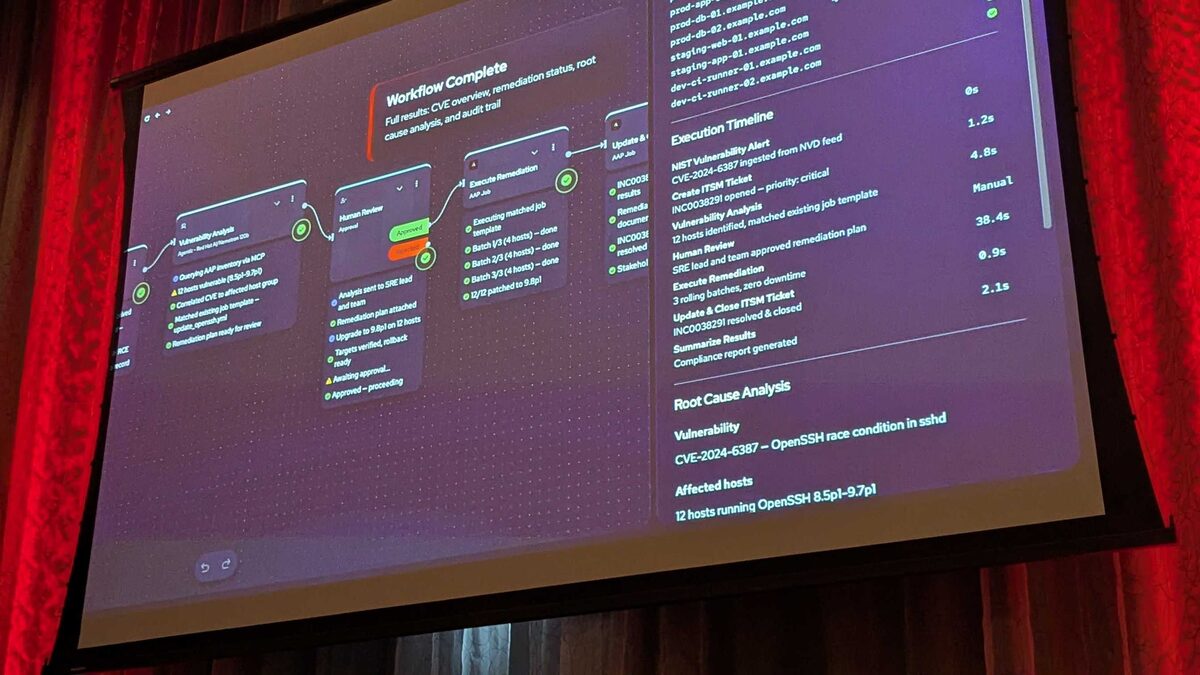
!Automation Orchestrator execution timeline with timing breakdown
Why Step 5 Is the Point of the Whole Pipeline
Everything in Red Hat's upcoming Automation Orchestrator — alert ingestion, Event-Driven Ansible rulebooks, an LLM proposing a fix — exists to set up one moment: the machine actually doing the work. That moment is Step 5, automated remediation execution via AAP, and it is the step where the platform's core design principle gets tested in production: AI isn't improvising against production infrastructure, it's acting through AAP.
This distinction matters more than it sounds. An AI agent can reason about a vulnerability, correlate it against your CMDB, and draft a remediation plan, but none of that reasoning ever touches a live host directly. Everything downstream of the human approval gate runs as a standard, deterministic Ansible Automation Platform job — the same execution engine, the same credentials model, the same audit trail you already trust for every other job template in your organization. Automation Orchestrator, announced at Red Hat Tech Day Netherlands 2026 in Bunnik and built on the upstream Temporal durable-execution engine, is arriving in Q3 2026 specifically to make that hand-off — from AI recommendation to governed execution — a first-class, single-canvas experience instead of a pile of glue scripts between a chatbot and Ansible.
See also: AAP Automation Orchestrator: Building a Human Review Approval Gate
The Five Steps, Briefly
Automated remediation execution doesn't exist in isolation. It's the payoff of a five-stage pipeline:
- Alerts from multiple sources — agents, events, and playbooks orchestrated on a single canvas.
- Events trigger a deterministic automation rulebook — Event-Driven Ansible picks up the alert.
- AI analyzes and recommends — an LLM plus MCP tools investigate and propose remediation.
- Humans approve — a governance gate before anything touches production.
- Automated remediation at scale — deterministic, auditable execution via AAP.
Anatomy of Step 5: What Actually Executes
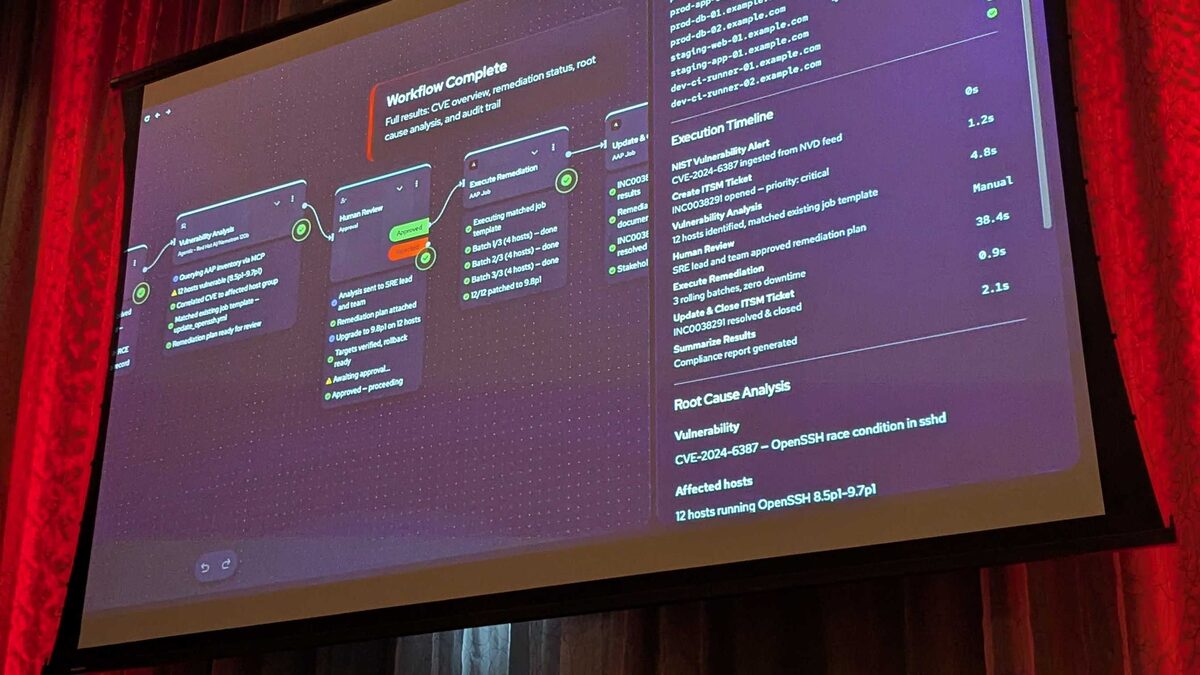
In the Tech Day demo, Step 5 remediated CVE-2024-6387 — "regresshion," the critical OpenSSH race condition in sshd. By the time execution began, the earlier steps had already done the investigative work: an IBM Instana webhook and a ServiceNow webhook had both posted to the EDA webhook endpoint (each with an auto-generated API key), and a Red Hat AI/Nomotron 120b agent — equipped with Splunk Query, Splunk Alert Search, Splunk Saved Search, and ServiceNow CMDB Lookup as MCP tools — had queried the AAP inventory, correlated the affected hosts to the correct host group, matched an existing remediation job template, and submitted a plan for approval that included a rollback strategy.
Step 5 simply launches that matched job template against that host group, exactly as approved — nothing improvised, nothing re-negotiated at execution time. In the demo this meant:
- 12 hosts patched across prod, staging, and dev
- A rolling update in 3 batches of 4 hosts, avoiding a big-bang deployment
- Zero downtime, with health checks passed at every batch
- The originating ServiceNow ticket INC0038291 resolved and closed automatically once the job completed
---
- name: Remediate CVE-2024-6387 (regresshion) on affected sshd hosts
  hosts: "{{ remediation_target_group }}"
  become: true
  serial: 4
  max_fail_percentage: 0

  vars:
    servicenow_ticket: "{{ incident_ticket_id }}"

  tasks:
    - name: Update openssh-server to patched version
      ansible.builtin.package:
        name: openssh-server
        state: latest

    - name: Restart sshd to apply the patched binary
      ansible.builtin.systemd:
        name: sshd
        state: restarted

    - name: Wait for SSH to come back healthy before next batch
      ansible.builtin.wait_for:
        port: 22
        host: "{{ inventory_hostname }}"
        delay: 5
        timeout: 60

    - name: Confirm patched version is installed
      ansible.builtin.command: rpm -q openssh-server
      register: openssh_version
      changed_when: false

    - name: Report batch health back to Automation Orchestrator
      ansible.builtin.debug:
        msg: "Host {{ inventory_hostname }} healthy on {{ openssh_version.stdout }}"
The serial: 4 directive is what produces the "3 batches of 4" rollout, and max_fail_percentage: 0 is what enforces zero-tolerance for failed hosts mid-rollout — if a batch fails health checks, the play stops rather than pushing the change further, which is exactly the kind of deterministic safety property that makes execution auditable after the fact.
See also: AAP Automation Orchestrator: Configuring Multi-Source Alert Triggers
Why the Approval Gate in Step 4 Shapes What Step 5 Is Allowed to Do
Step 5's determinism only means anything because Step 4 constrains it. The Human Review gate has:
| Gate parameter | Behavior |
|---|---|
| Notified usernames | Configurable list of approvers |
| Approval message | Custom text, e.g. "Please approve this deployment to production" |
| Timeout | 1 day default |
| On-timeout action | "Fail the workflow" — explicitly no silent auto-approval |
The Execution Timeline Tells the Real Story
The demo's measured timings make the point better than any slide could:
| Phase | Duration |
|---|---|
| Alert ingestion | 0s |
| ITSM ticket creation | 1.2s |
| Vulnerability analysis | 4.8s |
| Human review | 38.4s (manual) |
| Remediation execution | 0.9s |
| Ticket close | 2.1s |
See also: AAP Automation Orchestrator: ITSM Ticket Integration with ServiceNow
Key Takeaways
- Step 5 never improvises: it launches a pre-matched, pre-approved AAP job template — the AI's role ends at Step 3's recommendation.
- Rolling batches (
serial) and fail-percentage thresholds are what turn "automated remediation" into "automated remediation at scale" without risking a fleet-wide outage. - The Step 4 approval gate fails closed on timeout by default, so Step 5 can never execute on an unattended, unapproved plan.
- In the CVE-2024-6387 demo, 12 hosts across prod/staging/dev were patched with zero downtime, and the linked ServiceNow ticket INC0038291 closed automatically.
- Automated execution time (0.9s) is negligible next to human review time (38.4s) — the platform optimizes the parts that should be fast and preserves human judgment where it matters.
- Automation Orchestrator, built on Temporal and expected in Q3 2026, packages this whole flow — alerting, EDA, AI recommendation, approval, and AAP execution — into a single governed canvas rather than separate disconnected tools.
Related Articles
- AAP Automation Orchestrator: Configuring Multi-Source Alert Triggers
- AAP Automation Orchestrator: Building a Human Review Approval Gate
- AAP Automation Orchestrator: ITSM Ticket Integration with ServiceNow
- AAP Automation Orchestrator: Reading the Execution Timeline for Auditing
- From Alert to Patched Fleet: An OpenClaw and AAP Remediation Walkthrough
Category: installation