Ansible microsoft.mecm Collection: Automating Endpoint Configuration Manager Patching
By Luca Berton · Published 2024-01-01 · Category: troubleshooting
How the new Ansible microsoft.mecm collection automates SCCM/MECM patch orchestration, client actions, and health checks on AAP 2.7.
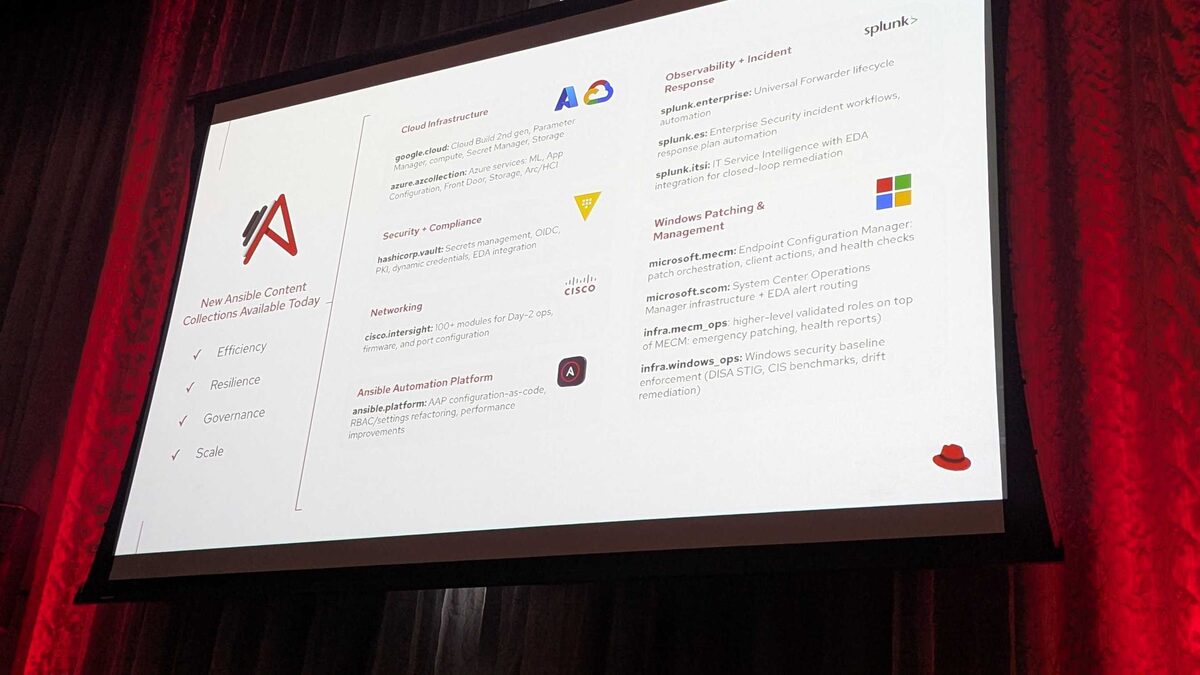
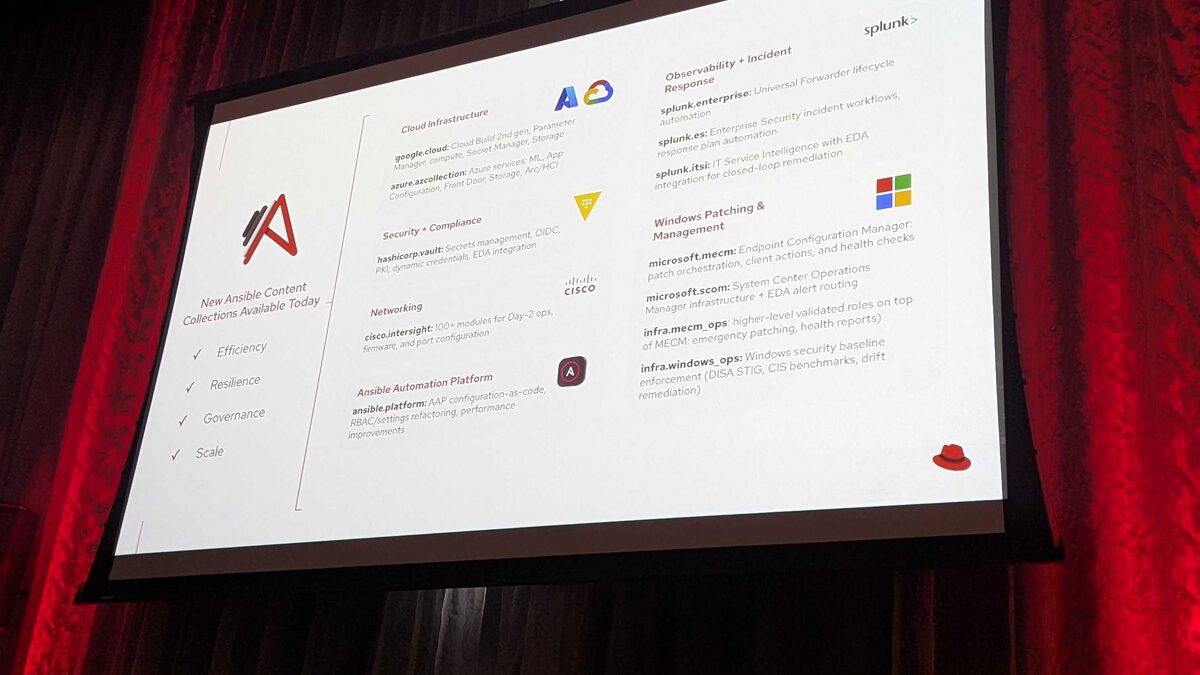
!New Ansible Content Collections Available Today — Red Hat Tech Day Netherlands 2026
Introduction
At Red Hat Tech Day Netherlands 2026, held on 3 June 2026 in Bunnik, the Ansible team announced 12 new content collections for Ansible Automation Platform (AAP) 2.7, organized around four themes: Efficiency, Resilience, Governance, and Scale. Among these, microsoft.mecm stands out for organizations still running Microsoft Endpoint Configuration Manager (MECM, formerly SCCM) as their primary Windows patch management platform. This collection brings patch orchestration, client actions, and health checks into the Ansible automation fabric, letting teams treat MECM operations as code alongside their broader hybrid-cloud automation.
This article focuses specifically on microsoft.mecm: what it targets, how it fits into an AAP 2.7 workflow, and what a realistic playbook looks like.
See also: Ansible infra.mecm_ops Collection: Emergency Patching and Health Report Roles
Why MECM Automation Matters
Endpoint Configuration Manager remains deeply embedded in many enterprise Windows estates, particularly in regulated industries and organizations with large on-premises fleets. Historically, patch orchestration in MECM has meant manual console work, PowerShell scripting glued together by individual admins, or bespoke scheduled tasks that are hard to audit and even harder to scale across thousands of endpoints.
By wrapping MECM operations in an Ansible collection, Red Hat extends the same declarative, idempotent, and auditable automation model that Ansible users already apply to Linux, network, and cloud infrastructure to the Windows patching lifecycle. This matters for three reasons:
- Consistency — patch orchestration steps become reusable playbooks instead of tribal-knowledge scripts.
- Integration — MECM actions can be chained with other AAP-managed workflows, including Event-Driven Ansible (EDA) triggers announced alongside collections like hashicorp.vault and splunk.itsi.
- Auditability — every patching action executed through AAP is logged, versioned, and subject to the same RBAC controls as the rest of the platform.
What the microsoft.mecm Collection Covers
Based on the Red Hat Tech Day Netherlands 2026 announcement, microsoft.mecm is scoped around three functional areas:
| Capability | Description | Typical Use Case |
|---|---|---|
| Patch orchestration | Triggering, scheduling, and tracking software update deployments through MECM | Rolling out a monthly patch cycle across device collections |
| Client actions | Initiating MECM client-side actions on managed endpoints | Forcing a policy refresh or hardware inventory cycle before/after patching |
| Health checks | Validating MECM client and site health status | Pre-flight checks to confirm endpoints are patch-ready, or post-patch validation |
How It Fits with infra.mecm_ops
Red Hat also announced infra.mecm_ops, a companion collection of higher-level validated roles built on top of microsoft.mecm. Where microsoft.mecm exposes granular modules for individual MECM operations, infra.mecm_ops packages those modules into ready-to-run roles for common operational patterns — most notably emergency patching and health reporting.
The relationship is intentional: microsoft.mecm gives automation engineers building blocks, while infra.mecm_ops gives operations teams turnkey playbooks they can run with minimal customization. Teams that need fine-grained control write directly against microsoft.mecm modules; teams that want a fast, standardized emergency-patch response consume infra.mecm_ops roles instead.
See also: AAP 2.7 EE Builder Step 1: Choosing a Base Image
Example Playbook: Health Check Before Emergency Patch Deployment
The following illustrative playbook shows the kind of workflow the microsoft.mecm collection is designed to support: verifying client health, triggering a client action, then kicking off a targeted software update deployment.
---
- name: Emergency patch orchestration via MECM
  hosts: mecm_site_servers
  gather_facts: false
  collections:
    - microsoft.mecm

  vars:
    target_collection: "Emergency-Patch-Ring1"
    update_group: "2026-06-Critical-Updates"

  tasks:
    - name: Check MECM client health for target collection
      microsoft.mecm.client_health_check
      register: health_status
      args:
        collection_name: "{{ target_collection }}"

    - name: Fail early if unhealthy clients exceed threshold
      ansible.builtin.fail:
        msg: "Too many unhealthy clients in {{ target_collection }}, aborting deployment"
      when: health_status.unhealthy_count | int > 5

    - name: Force policy refresh on target collection
      microsoft.mecm.client_action
      args:
        collection_name: "{{ target_collection }}"
        action: "machine_policy_refresh"

    - name: Deploy critical software update group
      microsoft.mecm.software_update_deployment
      args:
        collection_name: "{{ target_collection }}"
        update_group: "{{ update_group }}"
        deployment_type: "required"
        deadline: "2026-06-05T02:00:00"

    - name: Re-run health check after deployment window
      microsoft.mecm.client_health_check
      register: post_patch_health
      args:
        collection_name: "{{ target_collection }}"

    - name: Report unresolved health issues
      ansible.builtin.debug:
        msg: "Post-patch unhealthy clients: {{ post_patch_health.unhealthy_count }}"
This example is illustrative — exact module and parameter names will be finalized in the collection's published documentation — but it reflects the workflow shape MECM administrators will recognize: assess, act, deploy, and re-verify, all captured as version-controlled automation instead of manual console sessions.
Comparing microsoft.mecm and microsoft.scom
MECM automation was announced alongside a related but distinct collection, microsoft.scom, targeting System Center Operations Manager. It's worth distinguishing the two:
| Collection | Focus | Key Integration |
|---|---|---|
| microsoft.mecm | Endpoint patch orchestration, client actions, health checks | infra.mecm_ops validated roles |
| microsoft.scom | Infrastructure monitoring, alert routing | Event-Driven Ansible for closed-loop remediation |
See also: AAP 2.7 EE Builder Step 2: Adding Collections from Private Automation Hub
Where This Fits in the AAP 2.7 Content Strategy
microsoft.mecm is one piece of a broader Governance and Scale push in the 12 collections announced at Red Hat Tech Day Netherlands 2026. It sits naturally next to infra.windows_ops, which handles Windows security baseline enforcement (DISA STIG, CIS benchmarks, drift remediation). A mature Windows automation strategy on AAP 2.7 would likely combine:
- infra.windows_ops for baseline configuration and compliance drift correction
- microsoft.mecm for patch orchestration and client health
- infra.mecm_ops for standardized emergency-patch and reporting workflows
Key Takeaways
- microsoft.mecm was announced at Red Hat Tech Day Netherlands 2026 (3 June 2026, Bunnik) as one of 12 new AAP 2.7 collections.
- It covers three core areas: patch orchestration, client actions, and health checks for Microsoft Endpoint Configuration Manager.
- infra.mecm_ops builds validated, higher-level roles (emergency patching, health reports) on top of microsoft.mecm's modules.
- It pairs naturally with microsoft.scom for monitoring/alerting and infra.windows_ops for baseline compliance, forming a complete Windows governance stack on AAP 2.7.
- Exact module names and parameters will be confirmed in official collection documentation as it becomes available; treat any example task names as illustrative until then.
Related Articles
- Ansible infra.mecm_ops Collection: Emergency Patching and Health Report Roles
- Ansible infra.windows_ops Collection: DISA STIG and CIS Benchmark Drift Remediation
- Ansible microsoft.scom Collection: System Center Operations Manager Automation Guide
- Build an AAP Self-Service Template: Emergency CVE Patch Playbook
Category: troubleshooting