AAP Automation Orchestrator: Reading the Execution Timeline for Auditing
By Luca Berton · Published 2024-01-01 · Category: troubleshooting
How to read the AAP Automation Orchestrator execution timeline for audit trails, using the CVE-2024-6387 regreSSHion remediation demo as a worked example.
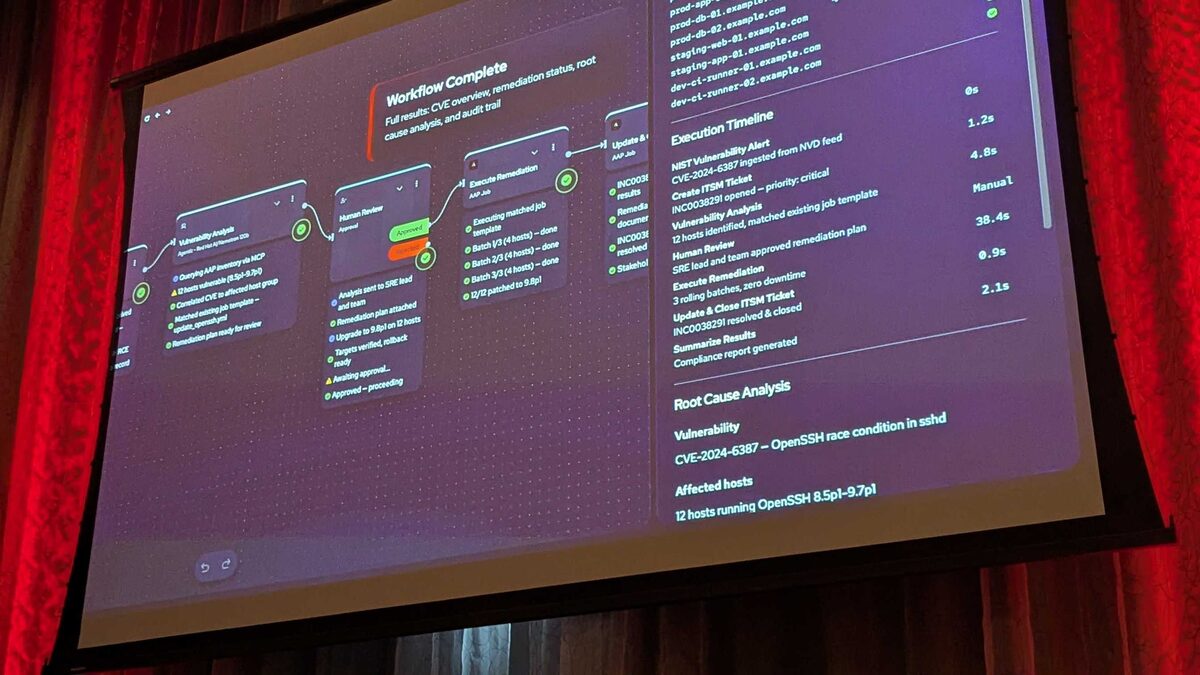
!Automation Orchestrator execution timeline with timing breakdown
Auditors do not care how elegant your automation is. They care about one thing: can you prove, step by step, exactly what happened, who approved it, and how long each stage took. Red Hat's upcoming Automation Orchestrator — announced for Q3 2026 at Red Hat Tech Day Netherlands 2026 in Bunnik — is built around that requirement from the ground up. It runs on the upstream Temporal durable-execution engine and gives every workflow, whether triggered by an event, a human, or an AI agent, a persistent, replayable execution timeline.
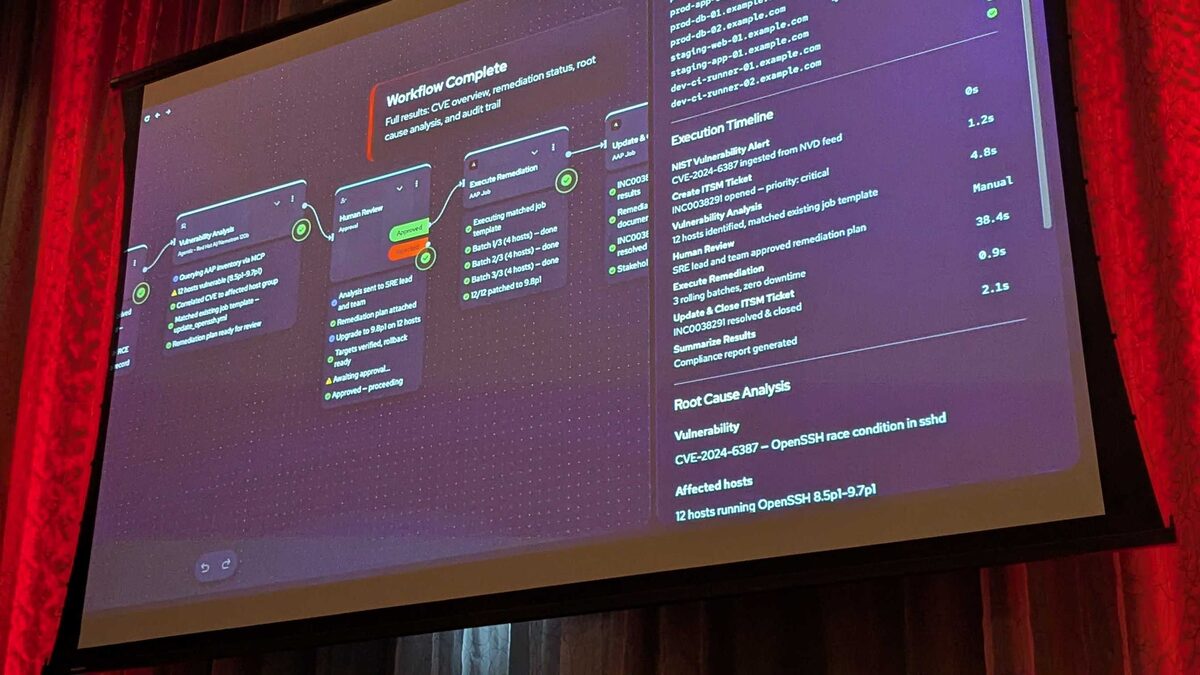
This article walks through that timeline using the live demo shown at the event: an 8-step remediation of CVE-2024-6387, the critical "regreSSHion" race condition in OpenSSH's sshd. The point isn't the vulnerability — it's what the timeline record proves about governance.
The Governing Principle: AI Acts Through AAP, Never Around It
The line Red Hat used at the event captures the design intent precisely:
> "AI isn't improvising against production infrastructure, it's acting through AAP."
That sentence is the entire audit story in miniature. An LLM can reason, correlate, and recommend, but every action it takes against real infrastructure passes through the same governed execution path as a human-triggered job — inventory lookups, job template runs, and approval gates all land in the same durable timeline. Nothing the AI does is invisible or unaccountable.
See also: AAP Automation Orchestrator: Automated Remediation Execution Explained
The Five-Step Orchestration Pipeline
Automation Orchestrator's canvas unifies task-based automation (playbooks, job templates) and event-based automation (Event-Driven Ansible) into a single pipeline:
- Alerts from multiple sources — agents, events, and playbooks are orchestrated on one canvas
- Events trigger a deterministic rulebook — EDA picks up the alert
- AI analyzes and recommends — an LLM plus MCP tools investigate and propose remediation
- Humans approve — a governance gate before anything touches production
- Automated remediation at scale — deterministic, auditable execution via AAP
Walking the CVE-2024-6387 Timeline
The demo workflow ran end to end in eight steps, triggered first by an IBM Instana webhook (step 2) and then by a ServiceNow webhook (step 3), both posting to the EDA webhook endpoint with auto-generated API keys. The AI agent — running on Red Hat AI/Nomotron 120b — was given a prompt instructing it to query AAP inventory via MCP, correlate the affected hosts to the correct host group, match an existing remediation job template, and submit a plan for human approval that included a rollback strategy. Its toolset was scoped to four MCP tools: Splunk Query, Splunk Alert Search, Splunk Saved Search, and ServiceNow CMDB Lookup.
Here is the recorded execution timeline from that run:
| Stage | Duration | Nature |
|---|---|---|
| Alert ingestion | 0s | Automated |
| ITSM ticket creation | 1.2s | Automated |
| Vulnerability analysis (AI + MCP) | 4.8s | Automated |
| Human review | 38.4s | Manual |
| Remediation execution | 0.9s | Automated |
| Ticket close | 2.1s | Automated |
The remediation itself patched 12 hosts across prod, staging, and dev, applied as a rolling update in 3 batches of 4 with zero downtime, and every health check passed. The originating ServiceNow ticket, INC0038291, was resolved and closed automatically as the final timeline entry.
See also: AAP Automation Orchestrator: Building a Human Review Approval Gate
Why the Human Review Gate Is the Audit Anchor
Step 4 — Human Review — is where an auditor's eye should go first, because it's configurable and it's where accountability is assigned to a named person rather than a system. In the demo, the gate exposed:
- Usernames to notify — a defined approver list, not a broadcast
- A custom message — "Please approve this deployment to production"
- A timeout — 1 day by default
- An explicit on-timeout action — "Fail the workflow"
Reading the Timeline as an Auditor
When you pull up an Automation Orchestrator execution record, treat it the same way you'd treat a deployment log during a SOX or ISO 27001 review:
- Confirm the trigger source (webhook, schedule, manual) and that its API key was scoped and not shared.
- Confirm the MCP tool calls the AI agent made were read-only investigation (queries, lookups) versus the actual remediation, which stays inside a job template.
- Confirm the approver identity and timestamp on the human review step, not just "approved: true."
- Confirm the timeout action matches policy — fail-closed, not auto-approve.
- Confirm the rollback strategy was attached to the plan before approval, not improvised after.
See also: AAP Automation Orchestrator: Configuring Multi-Source Alert Triggers
A Representative Job Template Task
While Automation Orchestrator's canvas is new, the remediation itself still executes as an ordinary AAP job template. A simplified task from a regreSSHion patch playbook, matched by the AI agent's plan, looks like this:
---
- name: Remediate CVE-2024-6387 on affected sshd hosts
  hosts: "{{ target_host_group }}"
  become: true
  serial: 4
  max_fail_percentage: 0

  tasks:
    - name: Ensure OpenSSH server package is at patched version
      ansible.builtin.package:
        name: openssh-server
        state: latest

    - name: Restart sshd to apply patched binary
      ansible.builtin.service:
        name: sshd
        state: restarted

    - name: Verify sshd health check
      ansible.builtin.wait_for:
        port: 22
        timeout: 30

    - name: Record remediation event for audit trail
      ansible.builtin.debug:
        msg: "CVE-2024-6387 remediated on {{ inventory_hostname }} — batch {{ ansible_play_batch }}"
The serial: 4 directive maps directly to the "3 batches of 4" rolling update described in the demo, and max_fail_percentage: 0 enforces the zero-downtime requirement by halting the rollout the moment a batch fails its health check.
Key Takeaways
- Automation Orchestrator's execution timeline is built on Temporal, giving every workflow step — human or AI — a durable, replayable audit record.
- In the CVE-2024-6387 demo, automated stages totaled under 10 seconds; the 38.4-second human review was the only manual, non-deterministic step.
- The Human Review gate's configurable timeout and explicit "fail the workflow" on-timeout action mean approval gaps never resolve to silent auto-approval.
- AI agents operate through scoped MCP tools (Splunk, ServiceNow CMDB) for investigation, while actual remediation stays inside governed AAP job templates.
- Auditors should read the timeline for trigger provenance, approver identity, timeout policy, and rollback strategy — not just a pass/fail outcome.
Related Articles
Category: troubleshooting