AAP Automation Orchestrator: ITSM Ticket Integration with ServiceNow
By Luca Berton · Published 2024-01-01 · Category: troubleshooting
How AAP Automation Orchestrator ties Event-Driven Ansible to ServiceNow ITSM tickets, shown live via a CVE-2024-6387 regreSSHion remediation demo.
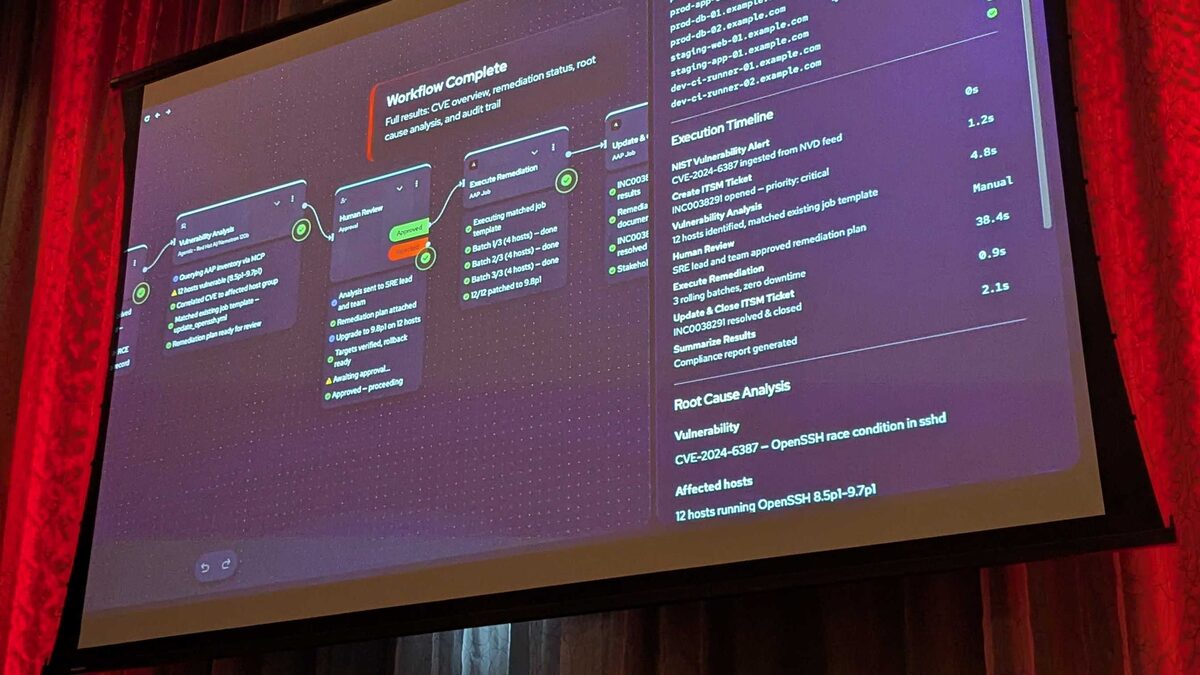
!Automation Orchestrator execution timeline with timing breakdown
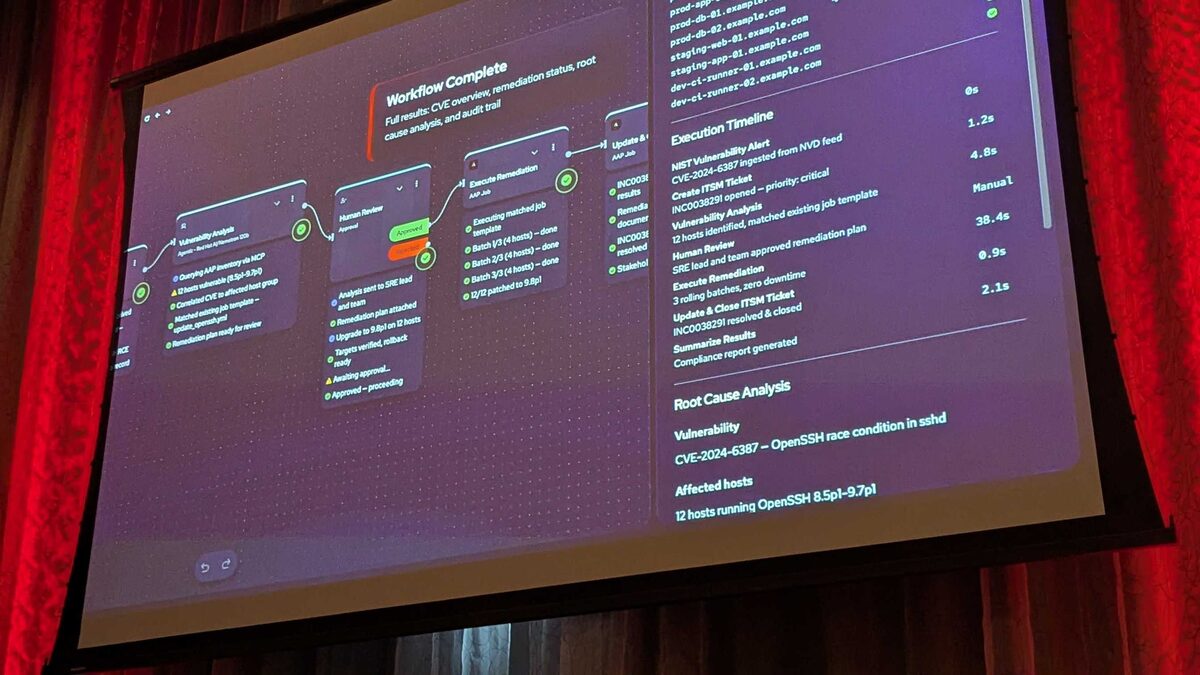
Red Hat used its Tech Day in Bunnik, the Netherlands, on 3 June 2026 to preview Automation Orchestrator, a coming-Q3-2026 capability built on the upstream Temporal durable-execution engine. The pitch is simple but consequential: put agents, events, and playbooks on a single governed canvas so that, as Red Hat put it on stage, "AI isn't improvising against production infrastructure, it's acting through AAP." The clearest proof point from the session was a ServiceNow-integrated remediation of CVE-2024-6387, better known as regreSSHion — a critical race condition in OpenSSH's sshd. This article breaks down how that ITSM integration actually works.
Why ITSM Integration Matters for AI-Driven Remediation
Enterprises don't let infrastructure change happen in a vacuum. Every patch, restart, or configuration push against production needs a paper trail — a ticket that says what happened, why, who approved it, and when it closed. Historically that meant a human filing a ServiceNow incident, another human running a playbook, and a third human closing the loop. Automation Orchestrator collapses that chain without removing the audit trail: the ticket, the automation, and the approval all live inside the same traceable workflow.
The five-step pipeline Red Hat described is:
- Alerts from multiple sources — agents, events, and playbooks orchestrated on one canvas
- Events trigger a deterministic rulebook — Event-Driven Ansible (EDA) picks up the alert
- AI analyzes and recommends — an LLM plus MCP tools investigate and propose remediation
- Humans approve — a governance gate before anything touches production
- Automated remediation at scale — deterministic, auditable execution via AAP
See also: ServiceNow, OPA, and Ansible: Policy-Gated Agentic Remediation Explained
Inside the CVE-2024-6387 Demo Workflow
The demo was an 8-step, end-to-end workflow. Two external systems fed it via webhook: an IBM Instana monitoring alert at step 2, and a ServiceNow webhook at step 3 — both POSTing to the EDA webhook endpoint using auto-generated API keys, so no shared secrets were hand-managed.
Once the ServiceNow ticket landed, the AI agent — running on Red Hat AI with Nemotron 120B — was invoked with a prompt instructing it to:
- Query AAP inventory over MCP
- Correlate the affected hosts to the correct host group
- Match an existing remediation job template for the OpenSSH fix
- Submit a plan for human approval, including an explicit rollback strategy
sshd versions; the CMDB Lookup tool let it pull authoritative configuration-item data straight from ServiceNow rather than guessing at host ownership or environment tags.
The Human Review Gate
This is the part worth dwelling on, because it's the governance mechanism that keeps "AI acting through AAP" from becoming "AI acting instead of AAP." The Human Review step (step 5 of the 8) is configurable with:
| Setting | Purpose |
|---|---|
| Usernames to notify | Who gets paged for approval |
| Custom message | e.g. "Please approve this deployment to production" |
| Timeout | 1 day by default |
| On-timeout action | "Fail the workflow" — no silent auto-approval |
See also: AAP Automation Orchestrator: Automated Remediation Execution Explained
What the Automated Remediation Looked Like
Once approved, execution was fully deterministic — plain AAP job template logic, not the LLM improvising commands. The remediation patched OpenSSH across 12 hosts spanning prod, staging, and dev, using a rolling update in 3 batches of 4 hosts. Every batch ran health checks before the next batch started, and the run finished with zero downtime.
A representative job template task for this kind of regreSSHion remediation might look like:
---
- name: Remediate CVE-2024-6387 (regreSSHion) on affected sshd hosts
  hosts: "{{ target_host_group }}"
  become: true
  serial: 4
  max_fail_percentage: 0

  tasks:
    - name: Ensure openssh-server is updated to patched version
      ansible.builtin.package:
        name: openssh-server
        state: latest

    - name: Validate sshd configuration syntax
      ansible.builtin.command: sshd -t
      changed_when: false

    - name: Restart sshd to apply patched binary
      ansible.builtin.systemd:
        name: sshd
        state: restarted

    - name: Health check - confirm sshd is listening
      ansible.builtin.wait_for:
        port: 22
        timeout: 30

    - name: Report remediation status back to ServiceNow
      ansible.builtin.uri:
        url: "https://{{ servicenow_instance }}/api/now/table/incident/{{ incident_sys_id }}"
        method: PATCH
        headers:
          Authorization: "Bearer {{ servicenow_api_token }}"
        body_format: json
        body:
          state: "6"
          close_notes: "CVE-2024-6387 patched on {{ inventory_hostname }} via AAP Automation Orchestrator"
That final task is the piece that closes the ITSM loop: the same workflow that patched the host also writes the resolution back into ServiceNow, so the ticket doesn't sit open waiting on a human to remember to close it.
Timeline and Outcome
The demo's numbers make the case for where automation actually saves time — and where it deliberately doesn't try to:
- Alert ingestion: 0s
- ITSM ticket creation: 1.2s
- Vulnerability analysis: 4.8s
- Human review: 38.4s (manual, human-paced)
- Remediation execution: 0.9s
- Ticket close: 2.1s
See also: AAP Automation Orchestrator: Building a Human Review Approval Gate
Key Takeaways
- Automation Orchestrator uses ServiceNow as both a trigger (incident webhook into EDA) and a data source (CMDB Lookup via MCP for the AI agent's investigation).
- Webhooks from external systems — Instana and ServiceNow in this demo — POST into the same EDA webhook endpoint, each secured with an auto-generated API key.
- The Human Review gate fails the workflow on timeout by default; there is no silent auto-approval path into production.
- Remediation itself stays deterministic and auditable — the LLM proposes and investigates, but AAP job templates execute the actual change.
- In the CVE-2024-6387 demo, automated processing (excluding the human approval wait) took under 10 seconds to patch 12 hosts and close the ServiceNow ticket.
Related Articles
Category: troubleshooting