BYOK for the AAP Intelligent Assistant: Injecting Your Own Knowledge into RAG
By Luca Berton · Published 2024-01-01 · Category: windows-automation
Learn how BYOK Tech Preview lets AAP 2.7's Intelligent Assistant ground RAG answers in your internal runbooks, naming conventions, and compliance policies.
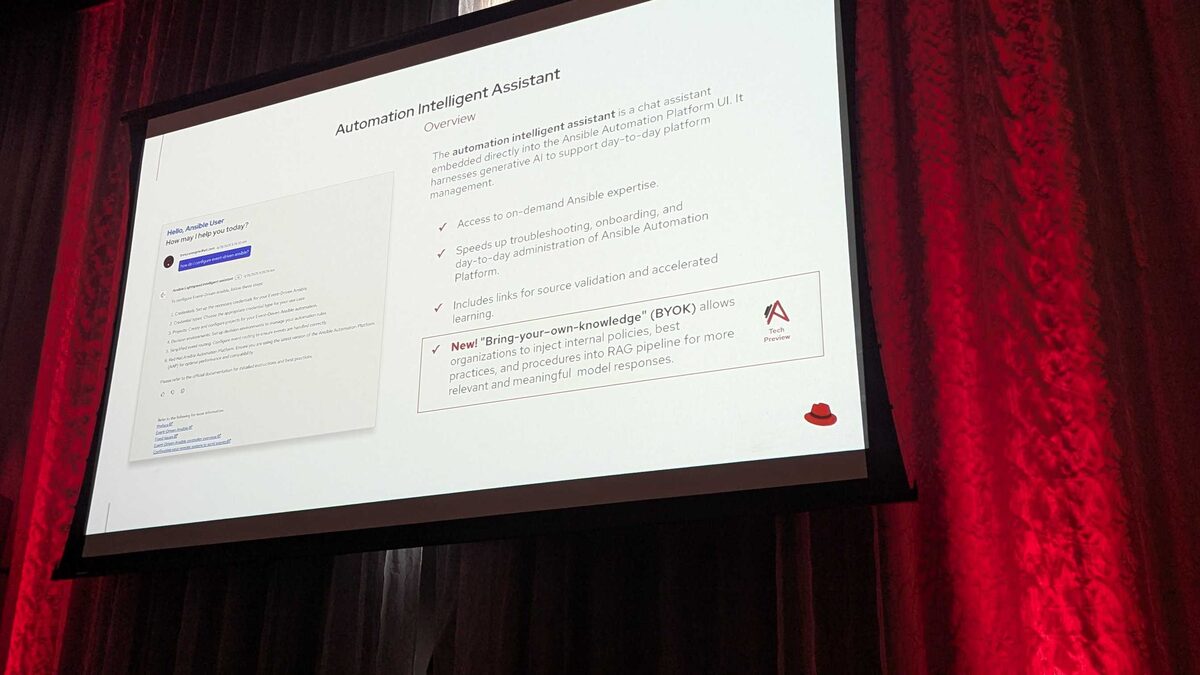
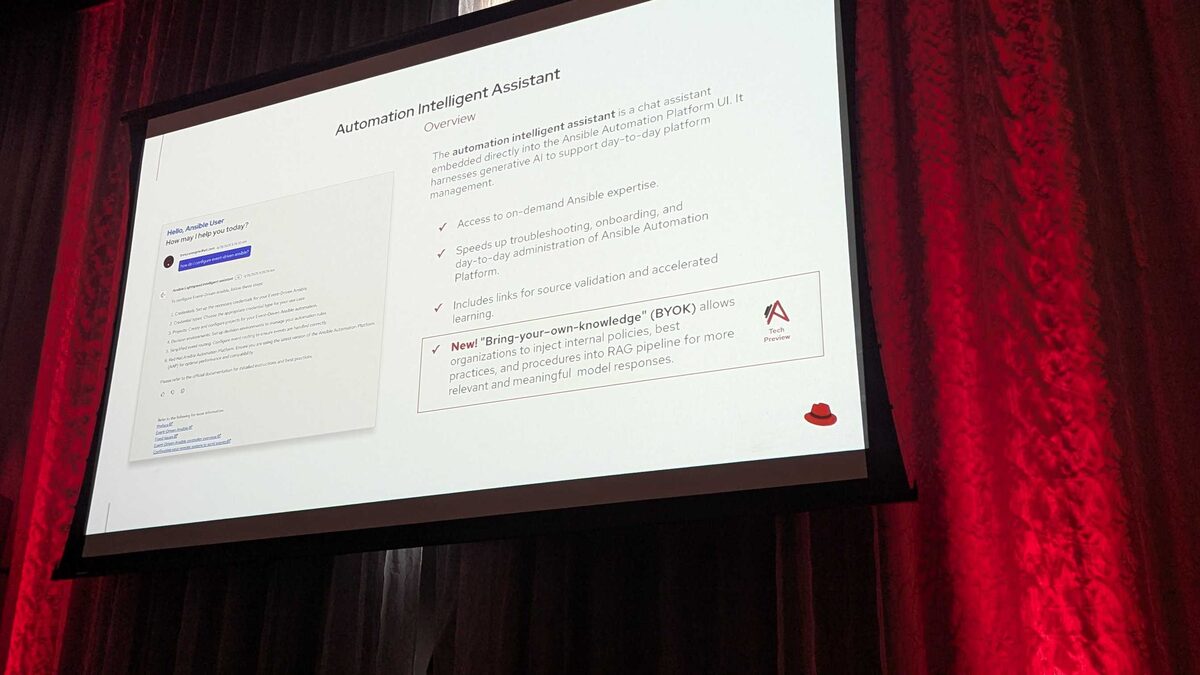
!Automation Intelligent Assistant overview, including the new BYOK capability
What BYOK Means for the Intelligent Assistant
At Red Hat Tech Day Netherlands 2026 in Bunnik, Red Hat introduced BYOK — Bring Your Own Knowledge — as a Tech Preview feature for Ansible Automation Platform 2.7. BYOK is the natural complement to the BYOM (Bring Your Own Model) work already shipping for the Intelligent Assistant: while BYOM lets you choose which large language model answers your questions, BYOK lets you choose what that model actually knows about your organization.
Out of the box, the Intelligent Assistant — the chatbot embedded directly in the AAP UI — answers questions using generic Ansible documentation, module references, and best-practice knowledge baked into its retrieval-augmented generation (RAG) pipeline. That's useful for "how do I write a loop in Ansible" style questions, but it falls short the moment someone on your team asks something like "what's our change-management process for patching production database servers" or "what naming convention do we use for VLAN interfaces in the EMEA data center." Generic training data simply doesn't contain that information — and it shouldn't, because it's yours.
BYOK closes that gap by letting organizations inject their own internal documents into the RAG pipeline that backs the Intelligent Assistant, so responses are grounded in your actual operating reality rather than generic public documentation.
See also: Bring Your Own Knowledge to Ansible Lightspeed: Custom RAG Pipeline for AAP 2.7
Why RAG Needs an Organizational Layer
Retrieval-augmented generation works by retrieving relevant chunks of text from a knowledge store and feeding them to the LLM alongside the user's question, so the model can ground its answer in that retrieved context instead of relying purely on what it memorized during training. The quality of a RAG-powered assistant is therefore bounded by the quality and relevance of what's in its knowledge store.
For a platform-wide automation assistant, the most valuable knowledge is often the knowledge that is hardest to standardize elsewhere:
- Change-management procedures — approval chains, maintenance windows, rollback requirements before a playbook can touch production.
- Network and infrastructure naming conventions — how your organization names hosts, VLANs, inventory groups, and environments, so generated playbooks and inventories match what your teams expect.
- Compliance requirements — controls tied to frameworks such as PCI-DSS, HIPAA, or SOC 2 that must be reflected in how automation is written and reviewed.
- Internal runbooks — the step-by-step procedures your operations team already follows for incident response, patching, or provisioning.
How BYOK Fits Into the AAP 2.7 AI Stack
BYOK is scoped specifically to the Intelligent Assistant — the in-UI chatbot — rather than the Coding Assistant (the Ansible VS Code extension). That distinction matters when you're planning a rollout, because the two AI surfaces in AAP 2.7 have different model support maturity as well:
| AI Feature | Red Hat AI | OpenAI | Azure OpenAI | IBM watsonx | Google Gemini/Vertex |
|---|---|---|---|---|---|
| Intelligent Assistant (chatbot in AAP UI) | AAP 2.6+ | AAP 2.6+ | AAP 2.6+ | Not supported | Coming Soon |
| Coding Assistant (VS Code extension) | AAP 2.5+ | Coming Soon | Coming Soon | AAP 2.5+ (first external provider) | AAP 2.6+ |
Because it's a Tech Preview, treat BYOK the way you would any Red Hat Tech Preview capability: suitable for evaluation and early adoption in non-critical workflows, not yet committed to long-term API stability, and worth tracking through subsequent AAP release notes before betting a compliance-critical workflow on it.
See also: AAP 2.7 EE Builder Step 1: Choosing a Base Image
Curating What You Feed the Assistant
The value of BYOK is entirely dependent on curation discipline. Dumping every internal wiki page into the knowledge store will dilute retrieval quality just as much as having no custom knowledge at all. A practical approach that mirrors how teams already manage automation content in AAP:
- Start with runbooks that are already automated. If a playbook exists for a procedure, its accompanying runbook is the highest-value candidate for BYOK ingestion — the assistant can then explain and point to the automation that implements it.
- Version your policy documents alongside your playbooks. Store naming-convention guides, compliance control mappings, and change-management SOPs in the same source-controlled repositories that hold your Ansible content, so updates to policy and updates to automation stay in sync.
- Tag content by compliance domain. Keeping PCI-DSS, HIPAA, and SOC 2 material clearly labeled helps ensure the assistant surfaces the right control set when someone asks a compliance-scoped question, rather than blending unrelated frameworks in a single answer.
- Review retrieved answers during the Tech Preview window. Because this is early-stage functionality, spot-check assistant responses against source documents regularly rather than assuming grounding is perfect from day one.
A Playbook That BYOK-Grounded Answers Can Reference
BYOK doesn't generate playbooks itself — it grounds the assistant's answers. But a well-curated knowledge base makes those answers directly actionable, because the assistant can point back to the automation that already implements the procedure it just explained. For example, a runbook ingested via BYOK for "patch production database servers under change control" might correspond to a playbook like this:
---
- name: Patch production database servers under change control
  hosts: db_production
  become: true
  serial: 1
  vars:
    change_ticket: "{{ change_id | mandatory }}"
    maintenance_window_confirmed: false

  pre_tasks:
    - name: Verify maintenance window has been approved
      ansible.builtin.assert:
        that:
          - maintenance_window_confirmed | bool
        fail_msg: >
          No approved maintenance window found for change {{ change_ticket }}.
          Refer to the change-management runbook before proceeding.

  tasks:
    - name: Take pre-patch database backup
      ansible.builtin.command: /opt/db-tools/backup.sh --tag "pre-patch-{{ change_ticket }}"
      changed_when: true

    - name: Apply OS security patches
      ansible.builtin.package:
        name: "*"
        state: latest

    - name: Restart database service if kernel or libs changed
      ansible.builtin.service:
        name: postgresql
        state: restarted
      when: ansible_facts.pkg_mgr is defined

  post_tasks:
    - name: Record patch completion for audit trail
      ansible.builtin.lineinfile:
        path: /var/log/change-audit.log
        line: "{{ change_ticket }} completed on {{ inventory_hostname }} at {{ ansible_date_time.iso8601 }}"
        create: true
When a team member asks the Intelligent Assistant "what's the process for patching production database servers," a BYOK-grounded response can cite the internal change-control requirement (maintenance window approval, mandatory pre-patch backup, audit logging) alongside a pointer to this exact playbook pattern — something a generic, non-BYOK assistant simply cannot do.
Key Takeaways
- BYOK ("Bring Your Own Knowledge") is a Tech Preview feature announced for AAP 2.7 at Red Hat Tech Day Netherlands 2026, scoped to the Intelligent Assistant chatbot in the AAP UI.
- It lets organizations inject internal change-management procedures, naming conventions, compliance requirements (PCI-DSS, HIPAA, SOC 2), and runbooks into the assistant's RAG pipeline.
- BYOK is complementary to BYOM: BYOM controls which LLM provider answers questions (Red Hat AI, OpenAI, and Azure OpenAI are supported for the Intelligent Assistant from AAP 2.6+; IBM watsonx is not supported here; Google Gemini/Vertex is Coming Soon), while BYOK controls what organizational knowledge that model can draw on.
- As a Tech Preview, BYOK is best evaluated in non-critical workflows first, with regular review of answer quality against source documents.
- Curation quality — well-organized, versioned, clearly tagged internal documents — directly determines how useful BYOK-grounded answers will be.
Related Articles
- AAP BYOM Provider Comparison 2026: Red Hat AI vs OpenAI vs Azure vs watsonx vs Gemini
- Connect the AAP Intelligent Assistant to OpenAI: Setup Guide
- Connect the AAP Intelligent Assistant to Azure OpenAI: Setup Guide
- Connect the AAP Intelligent Assistant to Red Hat AI: Setup Guide
- HashiCorp Vault Integration with Ansible: OIDC, PKI, and Dynamic Credentials Complete Guide
Category: windows-automation