AAP MCP Job Management Tool Set: 25 Tools for AI-Driven Job Control
By Luca Berton · Published 2024-01-01 · Category: troubleshooting
Explore the 25 Job management tools in Red Hat's AAP MCP Server, letting AI agents launch, monitor, and cancel jobs while AAP guardrails stay enforced.
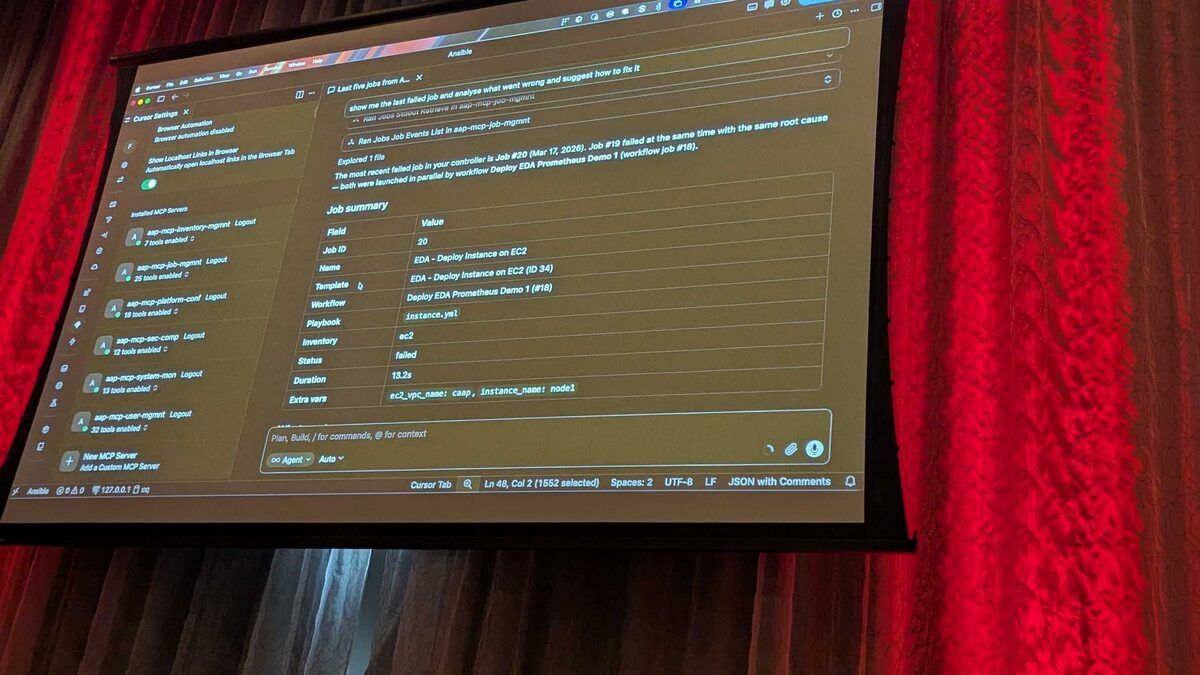
!Last 5 jobs table showing Paint and Demo Job Template runs via the AAP MCP server
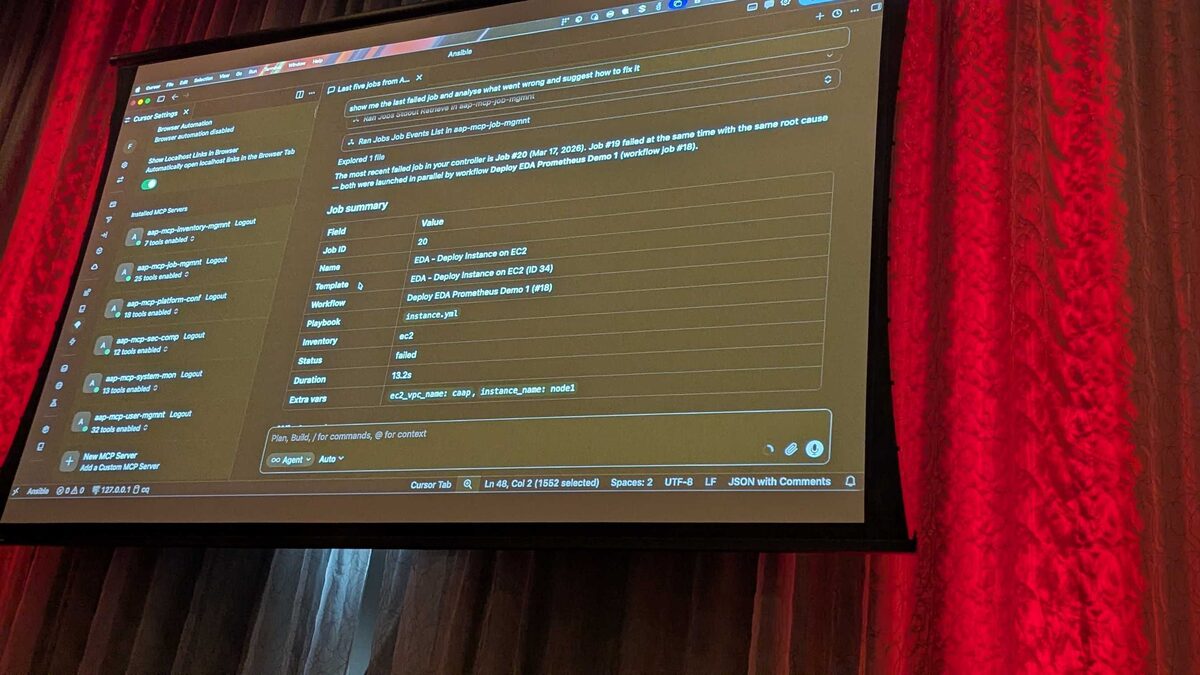
Red Hat's hosted MCP (Model Context Protocol) Server for Ansible Automation Platform, currently in Tech Preview, turns AAP's job engine into something an AI agent can operate directly. Among its six tool sets totaling 107 tools, the Job management set is the largest, with 25 tools dedicated to launching, monitoring, and canceling jobs. This article breaks down what that tool set does, why it matters, and what it looked like in practice during a live demo at Red Hat Tech Day Netherlands 2026 in Bunnik.
What Is the AAP MCP Server?
MCP (Model Context Protocol) is an open standard that lets AI models and agentic clients call external tools through a declarative, structured interface, rather than relying on scraped web pages or hand-rolled API wrappers. Red Hat's hosted MCP Server exposes Ansible Automation Platform's capabilities this way: any MCP-compatible client — Cursor, Claude Desktop, or a custom agent — can connect over plain HTTP with Bearer-token authentication and immediately see a catalog of callable tools.
At Red Hat Tech Day Netherlands 2026, Fred van Zwieten (Red Hat) demonstrated this live using Cursor IDE connected to an AAP instance. The demo showed a genuinely useful pattern: instead of clicking through the AAP UI or writing awx CLI commands, an engineer asks a question or gives an instruction in plain English, and the agent picks the right tool from the MCP catalog to satisfy it.
See also: AAP MCP Inventory Management Tool Set: Query Hosts and Groups via AI Agents
The Six Tool Sets
The AAP MCP Server organizes its 107 tools into six functional sets:
| Tool Set | Tool Count | Typical Use |
|---|---|---|
| Job management | 25 | Launch, monitor, cancel jobs |
| User management | 32 | Query permissions, roles, teams |
| Platform configuration | 18 | Settings, credentials, integrations |
| System monitoring | 13 | Service health, resource usage |
| Security and compliance | 12 | Audit trails, policy checks |
| Inventory management | 7 | Query hosts, groups, variables |
What the 25 Job Management Tools Cover
Red Hat did not publish a granular, tool-by-tool breakdown of all 25 job management tools at Tech Day Netherlands 2026, but the demo made the functional scope clear: this tool set spans the full lifecycle of a job in AAP, from template discovery and launch through live monitoring to post-mortem analysis of job output. In practice, an agent working against this tool set needs to be able to:
- List and search job templates
- Launch a job template, including one that requires survey input
- Query the last N jobs, with status and duration
- Fetch a specific job's stdout and job events
- Cancel a running or queued job
- Relaunch a failed job
See also: AAP MCP Platform Configuration Tool Set: Settings and Credentials via AI
Guardrails: The AI Cannot Bypass Survey Validation
The most consequential moment in the demo wasn't a success — it was a rejection. Van Zwieten asked the agent to launch a job template named "Paint" with a survey value of "Purple." The launch was rejected, because the MCP server enforces AAP's own survey validation rules on the backend, and "Purple" was not a permitted value for that survey field.
This matters more than it might first appear. A common worry with AI-driven infrastructure tools is that a model might be coaxed — by a bad prompt, a hallucination, or a malicious actor — into skipping validation that a human operator would normally respect. The demo showed the opposite: because the MCP Job management tools call through to AAP's real launch endpoint, AAP's survey constraints, credential checks, and RBAC rules apply exactly as they would for a human user in the UI or a script calling the API directly. The LLM can ask for anything, but AAP still says no when the input is invalid.
Here's a simplified illustration of the kind of survey-constrained job template AAP would enforce in this scenario:
---
- name: Paint job template survey-backed playbook
  hosts: paint_targets
  gather_facts: false
  vars:
    # survey_var provided by AAP's job launch survey; MCP tool passes
    # the requested value through unchanged for AAP to validate
    paint_color: "{{ survey_var | default('Red') }}"
  tasks:
    - name: Fail fast if color is not an allowed survey choice
      ansible.builtin.assert:
        that:
          - paint_color in ['Red', 'Blue', 'Green']
        fail_msg: "paint_color '{{ paint_color }}' is not a permitted survey value"

    - name: Apply paint configuration
      ansible.builtin.debug:
        msg: "Applying paint_color={{ paint_color }} to {{ inventory_hostname }}"
In the real demo, this validation happened before the playbook ever ran — AAP's survey schema rejected "Purple" at launch time, so the job never entered the queue at all.
Root-Cause Analysis Through MCP, Not Guesswork
The second demo highlight showed the Job management tools used for diagnosis rather than execution. A failed job was investigated entirely by the agent reading job stdout and job events through MCP tools — no human opened the AAP UI to inspect logs manually. The agent identified two separate problems:
- A typo in an
ec2_vpc_namevariable —"caap"instead of"aap"— that caused the target VPC lookup to fail. - A race condition caused by two jobs running in parallel against the same resource.
See also: AAP MCP Security and Compliance Tool Set: Audit Trails via AI Agents
Natural-Language Job Queries
The simplest demo moment was also the most immediately practical: asking the agent "show me the last 5 jobs from AAP" and getting back a structured table — job name, status, and presumably duration and launch time — without writing a single line of API-query code or opening a dashboard. This is the everyday value proposition of the Job management tool set: turning routine "what's happening in AAP right now" questions into a one-line prompt.
Key Takeaways
- The AAP MCP Server (Tech Preview) exposes 107 tools across six sets; Job management, with 25 tools, is the largest set, covering the full job lifecycle — launch, list, monitor, cancel, and inspect.
- AAP's own guardrails still apply: the live demo proved this when a job launch with an invalid survey value ("Purple") was rejected outright, because the MCP tools call through to AAP's real validation, not around it.
- Job stdout and job events are exposed as MCP tools, enabling agents to perform genuine root-cause analysis — as shown when an agent found both a variable typo and a race condition in a failed job without any human log review.
- Natural-language queries like "show me the last 5 jobs" demonstrate the low-friction, everyday use case: fast operational visibility without leaving your AI client of choice.
- Because the MCP Server was demoed connecting over plain HTTP with Bearer-token authentication, teams evaluating this Tech Preview should plan their network and token-handling posture accordingly before wider rollout.
Related Articles
- AAP MCP Inventory Management Tool Set: Query Hosts and Groups via AI Agents
- AAP MCP Platform Configuration Tool Set: Settings and Credentials via AI
- AAP MCP Security and Compliance Tool Set: Audit Trails via AI Agents
- OpenClaw and the AAP MCP Server: Architecture for Autonomous Patching
- From Alert to Patched Fleet: An OpenClaw and AAP Remediation Walkthrough
Category: troubleshooting