OpenClaw and the AAP MCP Server: Architecture for Autonomous Patching
By Luca Berton · Published 2024-01-01 · Category: troubleshooting
How OpenClaw connects to the AAP MCP server for autonomous CVE remediation, with ITSM, OPA policy gates, and a real Ansible playbook example.
!OpenClaw agent using MCP tools
Why an AI Agent Needs an MCP Server, Not Shell Access
At Red Hat Tech Day Netherlands 2026 in Bunnik, during the "Ansible Automation Platform 2.7 and Beyond" session, Fred van Zwieten and Ismail Dhaoui demonstrated something that looked, at first glance, like science fiction: an AI agent called OpenClaw detecting a critical CVE, opening a change ticket, waiting for policy approval, and then patching four production servers with zero downtime — with no human clicking "run" at any point.
What made the demo credible rather than reckless was the architecture underneath it. OpenClaw never touched a shell, never wrote a playbook, and never talked to a server directly. Every action it took was mediated through the AAP MCP server, which exposed a small, pre-approved set of Ansible Automation Platform capabilities as callable tools. This article breaks down that architecture and why it matters for anyone thinking about letting an LLM agent near production infrastructure.
See also: From Alert to Patched Fleet: An OpenClaw and AAP Remediation Walkthrough
The Five-Stage Pipeline
The demo ran a full CVE-to-compliance-report loop for CVE-2026-31337, a CVSS 9.8 critical vulnerability affecting four production servers. The pipeline had five distinct stages:
- Detect and validate. The OpenClaw agent, running as a pod inside OpenShift, identified CVE-2026-31337 and cross-checked it against the CVE database before doing anything else.
- Open the change record. OpenClaw created ServiceNow Change Request CHG0012847, set priority to critical, scheduled the 03:00–05:00 EST maintenance window, notified app owners via PagerDuty, and attached the four affected servers to the record.
- Policy gate. An Open Policy Agent (OPA) engine evaluated the change against four conditions: ITSM ticket validated, maintenance window confirmed, playbook pre-approved for this CVE class, and rollback plan present. All four had to pass before execution could begin.
- Rolling patch and reboot. The
patch_and_reboot.ymlplaybook ran one host at a time — prod-web-01, prod-web-02, prod-api-01, then prod-db-01 (drained first) — with monitoring silenced for the window and restored afterward, and health checks confirmed on every host. - Close and report. The ticket was closed, app owners and the SRE lead were notified, the CMDB was updated, and a compliance report was filed.
5.14.0-427.el9 to 5.14.0-503.el9, with the previous kernel retained as a GRUB boot entry for rollback — and because each host was drained before reboot, there was zero downtime.
Where OpenClaw Fits in the Architecture
The critical design decision Red Hat emphasized is this: OpenClaw did not write the fix. It selected an existing, pre-approved playbook exposed through the AAP MCP server. The agent's job was orchestration and judgment — deciding when to act, gathering context, and sequencing calls to existing enterprise systems — not code generation against live infrastructure.
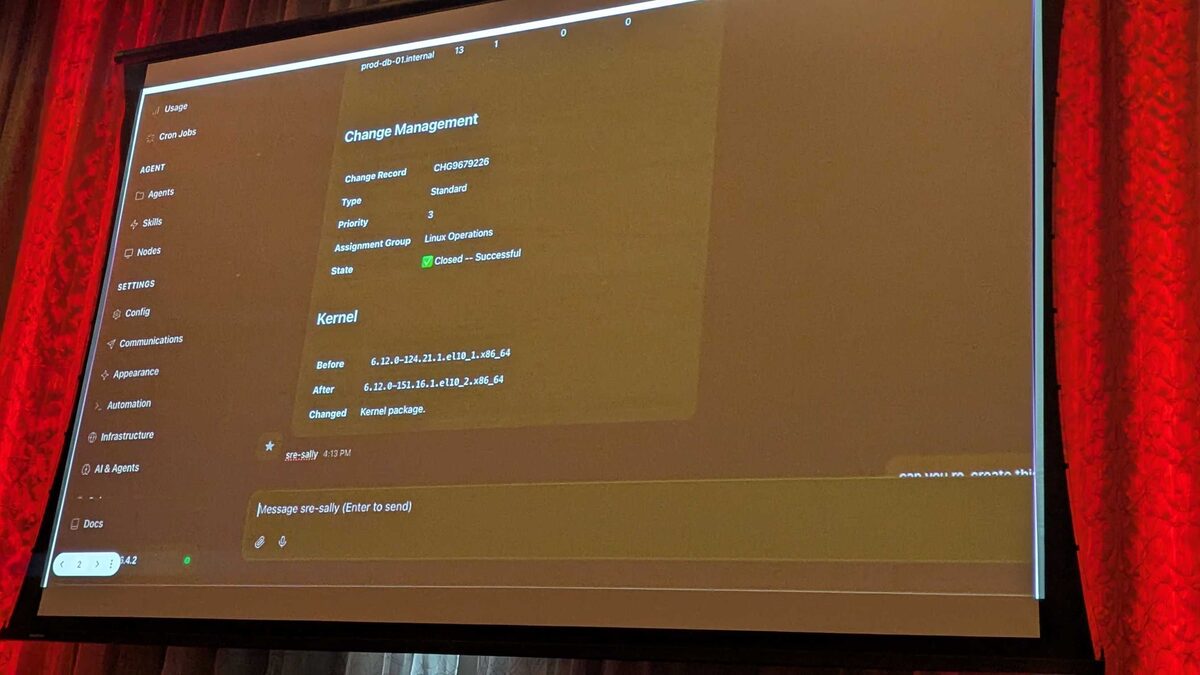
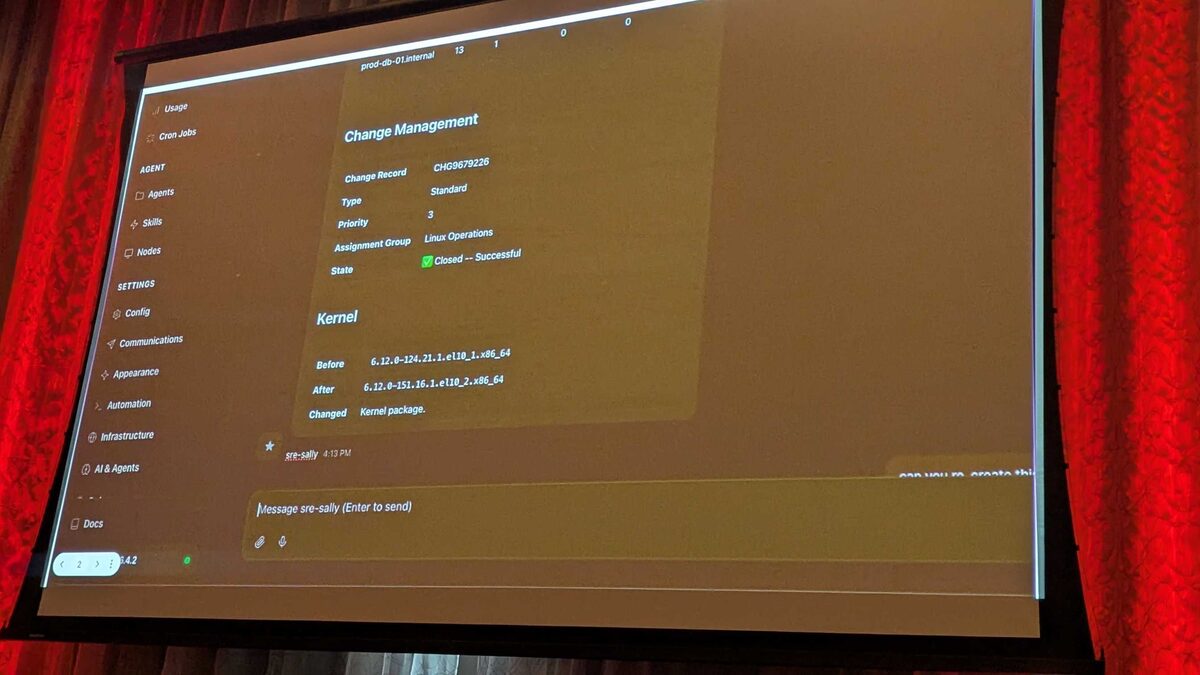
In the OpenClaw control panel, the agent was named sre-sally, running on Claude Sonnet 4.6 via LiteLLM. The visible tool calls during the run included memory_search (recalling prior incidents and runbook context), runtime_search (looking up available playbooks and job templates exposed by the MCP server), and runtime_exec (invoking an AAP job template through the MCP interface). None of these tools gave the agent a raw execution environment — each one was a bounded, named capability the MCP server chose to expose.
This is the architectural pattern that matters: the AAP MCP server acts as a translation and containment layer between a general-purpose LLM agent and the automation controller. The agent reasons in natural language and tool-call syntax; the MCP server maps that onto a fixed set of AAP job templates, workflow templates, and inventory lookups that administrators have already vetted. The agent can ask for a job to run — it cannot invent a new one.
| Layer | Role | Example in the demo |
|---|---|---|
| OpenClaw agent (sre-sally) | Detects conditions, reasons about next steps, calls tools | Validates CVE-2026-31337, decides to open a change |
| AAP MCP server | Exposes a fixed set of AAP capabilities as callable tools | runtime_search, runtime_exec mapped to job templates |
| OPA policy engine | Hard gate — pass/fail, no agent override | Checks ITSM, maintenance window, pre-approval, rollback plan |
| ServiceNow (ITSM) | System of record for the change | CHG0012847, later CHG9679226 |
| AAP controller | Executes the pre-approved playbook | Runs patch_and_reboot.yml against inventory |
| CMDB / compliance | Post-execution record keeping | Updated after ticket closure |
The Playbook the Agent Was Allowed to Run
The agent never saw or edited playbook content — it only selected it by name through the MCP tool interface. A representative version of what patch_and_reboot.yml looks like on the AAP side:
---
- name: Rolling kernel patch and reboot for critical CVE remediation
  hosts: "{{ target_hosts }}"
  serial: 1
  become: true
  vars:
    cve_id: "{{ cve_id }}"
    change_ticket: "{{ change_ticket }}"

  pre_tasks:
    - name: Silence monitoring for this host during the maintenance window
      ansible.builtin.uri:
        url: "https://monitoring.internal/api/v1/silence"
        method: POST
        body_format: json
        body:
          host: "{{ inventory_hostname }}"
          reason: "{{ change_ticket }}"
          duration_minutes: 60

    - name: Drain host from load balancer pool
      ansible.builtin.uri:
        url: "https://lb.internal/api/v1/drain/{{ inventory_hostname }}"
        method: POST
      when: inventory_hostname in groups['db_tier'] or inventory_hostname in groups['web_tier']

  tasks:
    - name: Apply kernel and security package updates
      ansible.builtin.dnf:
        name: "*"
        state: latest
        security: true

    - name: Reboot into patched kernel
      ansible.builtin.reboot:
        reboot_timeout: 600

    - name: Confirm new kernel is active
      ansible.builtin.command: uname -r
      register: kernel_check
      changed_when: false

  post_tasks:
    - name: Run health check endpoint
      ansible.builtin.uri:
        url: "http://{{ inventory_hostname }}:8080/healthz"
        status_code: 200
      retries: 5
      delay: 10

    - name: Re-add host to load balancer pool
      ansible.builtin.uri:
        url: "https://lb.internal/api/v1/enable/{{ inventory_hostname }}"
        method: POST

    - name: Restore monitoring silence removal
      ansible.builtin.uri:
        url: "https://monitoring.internal/api/v1/unsilence"
        method: POST
        body_format: json
        body:
          host: "{{ inventory_hostname }}"
This is standard, human-authored Ansible — nothing about it is agent-generated. What changed in the demo was who initiated the job template run and how fast the surrounding paperwork got done, not the trustworthiness of the automation itself.
See also: What Is OpenClaw? Agentic CVE Remediation with Ansible Automation Platform
Why the Policy Gate Is Non-Negotiable
OPA's role deserves emphasis because it's the piece that turns "an AI agent can trigger patching" into something an enterprise can actually sign off on. The policy check in the demo was a hard gate: ITSM ticket validated, maintenance window confirmed, playbook pre-approved for this CVE class, rollback plan present. If any condition failed, the pipeline stopped — full stop, no agent override, no retry logic that bypasses the check. Red Hat was explicit on this point: every guardrail an enterprise already relies on — the policy engine, ITSM, the CMDB, the audit trail — stayed authoritative. The agent simply drove those systems faster than a human operator could.
Key Takeaways
- OpenClaw's
sre-sallyagent (Claude Sonnet 4.6 via LiteLLM) never executed shell commands or wrote playbooks — it called bounded tools (memory_search,runtime_search,runtime_exec) exposed by the AAP MCP server. - The MCP server is a containment layer: it translates agent tool calls into a fixed set of pre-approved AAP job templates, preventing the agent from inventing new execution paths.
- OPA acted as a hard pass/fail gate — ITSM validation, maintenance window, pre-approval, and rollback plan all had to check out before any host was touched.
- The actual remediation used ordinary, human-authored Ansible (
patch_and_reboot.yml) with draining, rolling reboots, and health checks — the automation content itself didn't change, only who triggered it. - End-to-end traceability (CHG0012847 → CHG9679226, CMDB update, compliance report) was preserved throughout, which is what makes autonomous patching auditable rather than opaque.
Related Articles
- What Is OpenClaw? Agentic CVE Remediation with Ansible Automation Platform
- From Alert to Patched Fleet: An OpenClaw and AAP Remediation Walkthrough
- AAP MCP Job Management Tool Set: 25 Tools for AI-Driven Job Control
- Agent Identity and Guardrails: Securing OpenClaw Access to Ansible Automation Platform
Category: troubleshooting