Verify File Existence on Windows with Ansible
By Luca Berton · Published 2024-01-01 · Category: troubleshooting
Discover how to check if a file exists on Windows systems with Ansible's win_stat module. This guide includes a live Playbook example and execution details.

How to Check if a file exists on Windows-like systems with Ansible?
See also: Ansible win_file Module: Create Directory on Windows Hosts (Guide)
Ansible check file exists on Windows-like systems
ansible.windows.win_stat- Get information about Windows files
win_stat.
The full name is ansible.windows.win_stat, which means that is part of the collection of modules specialized to interact with Windows target host.
It's a module pretty stable and out for years.
It works in Windows and Windows Server operating systems.
It gets information about Windows files.
For Linux target use the ansible.builtin.stat module instead.
Parameters & Return Values
Mandatory Parameters
- path string
Main Return Values
- stat complex - exists
See also: Ansible win_file Module: Create & Manage Files on Windows (Guide)
Links
## Playbook
How to check if the file "example.txt" exists on the Desktop of the user on Windows-like systems with Ansible Playbook.
code
---
- name: check if a file exist
  hosts: all
  vars:
    myfile: 'C:\Users\vagrant\Desktop\example.txt'
  tasks:
    - name: check if a file exist
      ansible.windows.win_stat:
        path: "{{ myfile }}"
      register: file_data
    - name: report file exist
      ansible.builtin.debug:
        msg: "The file {{ myfile }} exist"
      when: file_data.stat.exists
    - name: report file not exist
      ansible.builtin.debug:
        msg: "The file {{ myfile }} doesn't exist"
      when: not file_data.stat.exists
file doesn't exist execution

ansible-pilot $ ansible-playbook -i virtualmachines/win/inventory check\ file\ exists/file_exist_windows.yml
PLAY [check if a file exist] **********************************************************************
TASK [Gathering Facts] ****************************************************************************
ok: [WindowsServer]
TASK [check if a file exist] **********************************************************************
ok: [WindowsServer]
TASK [report file exist] **************************************************************************
skipping: [WindowsServer]
TASK [report file not exist] **********************************************************************
ok: [WindowsServer] => {
    "msg": "The file C:\\Users\\vagrant\\Desktop\\example.txt doesn't exist"
}
PLAY RECAP ****************************************************************************************
WindowsServer              : ok=3    changed=0    unreachable=0    failed=0    skipped=1    rescued=0    ignored=0
ansible-pilot $
file exist execution
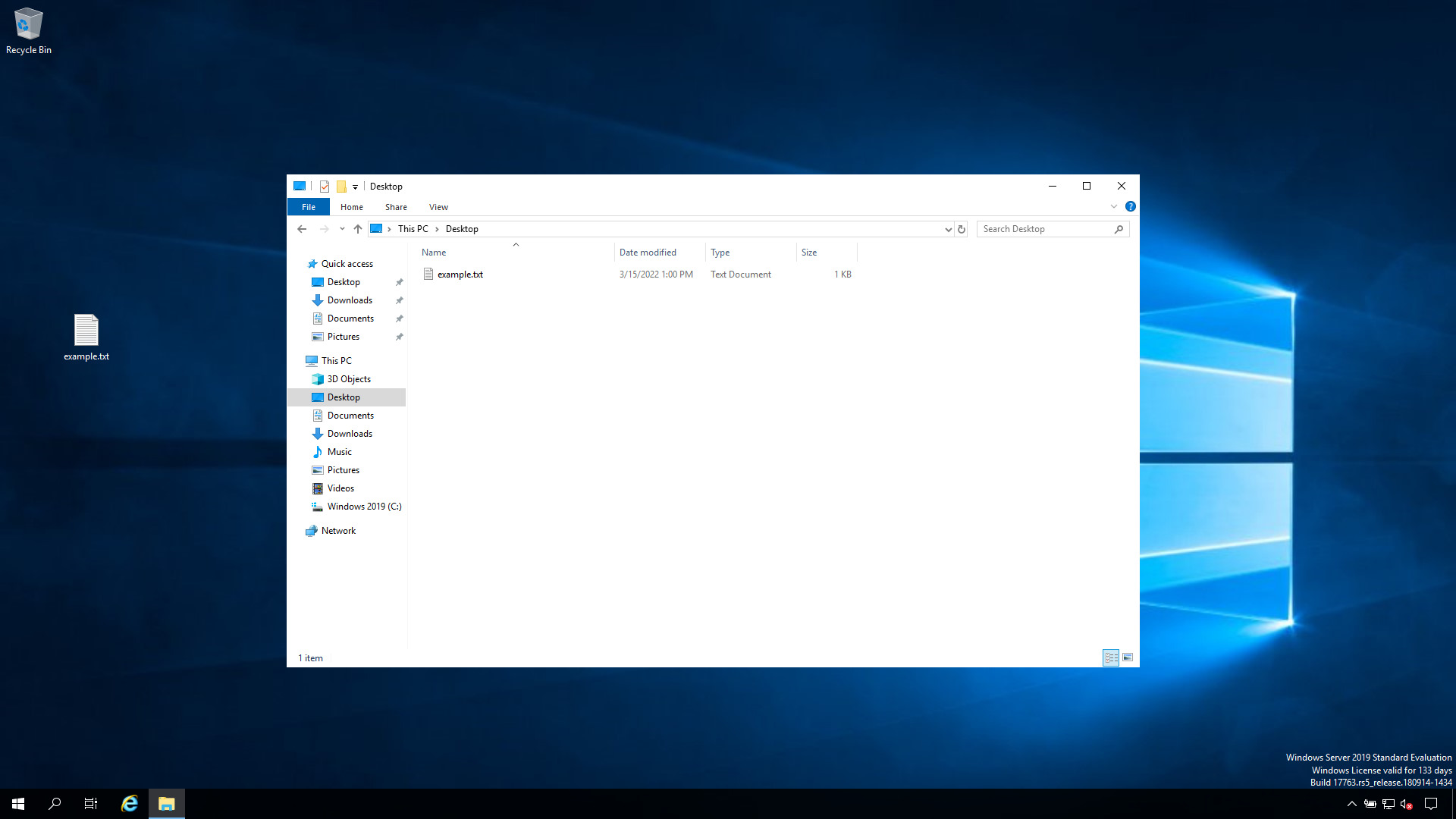
ansible-pilot $ ansible-playbook -i virtualmachines/win/inventory check\ file\ exists/file_exist_windows.yml
PLAY [check if a file exist] **********************************************************************
TASK [Gathering Facts] ****************************************************************************
ok: [WindowsServer]
TASK [check if a file exist] **********************************************************************
ok: [WindowsServer]
TASK [report file exist] **************************************************************************
ok: [WindowsServer] => {
    "msg": "The file C:\\Users\\vagrant\\Desktop\\example.txt exist"
}
TASK [report file not exist] **********************************************************************
skipping: [WindowsServer]
PLAY RECAP ****************************************************************************************
WindowsServer              : ok=3    changed=0    unreachable=0    failed=0    skipped=1    rescued=0    ignored=0
ansible-pilot $Distinguish a File from a Directory
stat.exists is true for both files and directories. When you need to be sure the path is a file (not a folder with the same name), check stat.isdir:
    - name: Fail if the path is a directory, not a file
      ansible.builtin.fail:
        msg: "{{ myfile }} is a directory, expected a file"
      when: file_data.stat.exists and file_data.stat.isdir
See also: Ansible win_unzip Module: Extract ZIP Archives on Windows (Guide)
Retrieve the File Checksum
By default win_stat returns a SHA1 checksum of the file, which is handy for verifying that a deployed file matches an expected version. Choose the algorithm with checksum_algorithm (md5, sha1, sha256, sha384, sha512), or skip hashing on large files with get_checksum: false to speed up the task:
    - name: Get the SHA256 checksum of a file
      ansible.windows.win_stat:
        path: "{{ myfile }}"
        checksum_algorithm: sha256
      register: file_data

    - name: Show the checksum
      ansible.builtin.debug:
        msg: "SHA256: {{ file_data.stat.checksum }}"
      when: file_data.stat.exists
Conclusion
Now you know how to check if a file exists on Windows-like systems with Ansible.Related Articles
Category: troubleshooting
Watch the video: Verify File Existence on Windows with Ansible — Video Tutorial