Add Windows Registry on Windows-like systems - Ansible module win_regedit
By Luca Berton · Published 2024-01-01 · Category: troubleshooting
Learn how to use Ansible win_regedit module to add, change, or remove Windows registry key-values efficiently and accurately with simple Ansible code examples.

How to Add Windows Registry key-value on Windows-like systems with Ansible?
Changing registry values manually can be time-consuming and error-prone. Ansible includes built-in capabilities for managing individual key-value pairs in an idempotent way.See also: Check .NET Framework Version on Windows with Ansible
Ansible adds Windows Registry on Windows-like systems
ansible.windows.win_regedit- Get information about Windows registry keys
win_regedit.
The full name is ansible.windows.win_regedit, which means that is part of the collection of modules specialized to interact with Windows target host.
It's a module pretty stable and out for years and it works in Windows and Windows Server operating systems.
It adds, changes, or remove registry keys and values.
Parameters
pathstring - The full registry key path including the hive to search fornamestring - Name of the registry entry in the path parameters.typestring -string/none/binary/dword/expandstring/multistring/qworddatastring - Value of the registry entrystatestring -present/absent
type" specify the datatype of the value: string, dword, qword, binary, multistring, etc. Some values could either be represented as a decimal number or a hex value. Multi-string values should be passed in as a list. Refer to the module manual for more details and examples.
Finally, we could specify the value of the registry entry in the "data" parameter.
Another useful parameter is the "state" to specify if we would like to add or modify ("present" option) or remove ("absent" option).
See also: Ansible win_regedit: Manage Windows Registry Keys & Values (Examples)
Links
- ansible.windows.win_regedit
- How to add, modify, or delete registry subkeys and values by using a .reg file
## Playbook
How to Add Windows Registry on Windows-like systems accessing the Windows Registry with Ansible Playbook.
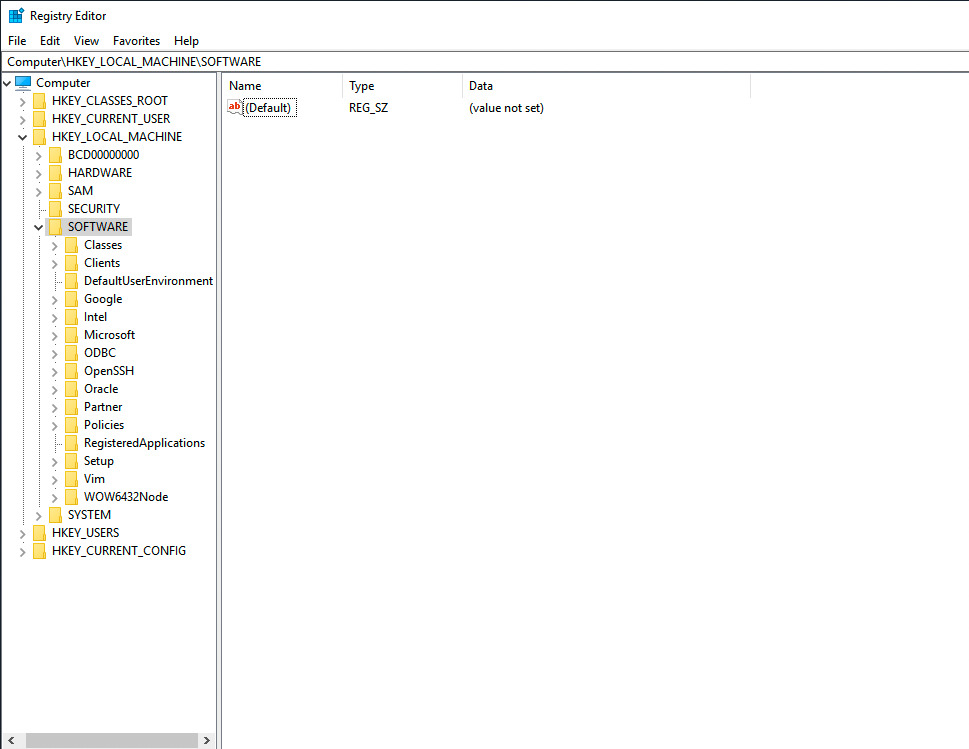
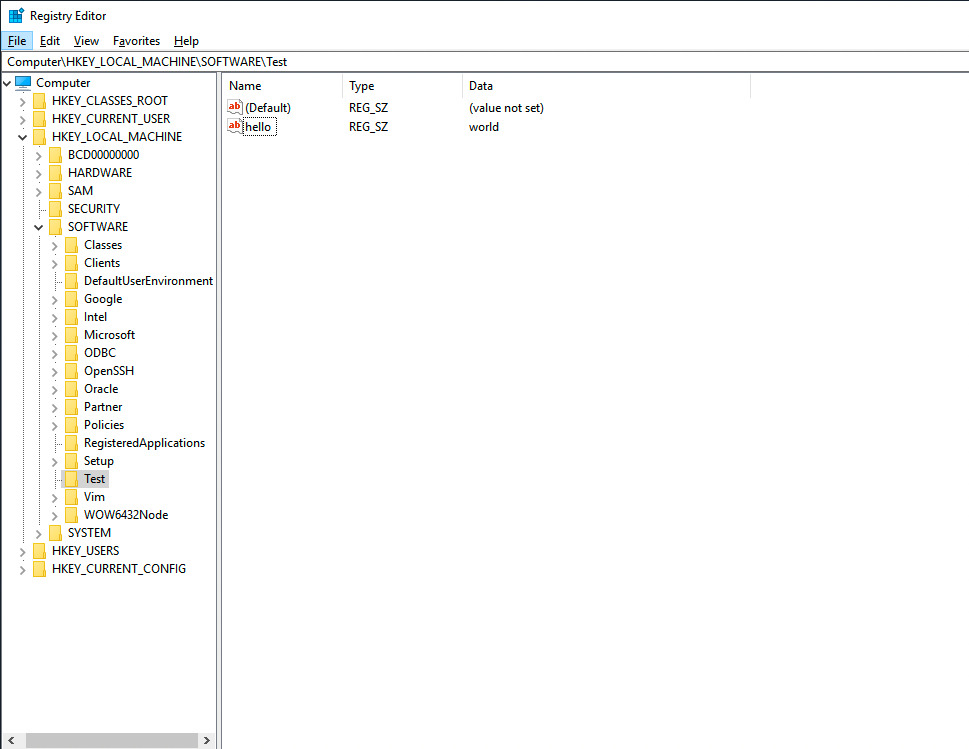
Specifically, I'm going to create a Windows Registry key located in "HKEY_LOCAL_MACHINE\Software\Test".
code
---
- name: windows registry add
  hosts: all
  vars:
    mypath: 'HKLM:\Software\Test'
    mykey: 'hello'
    mytype: string
    myvalue: 'world'
  tasks:
    - name: registry add key-value
      ansible.windows.win_regedit:
        path: "{{ mypath }}"
        name: "{{ mykey }}"
        type: "{{ mytype }}"
        data: "{{ myvalue }}"
execution
ansible-pilot $ ansible-playbook -i virtualmachines/win/inventory windows/registry_add.yml
PLAY [windows registry add] ***********************************************************************
TASK [Gathering Facts] ****************************************************************************
ok: [WindowsServer]
TASK [registry add key-value] *********************************************************************
changed: [WindowsServer]
PLAY RECAP ****************************************************************************************
WindowsServer              : ok=2    changed=1    unreachable=0    failed=0    skipped=0    rescued=0    ignored=0
ansible-pilot $
idempotency
ansible-pilot $ ansible-playbook -i virtualmachines/win/inventory windows/registry_add.yml
PLAY [windows registry add] ***********************************************************************
TASK [Gathering Facts] ****************************************************************************
ok: [WindowsServer]
TASK [registry add key-value] *********************************************************************
ok: [WindowsServer]
PLAY RECAP ****************************************************************************************
WindowsServer              : ok=2    changed=0    unreachable=0    failed=0    skipped=0    rescued=0    ignored=0
ansible-pilot $
before execution
after execution
Conclusion
Now you know how to Add Windows Registry key-value on Windows-like systems with Ansible.
See also: Ansible win_file Module: Create Directory on Windows Hosts (Guide)
Related Articles
Category: troubleshooting
Watch the video: Add Windows Registry on Windows-like systems - Ansible module win_regedit — Video Tutorial