Ansible win_regedit: Manage Windows Registry Keys & Values (Examples)
By Luca Berton · Published 2024-01-01 · Category: installation
How to manage Windows Registry with Ansible win_regedit module. Create, modify, and remove registry keys and values with practical automation examples.
How to Remove Windows Registry key on Windows-like systems with Ansible?
Changing registry values manually can be time-consuming and error-prone. Ansible includes built-in capabilities for managing individual key-value pairs in an idempotent way.See also: Add Windows Registry on Windows-like systems - Ansible module win_regedit
Ansible remove Windows Registry on Windows-like systems
ansible.windows.win_regedit- Get information about Windows registry keys
win_regedit.
The full name is ansible.windows.win_regedit , which means that is part of the collection of modules specialized to interact with Windows target host.
It's a module pretty stable and out for years and it works in Windows and Windows Server operating systems.
It adds, changes, or removes registry keys and values.
Parameters
- path string - The full registry key path including the hive to search for
- name string - Name of the registry entry in the path parameters.
- state string - present/absent
See also: Check .NET Framework Version on Windows with Ansible
Playbook
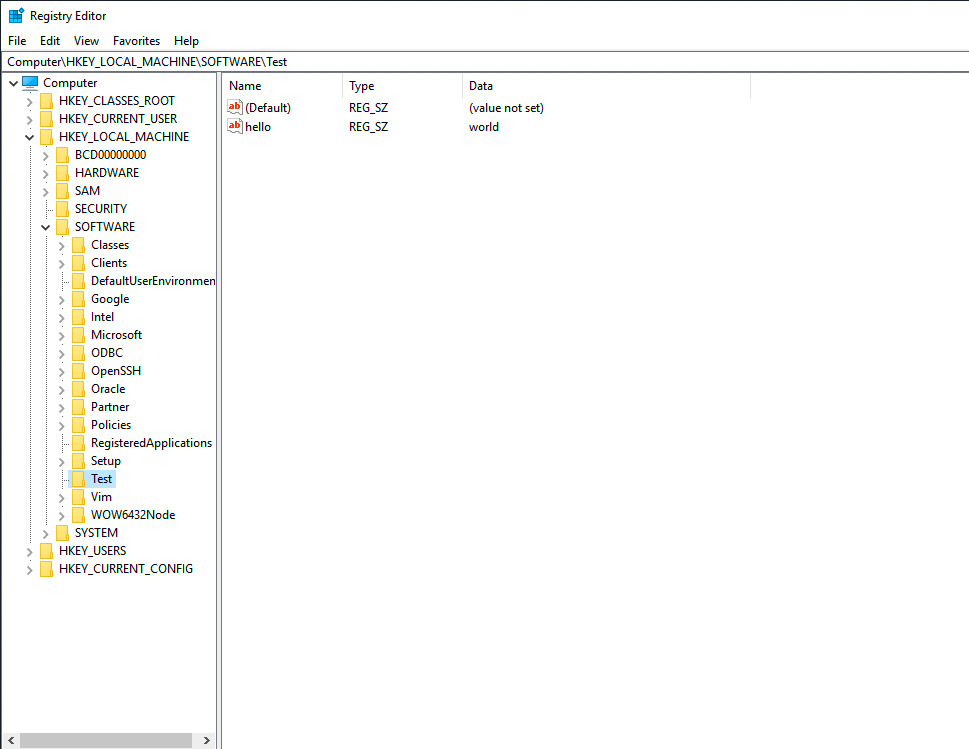
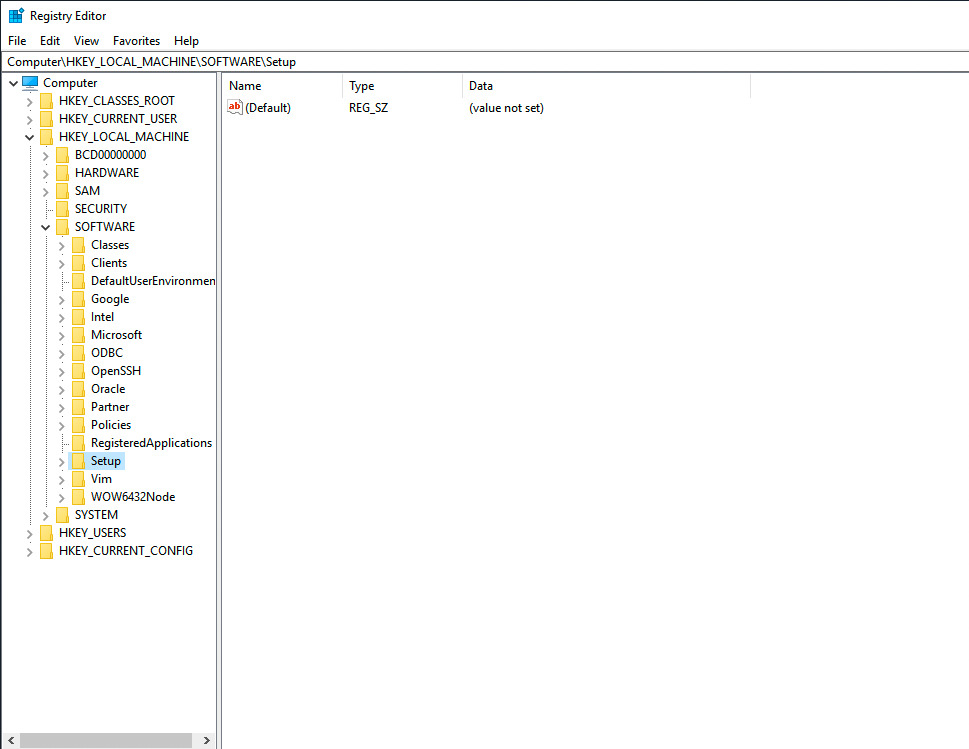
How to Remove Windows Registry key on Windows-like systems accessing the Windows Registry with Ansible Playbook. Specifically, I'm going to delete a Windows Registry key located in "HKEY_LOCAL_MACHINE\Software\Test".
code
---
- name: windows registry remove
  hosts: all
  vars:
    mypath: 'HKLM:\Software\Test'
  tasks:
    - name: registry remove path
      ansible.windows.win_regedit:
        path: "{{ mypath }}"
        state: absent
execution
ansible-pilot $ ansible-playbook -i virtualmachines/win/inventory windows/registry_remove.yml
PLAY [windows registry remove] ********************************************************************
TASK [Gathering Facts] ****************************************************************************
ok: [WindowsServer]
TASK [registry remove path] ***********************************************************************
changed: [WindowsServer]
PLAY RECAP ****************************************************************************************
WindowsServer              : ok=2    changed=1    unreachable=0    failed=0    skipped=0    rescued=0    ignored=0
ansible-pilot $
idempotency
ansible-pilot $ ansible-playbook -i virtualmachines/win/inventory windows/registry_remove.yml
PLAY [windows registry remove] ********************************************************************
TASK [Gathering Facts] ****************************************************************************
ok: [WindowsServer]
TASK [registry remove path] ***********************************************************************
ok: [WindowsServer]
PLAY RECAP ****************************************************************************************
WindowsServer              : ok=2    changed=0    unreachable=0    failed=0    skipped=0    rescued=0    ignored=0
ansible-pilot $
before execution
after execution
Conclusion
Now you know how to remove the Windows Registry key on Windows-like systems with Ansible.
See also: Ansible win_file Module: Create Directory on Windows Hosts (Guide)
Remove Registry Key
- name: Remove registry key
  ansible.windows.win_regedit:
    path: HKLM:\SOFTWARE\MyApp
    state: absent
    delete_key: true
Remove Registry Value
- name: Remove specific value
  ansible.windows.win_regedit:
    path: HKLM:\SOFTWARE\MyApp
    name: LicenseKey
    state: absent
Create/Set Registry Values
# String value
- ansible.windows.win_regedit:
    path: HKLM:\SOFTWARE\MyApp
    name: InstallPath
    data: C:\Program Files\MyApp
    type: string

# DWORD (integer)
- ansible.windows.win_regedit:
    path: HKLM:\SOFTWARE\MyApp
    name: MaxConnections
    data: 100
    type: dword

# Multi-string
- ansible.windows.win_regedit:
    path: HKLM:\SOFTWARE\MyApp
    name: AllowedHosts
    data:
      - server1.example.com
      - server2.example.com
    type: multistring
Common Registry Tweaks
Disable Windows Update auto-restart
- ansible.windows.win_regedit:
    path: HKLM:\SOFTWARE\Policies\Microsoft\Windows\WindowsUpdate\AU
    name: NoAutoRebootWithLoggedOnUsers
    data: 1
    type: dword
Set default browser
- ansible.windows.win_regedit:
    path: HKCU:\SOFTWARE\Microsoft\Windows\Shell\Associations\UrlAssociations\https\UserChoice
    name: ProgId
    data: ChromeHTML
    type: string
Disable remote desktop NLA
- ansible.windows.win_regedit:
    path: HKLM:\SYSTEM\CurrentControlSet\Control\Terminal Server\WinStations\RDP-Tcp
    name: UserAuthentication
    data: 0
    type: dword
Backup Before Modifying
- name: Export registry backup
  ansible.windows.win_shell: |
    reg export "HKLM\SOFTWARE\MyApp" C:\Backup\myapp-reg-backup.reg /y
  register: backup

- name: Modify registry
  ansible.windows.win_regedit:
    path: HKLM:\SOFTWARE\MyApp
    name: Setting
    data: NewValue
    type: string
Registry Data Types
| Type | win_regedit type | Description |
|---|---|---|
| REG_SZ | string | String |
| REG_DWORD | dword | 32-bit integer |
| REG_QWORD | qword | 64-bit integer |
| REG_BINARY | binary | Binary data |
| REG_MULTI_SZ | multistring | List of strings |
| REG_EXPAND_SZ | expandstring | String with env vars |
Registry Hives
| Short | Full Path |
|---|---|
| HKLM | HKEY_LOCAL_MACHINE |
| HKCU | HKEY_CURRENT_USER |
| HKCR | HKEY_CLASSES_ROOT |
| HKU | HKEY_USERS |
FAQ
How do I check if a registry key exists?
- ansible.windows.win_reg_stat:
    path: HKLM:\SOFTWARE\MyApp
    name: InstallPath
  register: reg_check

- debug:
    msg: "Exists: {{ reg_check.exists }}, Value: {{ reg_check.value }}"
Can I import a .reg file?
- ansible.windows.win_command: reg import C:\configs\settings.regDoes win_regedit require a reboot?
The registry change is immediate, but some Windows features only read registry at boot/service start.
Related Articles
Category: installation
Watch the video: Ansible win_regedit: Manage Windows Registry Keys & Values (Examples) — Video Tutorial