Check .NET Framework Version on Windows with Ansible
By Luca Berton · Published 2024-01-01 · Category: installation
Learn how to check the .NET Framework version on Windows systems with Ansible using the win_reg_stat module.
How to Check the .NET Framework version on Windows-like systems with Ansible?
The principle is to read the right Windows Registry key, store in a variable, and display it on the screen.See also: Add Windows Registry on Windows-like systems - Ansible module win_regedit
Ansible read Windows Registry
ansible.windows.win_reg_stat- Get information about Windows registry keys
win_reg_stat.
The full name is ansible.windows.win_reg_stat, which means that is part of the collection of modules specialized to interact with Windows target host.
It's a module pretty stable and out for years.
It works in Windows and Windows Server operating systems.
It gets information about Windows registry keys.
Parameters & Return Values
Parameters
- path string - The full registry key path including the hive to search for
- name string - key path including the hive to search for
Main Return Values
- exists, value, raw_value, type, sub_keys
See also: Ansible win_regedit: Manage Windows Registry Keys & Values (Examples)
Links
## Playbook
How to check the .NET Framework version on Windows-like systems accessing the Windows Registry with Ansible Playbook.
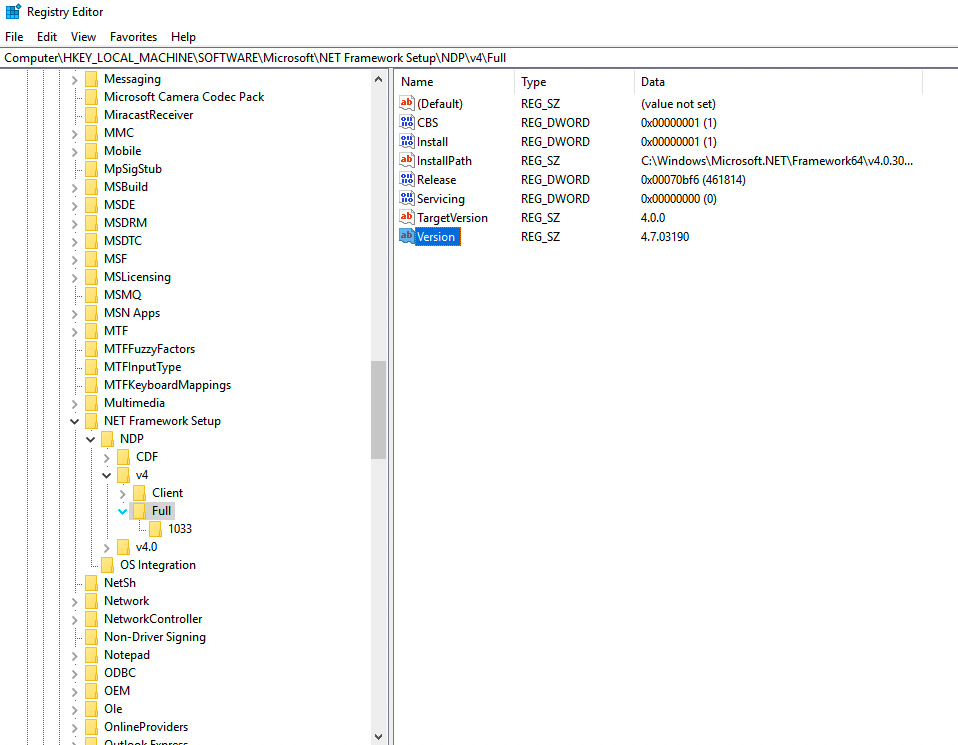
Specifically, the Windows Registry key is "Version" located in HKEY_LOCAL_MACHINE\SOFTWARE\Microsoft\NET Framework Setup\NDP\v4\Full.
code
---
- name: win_reg_stat module Playbook
  hosts: all
  tasks:
    - name: check .NET version
      ansible.windows.win_reg_stat:
        path: 'HKLM:\SOFTWARE\Microsoft\NET Framework Setup\NDP\v4\Full'
        name: "Version"
      register: reg_val
    - name: print .NET version
      ansible.builtin.debug:
        msg: "{{ reg_val }}"
execution
ansible-pilot $ ansible-playbook -i virtualmachines/win/inventory windows/printdotnet.yml
PLAY [win_reg_stat module Playbook] *************************************************************
TASK [Gathering Facts] **********************************************************************
ok: [WindowsServer]
TASK [check .NET version] *******************************************************************
ok: [WindowsServer]
TASK [print .NET version] *******************************************************************
ok: [WindowsServer] => {
    "msg": {
        "changed": false,
        "exists": true,
        "failed": false,
        "raw_value": "4.7.03190",
        "type": "REG_SZ",
        "value": "4.7.03190"
    }
}
PLAY RECAP **********************************************************************************
WindowsServer              : ok=3    changed=0    unreachable=0    failed=0    skipped=0    rescued=0    ignored=0
ansible-pilot $
idempotency
ansible-pilot $ ansible-playbook -i virtualmachines/win/inventory windows/printdotnet.yml
PLAY [win_reg_stat module Playbook] *************************************************************
TASK [Gathering Facts] **********************************************************************
ok: [WindowsServer]
TASK [check .NET version] *******************************************************************
ok: [WindowsServer]
TASK [print .NET version] *******************************************************************
ok: [WindowsServer] => {
    "msg": {
        "changed": false,
        "exists": true,
        "failed": false,
        "raw_value": "4.7.03190",
        "type": "REG_SZ",
        "value": "4.7.03190"
    }
}
PLAY RECAP **********************************************************************************
WindowsServer              : ok=3    changed=0    unreachable=0    failed=0    skipped=0    rescued=0    ignored=0
ansible-pilot $
manual check
Conclusion
Now you know how to check the Windows Registry .NET Framework version on Windows-like systems with Ansible.
See also: Ansible win_file Module: Create Directory on Windows Hosts (Guide)
Related Articles
Category: installation
Watch the video: Check .NET Framework Version on Windows with Ansible — Video Tutorial