Ansible azure.azcollection Guide: Machine Learning, App Configuration, and Front Door in AAP 2.7
By Luca Berton · Published 2024-01-01 · Category: containers-kubernetes
How the expanded azure.azcollection in AAP 2.7 automates Azure ML, App Configuration, Front Door, Storage, and Arc/HCI with Ansible playbooks.
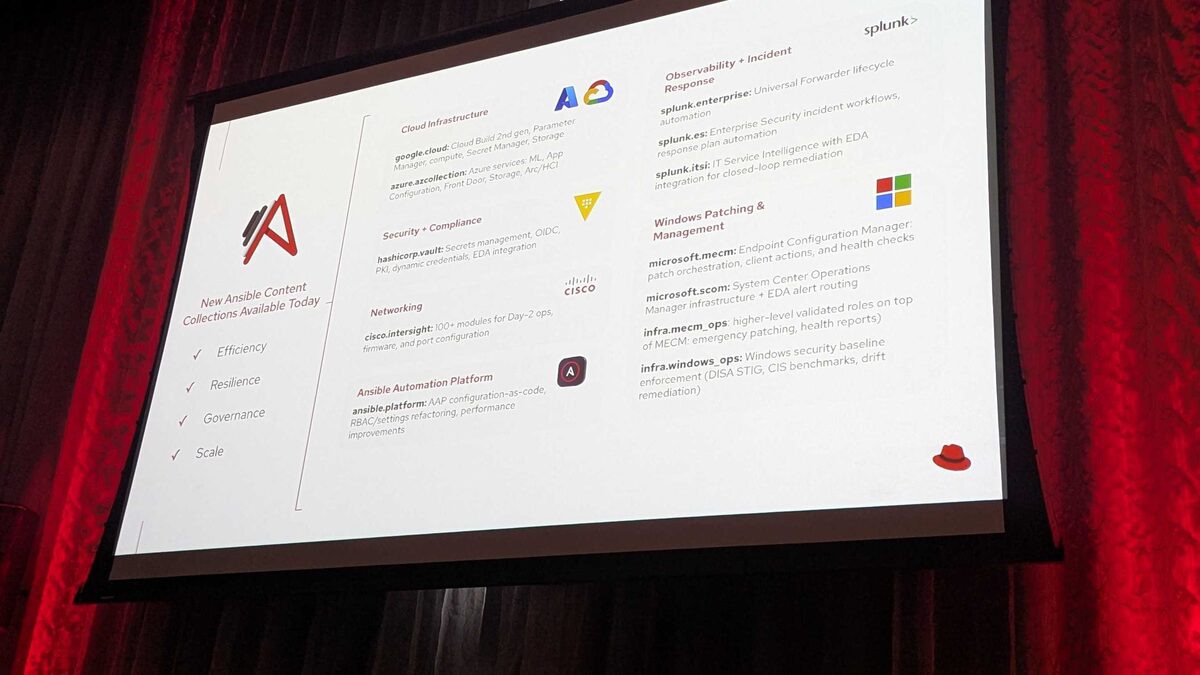
!New Ansible Content Collections Available Today — Red Hat Tech Day Netherlands 2026
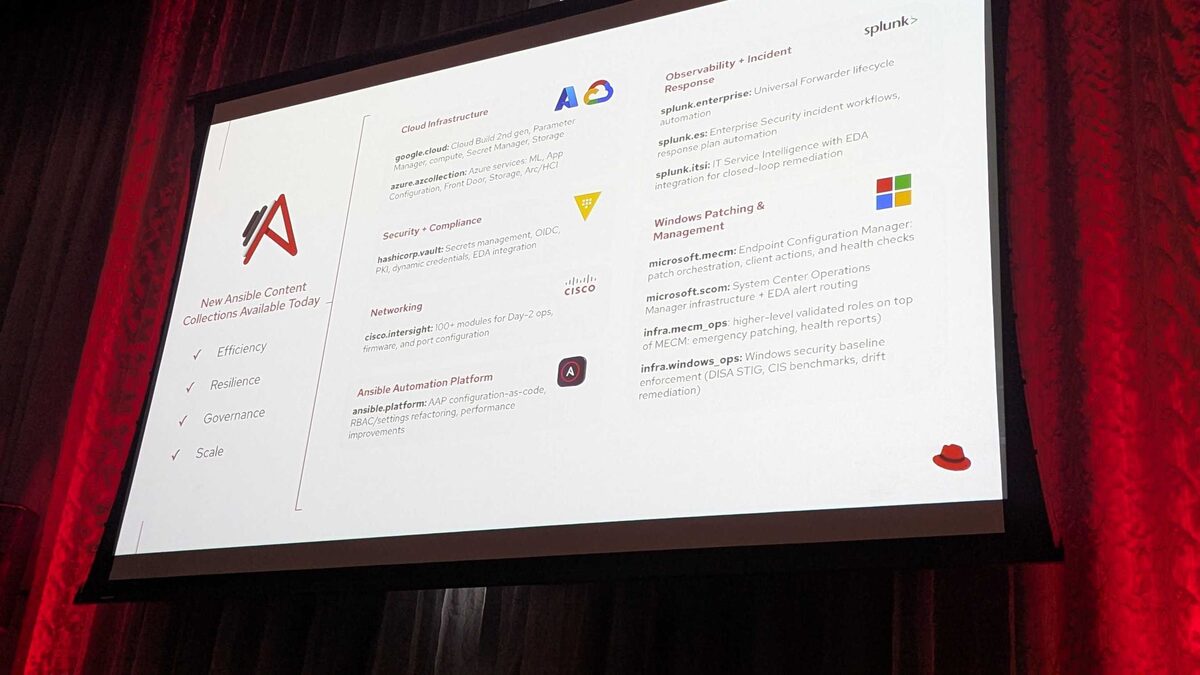
Microsoft Azure remains one of the most heavily automated clouds in enterprise Ansible estates, and Red Hat used Red Hat Tech Day Netherlands 2026 (3 June 2026, Bunnik) to show why the relationship keeps deepening. Alongside eleven other new content collections landing in Ansible Automation Platform (AAP) 2.7, the team confirmed an expanded azure.azcollection, extending coverage into Azure Machine Learning, App Configuration, Front Door, Storage, and Arc/HCI. This guide walks through what that expansion means in practice and how to start automating these services today.
Why azure.azcollection Got a Refresh in AAP 2.7
The 12 collections announced at Bunnik were grouped around four themes: Efficiency, Resilience, Governance, and Scale. azure.azcollection sits squarely at the intersection of Efficiency and Scale — Azure customers running hybrid and multi-region estates need consistent, idempotent automation that covers not just core infrastructure (VMs, networking, resource groups) but the higher-level PaaS and edge services that modern applications actually depend on. Historically, teams stitched together ARM templates, Bicep, and Azure CLI scripts to fill these gaps. Bringing ML, App Configuration, Front Door, Storage, and Arc/HCI into the same collection as your existing Azure playbooks means one inventory, one credential model, and one execution environment for the whole Azure footprint.
See also: AAP BYOM Provider Comparison 2026: Red Hat AI vs OpenAI vs Azure vs watsonx vs Gemini
What's New: Service-by-Service Breakdown
| Azure Service | Automation Focus | Typical Use Case |
|---|---|---|
| Azure Machine Learning | Workspace provisioning, compute cluster lifecycle, model deployment triggers | Standing up ML environments consistently across dev/test/prod |
| App Configuration | Key-value store management, feature flag rollout, config snapshots | Centralized app settings without redeploying code |
| Front Door | Routing rules, WAF policy attachment, origin group health probes | Global load balancing and edge security for web apps |
| Storage | Account creation, container/blob lifecycle policies, network rules | Consistent storage governance across subscriptions |
| Arc/HCI | Arc-enabled server onboarding, HCI cluster registration, extension management | Managing on-prem and edge infrastructure through Azure control plane |
Example: Automating Azure ML and App Configuration Together
A common pattern emerging from early adopters is pairing Azure Machine Learning workspace setup with App Configuration so that ML endpoints and application feature flags stay in sync. Here's an illustrative playbook showing the shape of that automation:
---
- name: Provision Azure ML workspace and sync app configuration
  hosts: localhost
  gather_facts: false
  collections:
    - azure.azcollection

  vars:
    resource_group: rg-ml-platform
    location: westeurope
    ml_workspace_name: mlw-fraud-detection
    app_config_name: appcs-fraud-detection

  tasks:
    - name: Ensure resource group exists
      azure.azcollection.azure_rm_resourcegroup:
        name: "{{ resource_group }}"
        location: "{{ location }}"

    - name: Create Azure Machine Learning workspace
      azure.azcollection.azure_rm_mlworkspace:
        resource_group: "{{ resource_group }}"
        name: "{{ ml_workspace_name }}"
        location: "{{ location }}"
        sku: basic
        tags:
          managed_by: ansible
          environment: production

    - name: Create App Configuration store for feature flags
      azure.azcollection.azure_rm_appconfiguration:
        resource_group: "{{ resource_group }}"
        name: "{{ app_config_name }}"
        location: "{{ location }}"
        sku: standard

    - name: Set feature flag pointing to new ML endpoint
      azure.azcollection.azure_rm_appconfigurationkeyvalue:
        resource_group: "{{ resource_group }}"
        configuration_store_name: "{{ app_config_name }}"
        key: "fraud-detection.ml-endpoint-enabled"
        value: "true"
        content_type: "application/json"
The task and module names above are illustrative of how this newly announced coverage will be documented, but the pattern is real and idiomatic: resource group first, then the PaaS resource, then application-level configuration wired to it — all in one apply.
See also: Build an AAP Self-Service Template: Request an Azure Resource Group
Front Door and the Edge Automation Story
Front Door automation deserves special mention because it's often the last mile that gets left to manual console clicks even in otherwise well-automated Azure shops. With azure.azcollection extending into Front Door, teams can codify routing rules, origin groups, and WAF policy attachment the same way they already codify VM scale sets — meaning a global traffic cutover or a new WAF rule rollout becomes a playbook run and a pull request, not a change ticket followed by manual portal navigation.
Arc/HCI: Bridging Cloud and Edge
The Arc/HCI addition matters for organizations running Azure Local (formerly Azure Stack HCI) or managing on-prem servers through Azure Arc. By putting Arc-enabled server onboarding and HCI cluster registration inside the same collection used for pure cloud resources, AAP 2.7 lets a single automation controller job template manage infrastructure regardless of whether the underlying hardware lives in a hyperscale region or a retail store's server closet.
See also: Connect the AAP Intelligent Assistant to Azure OpenAI: Setup Guide
How This Fits the Broader AAP 2.7 Announcement
azure.azcollection was one of 12 new content collections revealed at Red Hat Tech Day Netherlands 2026, alongside google.cloud (Cloud Build 2nd gen, Parameter Manager, Compute, Secret Manager, Storage), hashicorp.vault (secrets, OIDC, PKI, dynamic credentials, EDA), and platform-focused collections like ansible.platform for configuration-as-code and RBAC refactoring. Seeing azure.azcollection expand in the same release wave as google.cloud is a signal: Red Hat is treating multi-cloud PaaS and edge services as a first-class automation surface, not an afterthought bolted onto infrastructure-as-code basics.
Key Takeaways
- azure.azcollection in AAP 2.7 expands beyond core infrastructure into Azure Machine Learning, App Configuration, Front Door, Storage, and Arc/HCI.
- The expansion was announced as part of 12 new content collections at Red Hat Tech Day Netherlands 2026 (3 June 2026, Bunnik), organized around Efficiency, Resilience, Governance, and Scale.
- Pairing ML workspace provisioning with App Configuration lets teams sync feature flags to new model endpoints in a single playbook run.
- Front Door automation closes a common gap where edge routing and WAF policy changes were previously manual.
- Arc/HCI coverage means one collection can now manage both cloud-native Azure resources and on-prem/edge infrastructure registered through Azure Arc.
Related Articles
Category: containers-kubernetes