Stop a VMware vSphere Virtual Machine - Ansible module vmware_guest_powerstate
By Luca Berton · Published 2024-01-01 · Category: troubleshooting
How to automate the gracefully use guest shutdown and forcefully power off to change the power state from Powered On to Powered Off of the virtual machine.
How to Stop a VMware vSphere Virtual Machine with Ansible?
See also: How to Add a Disk to a VMware VM Using Ansible Playbook
Ansible Stop a VMware vSphere Virtual Machine
community.vmware.vmware_guest_powerstate- Manages power states of virtual machines in vCenter
vmware_guest_powerstate.
The full name is community.vmware.vmware_guest_powerstate, which means that is part of the collection of modules to interact with VMware, community-supported.
It manages power states of virtual machines in vCenter.
Parameters
- hostname string / username string / password string / datacenter string / validate_certs boolean - connection details
- state string - present / powered-off / powered-on / reboot-guest / restarted / shutdown-guest / suspended
- force boolean - no/yes
- answer string - A list of questions to answer, should one or more arise while waiting for the task to be complete.
vmware_guest_powerstate.
First of all, we need to establish the connection with VMware vSphere or VMware vCenter using a plethora of self-explicative parameters: hostname, username, password, datacenter, and validate_certs.
Once the connection is successfully established you could specify the desired power state, in this case "shutdown-guest" to gracefully ask the guest operating system to shutdown or "powered-off" to turn off the virtual machine guest.
You could also force the power state to change using the force parameter, default disabled.
See also: Configure Ansible Dynamic Inventory for VMware in Simple Steps
Links
## Playbook
How to Stop a VMware vSphere Virtual Machine with Ansible.
code
- vm_stop.yml
---
- name: stop vm Playbook
  hosts: localhost
  become: false
  gather_facts: false
  collections:
    - community.vmware
  pre_tasks:
    - include_vars: vars.yml
  tasks:
    - name: guest shutdown
      vmware_guest_powerstate:
        hostname: "{{ vcenter_hostname }}"
        username: "{{ vcenter_username }}"
        password: "{{ vcenter_password }}"
        validate_certs: "{{ vcenter_validate_certs }}"
        name: "{{ vm_name }}"
        state: shutdown-guest
        state_change_timeout: 120
      register: shutdown
      ignore_errors: true
    - name: poweroff
      vmware_guest_powerstate:
        hostname: "{{ vcenter_hostname }}"
        username: "{{ vcenter_username }}"
        password: "{{ vcenter_password }}"
        validate_certs: "{{ vcenter_validate_certs }}"
        name: "{{ vm_name }}"
        state: powered-off
      when: shutdown.failed
- vars.yml
---
vcenter_hostname: "vmware.example.com"
vcenter_datacenter: "vmwaredatacenter"
vcenter_validate_certs: false
vcenter_username: "username@vsphere.local"
vcenter_password: "MySecretPassword123"
vm_name: "myvm"- inventory
localhostexecution
$ ansible-playbook vm_stop.yml
[WARNING]: provided hosts list is empty, only localhost is available. Note that the implicit
localhost does not match 'all'
PLAY [stop vm Playbook] *******************************************************************************
TASK [include_vars] *******************************************************************************
ok: [localhost]
TASK [guest shutdown] *****************************************************************************
fatal: [localhost]: FAILED! => {"changed": false, "instance": {"annotation": "", "current_snapshot": null, "customvalues": {}, "guest_consolidation_needed": false, "guest_question": null, "guest_tools_status": "guestToolsNotRunning", "guest_tools_version": "0", "hw_cluster": "prod-cluster", "hw_cores_per_socket": 1, "hw_datastores": ["Datastore"], "hw_esxi_host": "vmware.example.com", "hw_eth0": {"addresstype": "assigned", "ipaddresses": null, "label": "Network adapter 1", "macaddress": "00:50:56:a5:c4:8a", "macaddress_dash": "00-50-56-a5-c4-8a", "portgroup_key": null, "portgroup_portkey": null, "summary": "VM Network"}, "hw_files": ["[Datastore] myvm/myvm.vmx", "[Datastore] myvm/myvm.nvram", "[Datastore] myvm/myvm.vmsd", "[Datastore] myvm/vmware.log", "[Datastore] myvm/myvm.vmdk"], "hw_folder": "/vmwaredatacenter/vm/myvm", "hw_guest_full_name": null, "hw_guest_ha_state": null, "hw_guest_id": null, "hw_interfaces": ["eth0"], "hw_is_template": false, "hw_memtotal_mb": 2048, "hw_name": "lberton-ansible-provision", "hw_power_status": "poweredOff", "hw_processor_count": 1, "hw_product_uuid": "42250dd5-2672-1d32-7898-ad430028e696", "hw_version": "vmx-11", "instance_uuid": "5025e482-f138-b482-a027-0a868ff4bcf3", "ipv4": null, "ipv6": null, "module_hw": true, "moid": "vm-17928", "snapshots": [], "vimref": "vim.VirtualMachine:vm-17928", "vnc": {}}, "msg": "Virtual machine myvm must be in poweredon state for guest shutdown/reboot"}
...ignoring
TASK [poweroff] ***********************************************************************************
changed: [localhost]
PLAY RECAP ****************************************************************************************
localhost                  : ok=3    changed=1    unreachable=0    failed=0    skipped=0    rescued=0    ignored=1
idempotency
$ ansible-playbook vm_stop.yml
[WARNING]: provided hosts list is empty, only localhost is available. Note that the implicit
localhost does not match 'all'
PLAY [stop vm Playbook] *******************************************************************************
TASK [include_vars] *******************************************************************************
ok: [localhost]
TASK [guest shutdown] *****************************************************************************
fatal: [localhost]: FAILED! => {"changed": false, "instance": {"annotation": "", "current_snapshot": null, "customvalues": {}, "guest_consolidation_needed": false, "guest_question": null, "guest_tools_status": "guestToolsNotRunning", "guest_tools_version": "0", "hw_cluster": "prod-cluster", "hw_cores_per_socket": 1, "hw_datastores": ["Datastore"], "hw_esxi_host": "vmware.example.com", "hw_eth0": {"addresstype": "assigned", "ipaddresses": null, "label": "Network adapter 1", "macaddress": "00:50:56:a5:c4:8a", "macaddress_dash": "00-50-56-a5-c4-8a", "portgroup_key": null, "portgroup_portkey": null, "summary": "VM Network"}, "hw_files": ["[Datastore] myvm/myvm.vmx", "[Datastore] myvm/myvm.nvram", "[Datastore] myvm/myvm.vmsd", "[Datastore] myvm/vmware.log", "[Datastore] myvm/myvm.vmdk"], "hw_folder": "/vmwaredatacenter/vm/myvm", "hw_guest_full_name": null, "hw_guest_ha_state": null, "hw_guest_id": null, "hw_interfaces": ["eth0"], "hw_is_template": false, "hw_memtotal_mb": 2048, "hw_name": "lberton-ansible-provision", "hw_power_status": "poweredOff", "hw_processor_count": 1, "hw_product_uuid": "42250dd5-2672-1d32-7898-ad430028e696", "hw_version": "vmx-11", "instance_uuid": "5025e482-f138-b482-a027-0a868ff4bcf3", "ipv4": null, "ipv6": null, "module_hw": true, "moid": "vm-17928", "snapshots": [], "vimref": "vim.VirtualMachine:vm-17928", "vnc": {}}, "msg": "Virtual machine myvm must be in poweredon state for guest shutdown/reboot"}
...ignoring
TASK [poweroff] ***********************************************************************************
ok: [localhost]
PLAY RECAP ****************************************************************************************
localhost                  : ok=3    changed=0    unreachable=0    failed=0    skipped=0    rescued=0    ignored=1
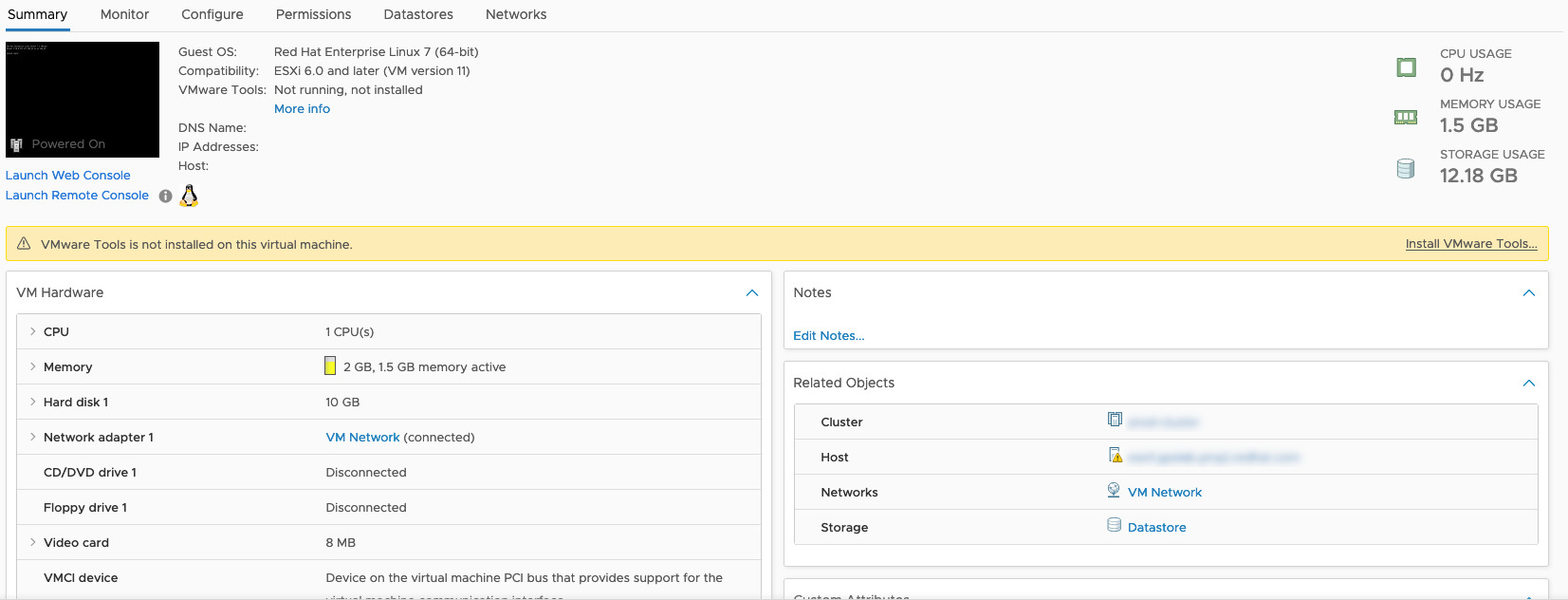
before execution
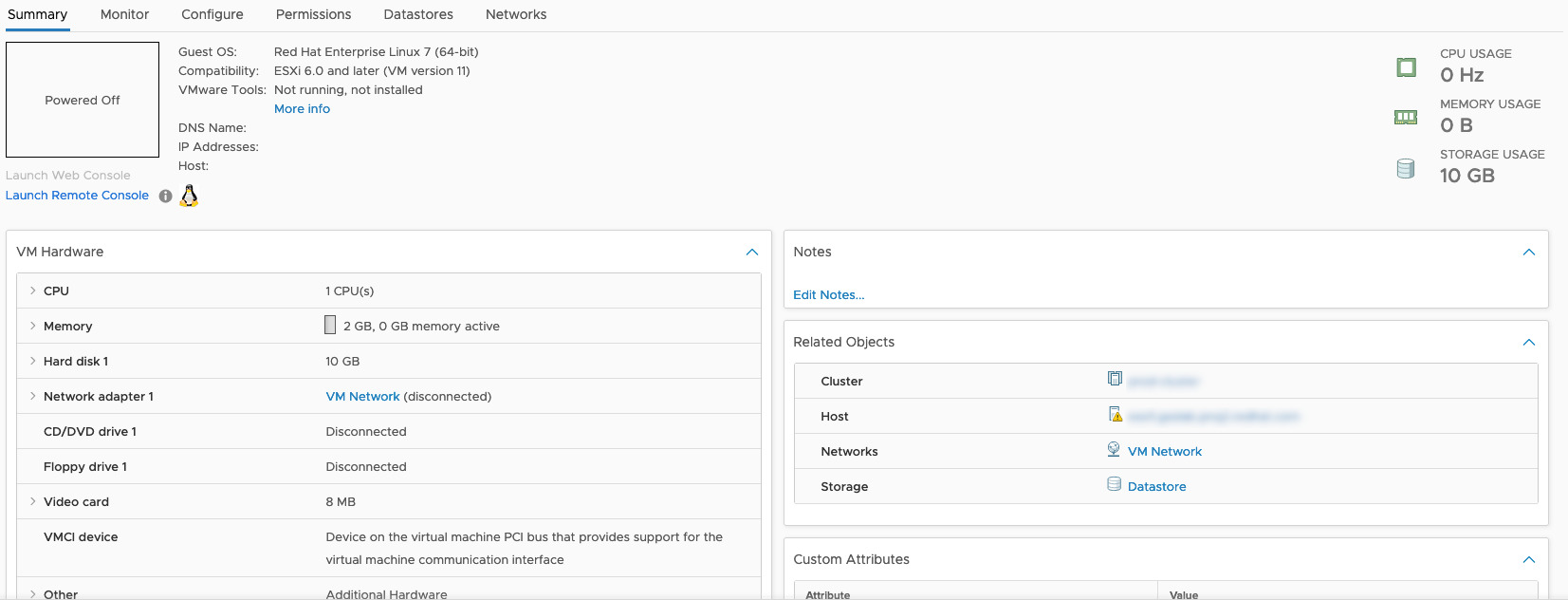
after execution
Conclusion
Now you know how to Stop a VMware vSphere Virtual Machine with Ansible.See also: Take a VMware Virtual Machine Snapshot - Ansible module vmware_guest_snapshot
Related Articles
Category: troubleshooting
Watch the video: Stop a VMware vSphere Virtual Machine - Ansible module vmware_guest_powerstate — Video Tutorial