Take a VMware Virtual Machine Snapshot - Ansible module vmware_guest_snapshot
By Luca Berton · Published 2024-01-01 · Category: troubleshooting
How to automate taking snapshots named “Ansible Managed Snapshot” to a VMware Virtual Machine “myvm” Ansible Playbook and vmware_guest_snapshot module.
How to Take a VMware Virtual Machine Snapshot with Ansible?
See also: How to Add a Disk to a VMware VM Using Ansible Playbook
Ansible Take a VMware Virtual Machine Snapshot
community.vmware.vmware_guest_snapshot- Manages virtual machines snapshots in vCenter
vmware_guest_snapshot.
The full name is community.vmware.vmware_guest_snapshot, which means that is part of the collection of modules to interact with VMware, community-supported.
It manages virtual machine snapshots in vCenter.
Parameters
- hostname string / username string / password string / datacenter string / validate_certs boolean - connection details
- state string - present / absent / revert / remove_all
- remove_children boolean - no/yes
- snapshot_name string description string - Name/description of the virtual machine to work with
- memory_dump boolean - no/yes - memory snapshots take time and resource
vmware_guest_snapshot.
First of all, we need to establish the connection with VMware vSphere or VMware vCenter using a plethora of self-explicative parameters: hostname, username, password, datacenter, and validate_certs.
Once the connection is successfully established you could specify the desired snapshot state, in this case, "present" to take a snapshot. You could also revert or remove a snapshot with the same Ansible module.
If you want to remove a snapshot you could also remove all the dependent snapshots using the parameter remove_children.
It's a good practice to set the name and description of the snapshot using thesnapshot_name and description parameters.
Advanced practice is to create the memory dump of the virtual machines, please note that memory snapshots take time and resources will take a longer time to create.
Default memory dump is disabled but you could enable using memory_dump parameter.
See also: Configure Ansible Dynamic Inventory for VMware in Simple Steps
Links
## Playbook
How to Take a VMware Virtual Machine Snapshot with Ansible.
code
- vm_snapshot_create.yml
---
- name: vm snapshot Playbook
  hosts: localhost
  become: false
  gather_facts: false
  collections:
    - community.vmware
  pre_tasks:
    - include_vars: vars.yml
  tasks:
    - name: create snapshot
      vmware_guest_snapshot:
        hostname: "{{ vcenter_hostname }}"
        username: "{{ vcenter_username }}"
        password: "{{ vcenter_password }}"
        datacenter: "{{ vcenter_datacenter }}"
        validate_certs: "{{ vcenter_validate_certs }}"
        name: "{{ vm_name }}"
        state: present
        snapshot_name: "Ansible Managed Snapshot"
        folder: "{{ vm_folder }}"
description: "This snapshot is created by Ansible Playbook"- vars.yml
---
vcenter_hostname: "vmware.example.com"
vcenter_datacenter: "vmwaredatacenter"
vcenter_validate_certs: false
vcenter_username: "username@vsphere.local"
vcenter_password: "MySecretPassword123"
vm_name: "myvm"
vm_template: "mytemplate"
vm_folder: "myvm"- inventory
localhostexecution
$ ssh devops@demo.example.com
[devops@demo ~]$ cd vmware/
[devops@demo vmware]$ ls
inventory         vars.yml       vm_deploy_template.yml  vm_snapshot_create.yml  vm_stop.yml
requirements.yml  vm_create.yml  vm_info.yml             vm_start.yml
[devops@demo vmware]$ ansible-playbook vm_snapshot_create.yml
[WARNING]: provided hosts list is empty, only localhost is available. Note that the implicit
localhost does not match 'all'
PLAY [vm snapshot Playbook] ***************************************************************************
TASK [include_vars] *******************************************************************************
ok: [localhost]
TASK [create snapshot] ****************************************************************************
changed: [localhost]
PLAY RECAP ****************************************************************************************
localhost                  : ok=2    changed=1    unreachable=0    failed=0    skipped=0    rescued=0    ignored=0
idempotency
$ ansible-playbook vm_snapshot_create.yml
[WARNING]: provided hosts list is empty, only localhost is available. Note that the implicit
localhost does not match 'all'
PLAY [vm snapshot Playbook] ***************************************************************************
TASK [include_vars] *******************************************************************************
ok: [localhost]
TASK [create snapshot] ****************************************************************************
ok: [localhost]
PLAY RECAP ****************************************************************************************
localhost                  : ok=2    changed=0    unreachable=0    failed=0    skipped=0    rescued=0    ignored=0
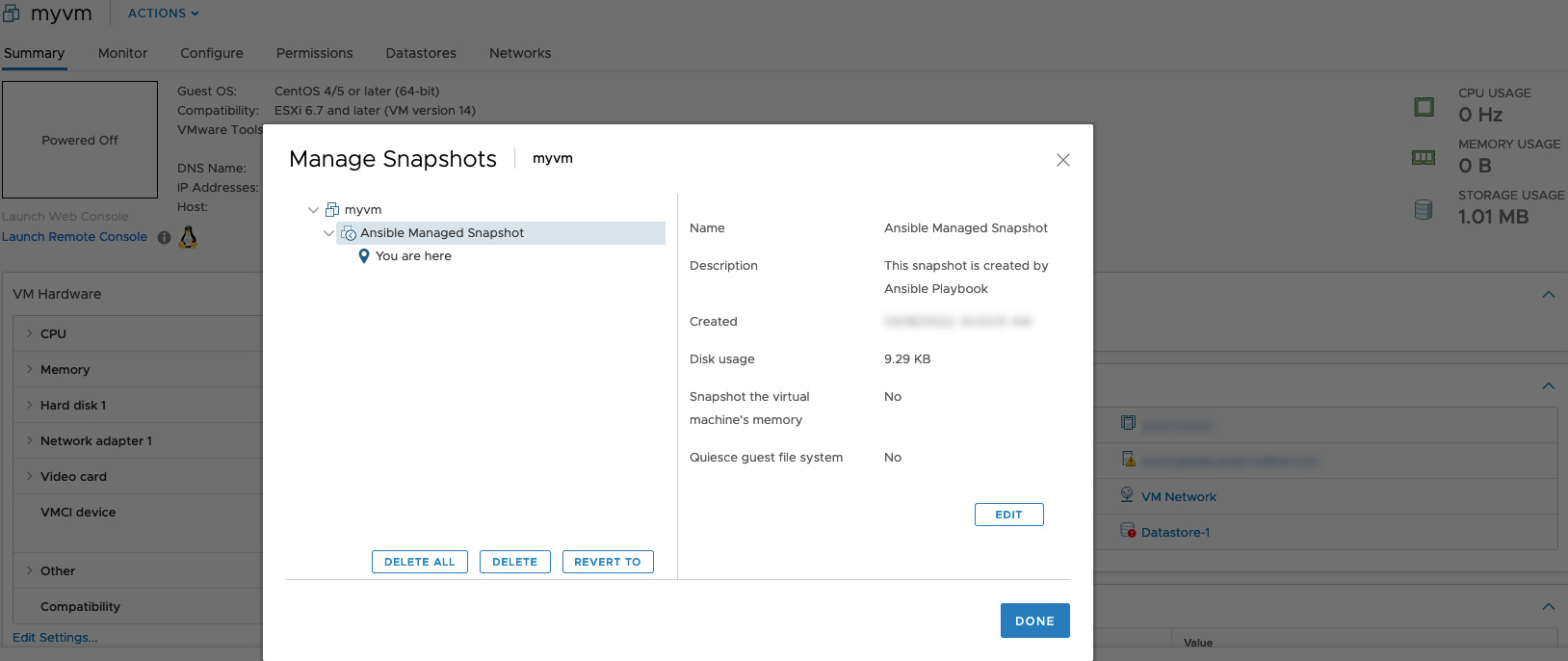
before execution
after execution
before execution
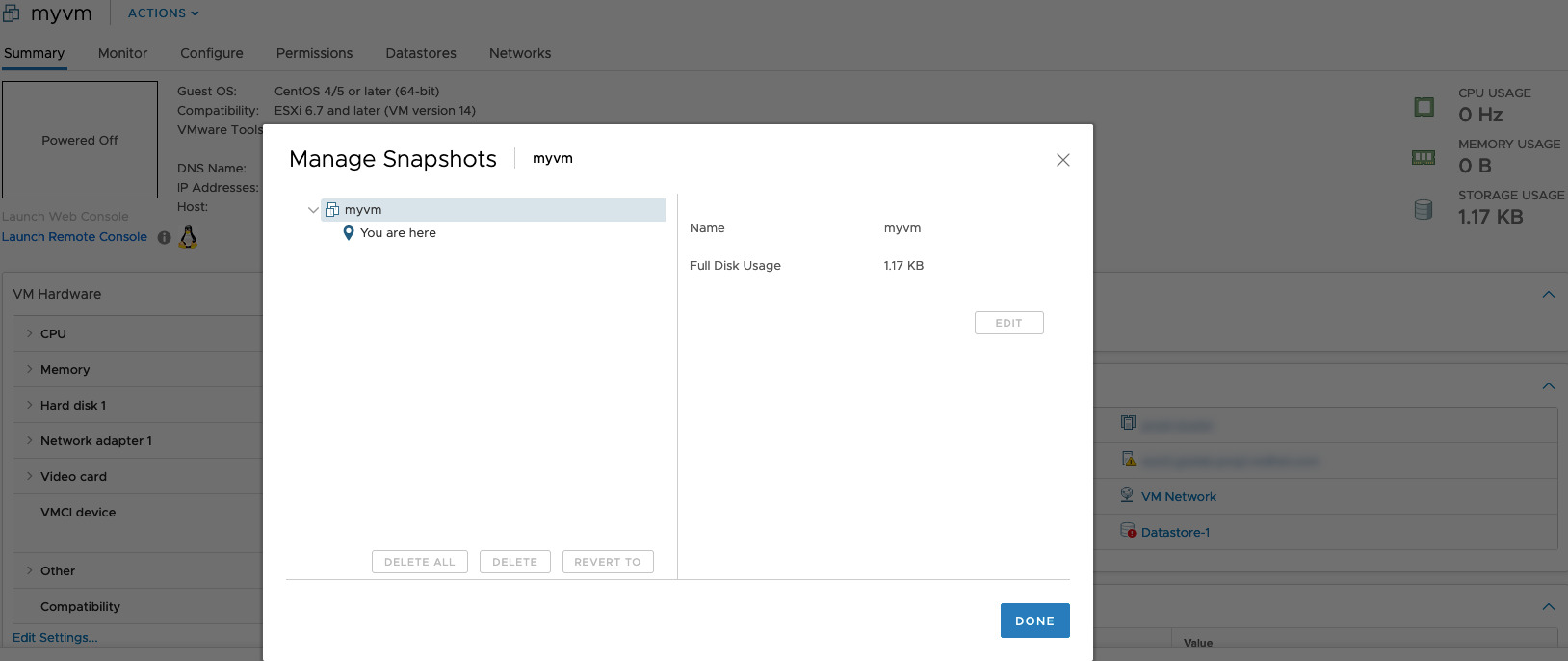
after execution
Conclusion
Now you know how to create a VMware vSphere Virtual Machine with Ansible.See also: Stop a VMware vSphere Virtual Machine - Ansible module vmware_guest_powerstate
Related Articles
Category: troubleshooting
Watch the video: Take a VMware Virtual Machine Snapshot - Ansible module vmware_guest_snapshot — Video Tutorial