Configuring Ansible for AWS: Setup Guide & Playbook
By Luca Berton · Published 2024-01-01 · Category: installation
Set up Ansible for AWS with IAM credentials, boto3, and the amazon.aws collection. Follow our guide to configure and execute your first AWS playbook.
How to configure Ansible for AWS?
Ansible provides various modules to manage AWS infrastructure, which includes EC2, VPC, Security Groups, etc.
I'll show you step by step how to prepare your Ansible controller to interact with the AWS infrastructure.
This initial configuration sometimes is a roadblock for some AWS users to start using Ansible.
See also: Ansible AWS EC2: Automate Ubuntu Instance Creation & Data Collection
Configure Ansible for AWS
- Amazon Identity and Access Management (IAM) Access Key
- Python
boto3SDK requires 3.6+
- Ansible collection
amazon.aws
boto3. boto3 is the Python SDK for the AWS that allows users to interact with AWS infrastructure via API.
This library interacts with the AWS API via the Ansible modules and plugins.
The boto3 Python library requires Python 3.6+.
The Ansible collection amazon.aws of modules and plugins manages various operations related to EC2, VPC, Security Groups, etc.
As the name suggests, this resource is provided by the Ansible Engineer Team.
Links
See also: Configure a Python Virtual Environment for Ansible AWS - ansible collection amazon.aws
Playbook
Configure Ansible for AWS
- Amazon IAM Access Key
- Install Python boto3 SDK
- Install Ansible amazon.aws collection
- Ansible Playbook
boto3 - the AWS API Python SDK.
Second, you need to install the Ansible amazon.aws collection.
Once everything is done on the node you could configure the Ansible Controller machine and run your first Ansible Playbook with the ec2_ami_info module to search for AMI in EC2 and verify the successful configuration.
Amazon Identity and Access Management (IAM) Access Key
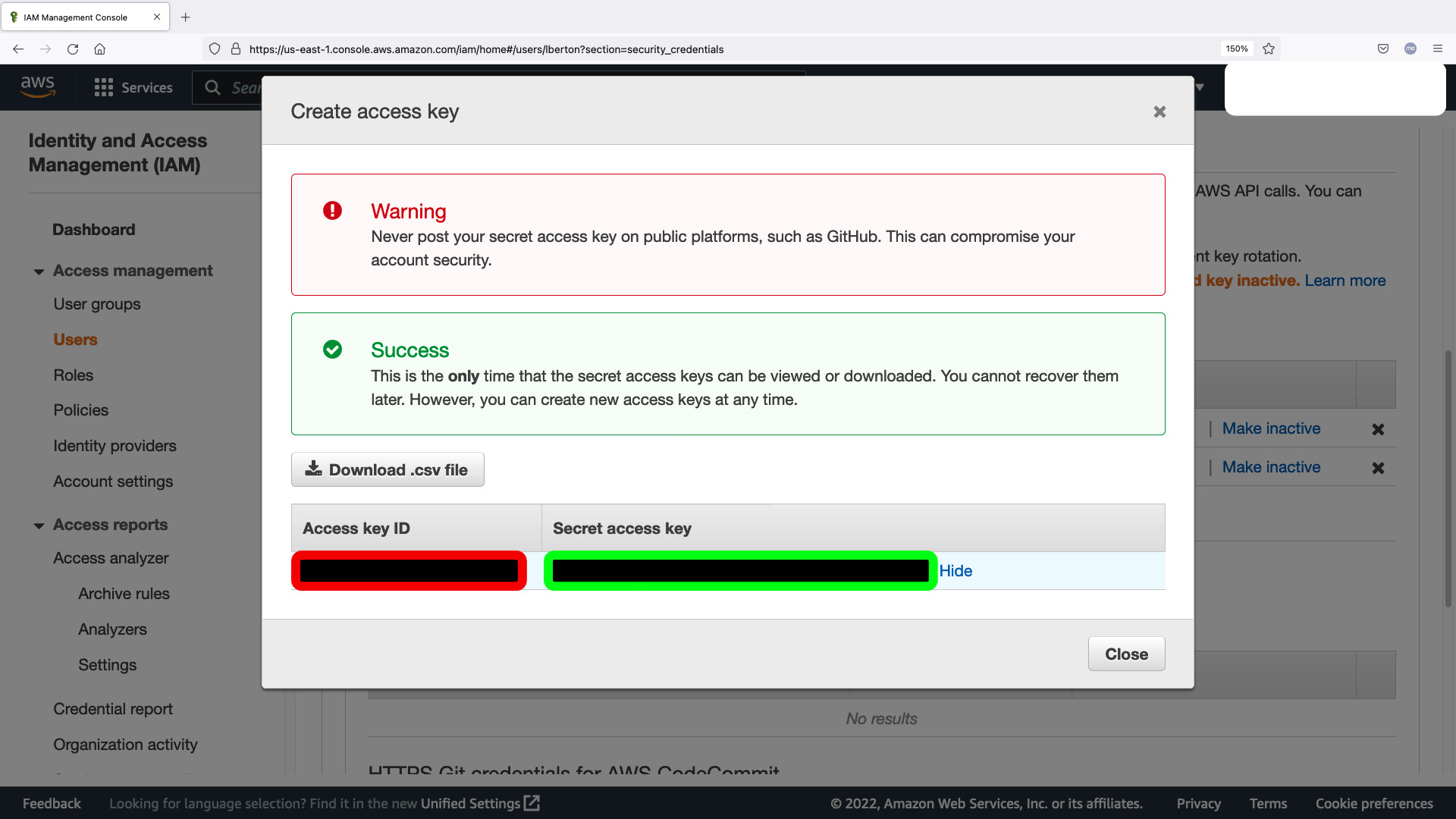
Generate new "Access keys" credential in your Identity and Access Management (IAM) dashboard in your AWS infrastructure account. You should copy the Access key ID (red below) and Secret access key (green below) for the env.sh shell script.
- env.sh
#!/bin/bash
export AWS_ACCESS_KEY_ID="RED-CODE"
export AWS_SECRET_ACCESS_KEY="GREEN-CODE"
export AWS_DEFAULT_REGION="us-east-1"
Install Python boto3 SDK
This example uses Python 3.8 so pip3.8 tool, adapt to your current configuration.
[devops@demo aws]$ ansible --version
ansible [core 2.12.2]
  config file = /etc/ansible/ansible.cfg
  configured module search path = ['/home/devops/.ansible/plugins/modules', '/usr/share/ansible/plugins/modules']
  ansible python module location = /usr/lib/python3.8/site-packages/ansible
  ansible collection location = /home/devops/.ansible/collections:/usr/share/ansible/collections
  executable location = /usr/bin/ansible
  python version = 3.8.12 (default, Sep 16 2021, 10:46:05) [GCC 8.5.0 20210514 (Red Hat 8.5.0-3)]
  jinja version = 2.10.3
  libyaml = True
[devops@demo aws]$ sudo su
[root@demo aws]# pip3.8 install boto3
WARNING: Running pip install with root privileges is generally not a good idea. Try `pip3.8 install --user` instead.
Collecting boto3
  Using cached https://files.pythonhosted.org/packages/21/b1/fafeff38043e4d4c18948109b96df295a7a11350fad32744aaa4e4917004/boto3-1.24.28-py3-none-any.whl
Collecting botocore<1.28.0,>=1.27.28
  Using cached https://files.pythonhosted.org/packages/fa/9e/f7662cd2c326b74eee8bb91e2bf3ea61f2b2d62738863d53fe801dcfdeca/botocore-1.27.28-py3-none-any.whl
Requirement already satisfied: s3transfer<0.7.0,>=0.6.0 in /usr/local/lib/python3.8/site-packages (from boto3) (0.6.0)
Requirement already satisfied: jmespath<2.0.0,>=0.7.1 in /usr/local/lib/python3.8/site-packages (from boto3) (1.0.1)
Requirement already satisfied: urllib3<1.27,>=1.25.4 in /usr/local/lib/python3.8/site-packages (from botocore<1.28.0,>=1.27.28->boto3) (1.26.9)
Requirement already satisfied: python-dateutil<3.0.0,>=2.1 in /usr/local/lib/python3.8/site-packages (from botocore<1.28.0,>=1.27.28->boto3) (2.8.2)
Requirement already satisfied: six>=1.5 in /usr/lib/python3.8/site-packages (from python-dateutil<3.0.0,>=2.1->botocore<1.28.0,>=1.27.28->boto3) (1.12.0)
Installing collected packages: botocore, boto3
Successfully installed boto3-1.24.28 botocore-1.27.28
[root@demo aws]# pip3.8 list | grep boto
boto3              1.24.28
botocore           1.27.28
[root@demo aws]#
Install Ansible amazon.aws collection
[devops@demo aws]$ ansible-galaxy collection install --force amazon.aws
Starting galaxy collection install process
Process install dependency map
Starting collection install process
Downloading https://galaxy.ansible.com/download/amazon-aws-4.0.0.tar.gz to /home/devops/.ansible/tmp/ansible-local-62851lkitk3p/tmpapjfnzjm/amazon-aws-4.0.0-b69_h8xk
Installing 'amazon.aws:4.0.0' to '/home/devops/.ansible/collections/ansible_collections/amazon/aws'
amazon.aws:4.0.0 was installed successfully
[devops@demo aws]$ ansible-galaxy collection list amazon.aws
# /usr/lib/python3.8/site-packages/ansible_collections
Collection Version
---------- -------
amazon.aws 2.1.0
# /home/devops/.ansible/collections/ansible_collections
Collection Version
---------- -------
amazon.aws 4.0.0
[devops@demo aws]$
run Ansible Playbook
[devops@demo aws]$ source env.sh
[devops@demo aws]$ ansible-playbook ami_search.yml
[WARNING]: provided hosts list is empty, only localhost is available. Note that the implicit
localhost does not match 'all'
[WARNING]: Found variable using reserved name: name
PLAY [AMI search] *********************************************************************************
TASK [search for existing AMI] ********************************************************************
ok: [localhost]
TASK [debug] **************************************************************************************
ok: [localhost] => {
    "ami_found": {
        "changed": false,
        "failed": false,
        "images": [
            {
                "architecture": "x86_64",
                "block_device_mappings": [
                    {
                        "device_name": "/dev/sda1",
                        "ebs": {
                            "delete_on_termination": true,
                            "encrypted": false,
                            "snapshot_id": "snap-03f2e24f30f580353",
                            "volume_size": 10,
                            "volume_type": "gp2"
                        }
                    }
                ],
                "creation_date": "2020-11-02T11:01:38.000Z",
                "deprecation_time": "2022-11-02T11:01:38.000Z",
                "description": "Provided by Red Hat, Inc.",
                "ena_support": true,
                "hypervisor": "xen",
                "image_id": "ami-096fda3c22c1c990a",
                "image_location": "309956199498/RHEL-8.3.0_HVM-20201031-x86_64-0-Hourly2-GP2",
                "image_type": "machine",
                "name": "RHEL-8.3.0_HVM-20201031-x86_64-0-Hourly2-GP2",
                "owner_id": "309956199498",
                "platform_details": "Red Hat Enterprise Linux",
                "public": true,
                "root_device_name": "/dev/sda1",
                "root_device_type": "ebs",
                "sriov_net_support": "simple",
                "state": "available",
                "tags": {},
                "usage_operation": "RunInstances:0010",
                "virtualization_type": "hvm"
            }
        ]
    }
}
PLAY RECAP ****************************************************************************************
localhost                  : ok=2    changed=0    unreachable=0    failed=0    skipped=0    rescued=0    ignored=0
[devops@demo aws]$Conclusion
Now you know Configure Ansible for AWS: Amazon IAM Access Key, boto3 Python library, amazon.aws collection and how to execute an Ansible Playbook using ec2_ami_info Ansible module.
See also: Search for AWS EC2 AMI ID by Region - Ansible module ec2_ami_info
Related Articles
Category: installation
Watch the video: Configuring Ansible for AWS: Setup Guide & Playbook — Video Tutorial