How to Add a Disk to a VMware VM Using Ansible Playbook
By Luca Berton · Published 2024-01-01 · Category: troubleshooting
Learn how to add a disk to a VMware VM using an Ansible playbook. This guide includes the YAML configuration, variables, and execution steps for easy.
Introduction
- Module:
community.vmware.vmware_guest_disk - Purpose: Manage disks related to virtual machines in a given vCenter infrastructure
vmware_guest_disk is part of the community-supported collection of modules for interacting with VMware. It manages disks associated with virtual machines within a specified vCenter infrastructure.
See also: Configure Ansible Dynamic Inventory for VMware in Simple Steps
Parameters Overview
- Connection Details:
hostname(string)username(string)password(string)datacenter(string)validate_certs(boolean)
- SCSI Controller Details:
scsi_controller(string)unit_number(string)scsi_type(string)
- Disk Size:
size_kb/size_mb/size_gb/size_tb(string)
- Disk Mode:
disk_mode(string:persistent,independent_persistent,independent_nonpersistent)
vmware_guest_disk module, you must first establish a connection to VMware vSphere or VMware vCenter. This is done using parameters such as hostname, username, password, datacenter, and validate_certs.
Once connected, you can specify the desired disk configuration to add a new disk to the virtual machine. The required parameters are datacenter and unit_number. The datacenter parameter identifies the datacenter to which the virtual machine belongs.
The disk must be connected to a SCSI controller inside the virtual machine, so parameters like scsi_controller, unit_number, and scsi_type are essential. You can specify the disk size using units like KB, MB, GB, or TB.
One crucial parameter is disk_mode, which defaults to persistent. Other options include independent_persistent and independent_nonpersistent.
For more detailed information, refer to the official community.vmware.vmware_guest_disk documentation.
Playbook Example
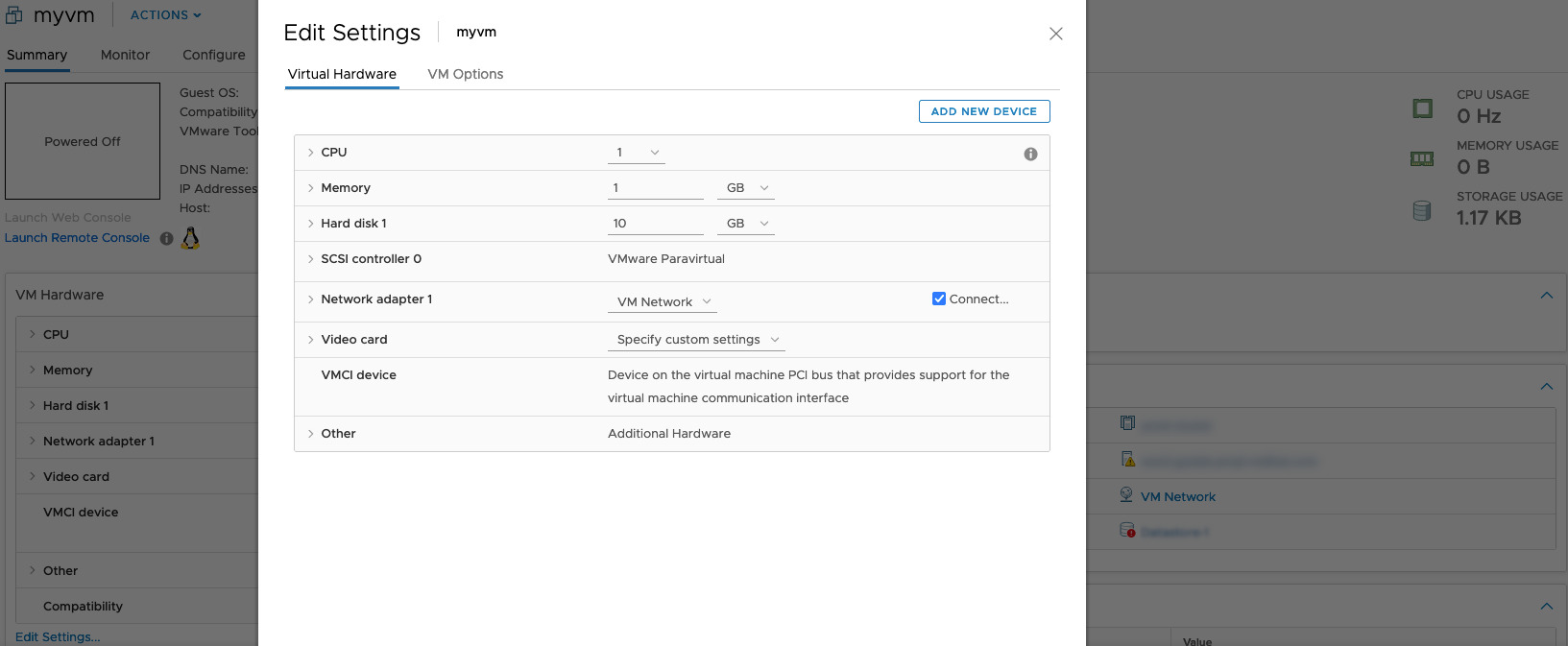
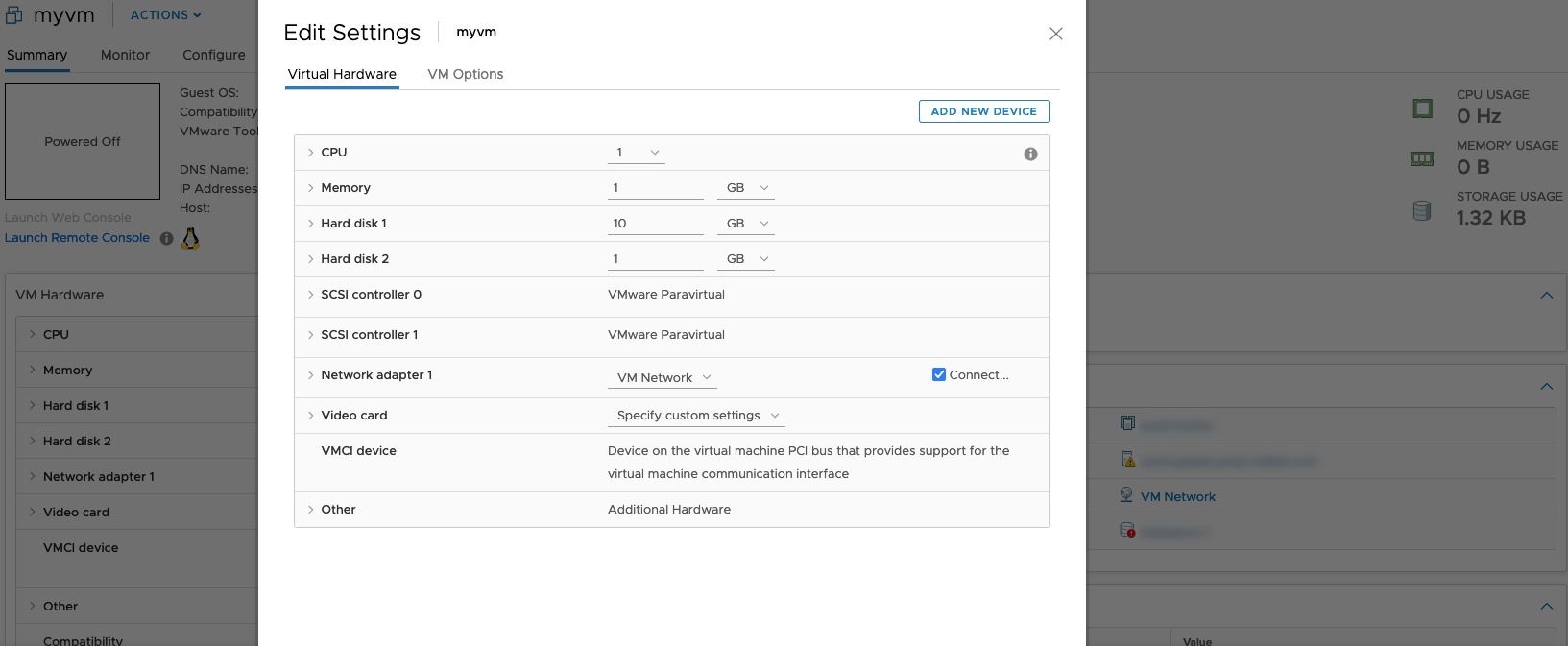
I'll Playbooknstrate how to add a 1GB additional disk to a Virtual Machine named "myvm" using an Ansible Playbook. The disk will be added to SCSI controller number 1, unit number 1.
Playbook
- vm_add_disk.yml
---
- name: vm disk Playbook
  hosts: localhost
  become: false
  gather_facts: false
  collections:
    - community.vmware
  pre_tasks:
    - include_vars: vars.yml
  tasks:
    - name: add disk to vm
      vmware_guest_disk:
        hostname: "{{ vcenter_hostname }}"
        username: "{{ vcenter_username }}"
        password: "{{ vcenter_password }}"
        validate_certs: "{{ vcenter_validate_certs }}"
        datacenter: "{{ vcenter_datacenter }}"
        name: "{{ vm_name }}"
        disk:
          - size_gb: "{{ vm_disk_gb }}"
            type: "{{ vm_disk_type }}"
            datastore: "{{ vm_disk_datastore }}"
            state: present
            scsi_controller: "{{ vm_disk_scsi_controller }}"
            unit_number: "{{ vm_disk_scsi_unit }}"
            scsi_type: "{{ vm_disk_scsi_type }}"
            disk_mode: "{{ vm_disk_mode }}"
Variables: vars.yml
---
vcenter_hostname: "vmware.example.com"
vcenter_datacenter: "vmwaredatacenter"
vcenter_validate_certs: false
vcenter_username: "username@vsphere.local"
vcenter_password: "MySecretPassword123"
vm_name: "myvm"
vm_disk_gb: 1
vm_disk_type: "thin"
vm_disk_datastore: "datastore"
vm_disk_scsi_controller: 1
vm_disk_scsi_unit: 1
vm_disk_scsi_type: 'paravirtual'
vm_disk_mode: 'persistent'
Inventory
localhostExecution
Run the following command to execute the playbook:
$ ansible-playbook vm_add_disk.ymlExpected output:
[WARNING]: provided hosts list is empty, only localhost is available. Note that the implicit
localhost does not match 'all'
PLAY [vm disk Playbook] *******************************************************************************
TASK [include_vars] *******************************************************************************
ok: [localhost]
TASK [add disk to vm] *****************************************************************************
changed: [localhost]
PLAY RECAP ****************************************************************************************
localhost                  : ok=2    changed=1    unreachable=0    failed=0    skipped=0    rescued=0    ignored=0
before execution
after execution
See also: Stop a VMware vSphere Virtual Machine - Ansible module vmware_guest_powerstate
Conclusion
This Playbooknstrates a successful disk addition to the specified virtual machine using Ansible. Now you know how to Add disk to VMware vSphere Virtual Machine with Ansible.
Related Articles
Category: troubleshooting
Watch the video: How to Add a Disk to a VMware VM Using Ansible Playbook — Video Tutorial