Create VMware vSphere VM with Ansible: Full Playbook Guide
By Luca Berton · Published 2024-01-01 · Category: troubleshooting
Master creating VMware vSphere VMs using Ansible. Our guide provides a comprehensive playbook and step-by-step instructions for VM setup and management.
How to create a VMware vSphere Virtual Machine with Ansible?
See also: How to Add a Disk to a VMware VM Using Ansible Playbook
Ansible creates a VMware vSphere Virtual Machine
> community.vmware.vmware_guest Manages virtual machines in vCenter
Today we're talking about the Ansible module vmware_guest.
The full name is community.vmware.vmware_guest, which means that is part of the collection of modules to interact with VMware, community-supported.
It's a module pretty stable and out for years.
It manages virtual machines in vCenter.
Parameters
The modulevmware_guest has a very long list of parameters to customize all your needs to create a VMware vSphere Virtual Machine. Please refer to manual for the full list.
See also: Configure Ansible Dynamic Inventory for VMware in Simple Steps
Links
## Playbook How to create a VMware vSphere Virtual Machine with Ansible.
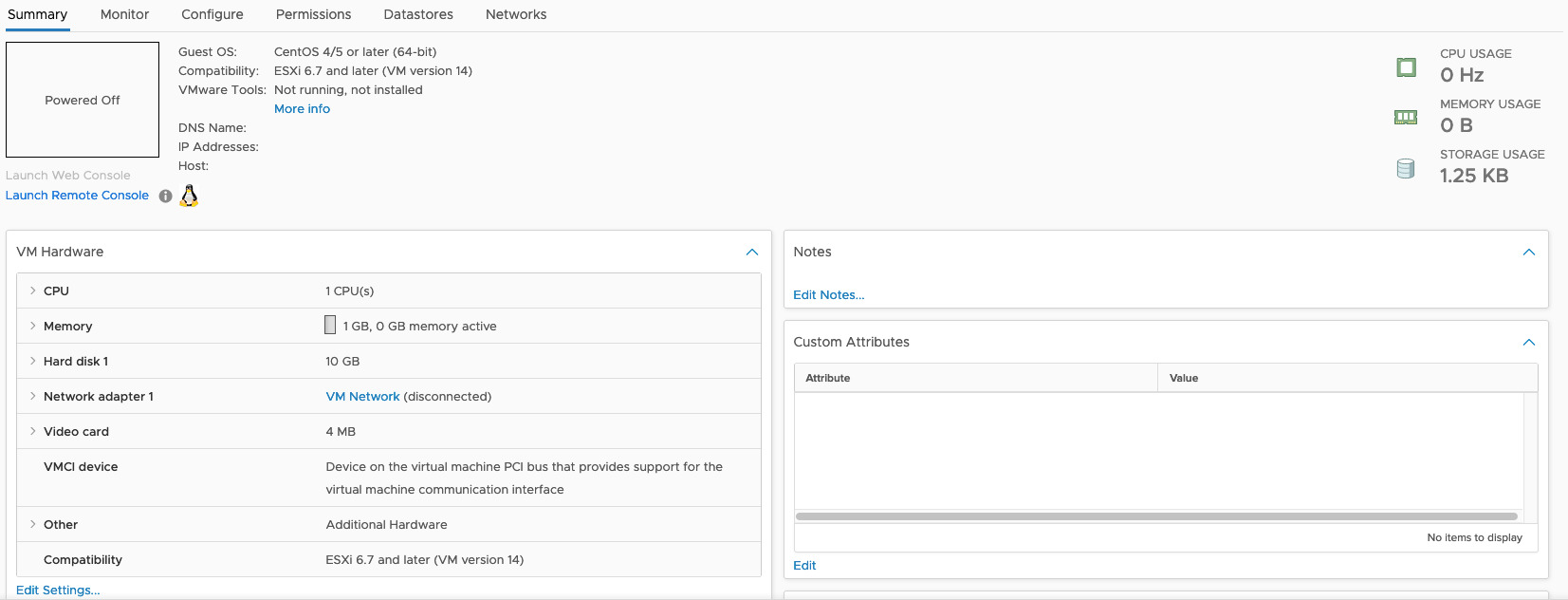
- 1 CPU
- 1 GB of RAM
- 10 GB of storage, thin-provisioned in the datastore "Datastore-1"
code
- create_vm.yml
---
- name: create vm Playbook
  hosts: localhost
  become: false
  gather_facts: false
  collections:
    - community.vmware
  pre_tasks:
      - include_vars: vars.yml
  tasks:
      - name: create folder
        vcenter_folder:
          hostname: "{{ vcenter_hostname }}"
          username: "{{ vcenter_username }}"
          password: "{{ vcenter_password }}"
          validate_certs: "{{ vcenter_validate_certs }}"
          datacenter_name: "{{ vcenter_datacenter }}"
          folder_name: "{{ vcenter_destination_folder }}"
          folder_type: vm
          state: present
      - name: create VM
        vmware_guest:
          hostname: "{{ vcenter_hostname }}"
          username: "{{ vcenter_username }}"
          password: "{{ vcenter_password }}"
          validate_certs: "{{ vcenter_validate_certs }}"
          datacenter: "{{ vcenter_datacenter }}"
          name: "{{ vm_name }}"
          folder: "{{ vcenter_destination_folder }}"
          state: "{{ vm_state }}"
          guest_id: "{{ vm_guestid }}"
          cluster: "{{ vcenter_cluster }}"
          disk:
            - size_gb: "{{ vm_disk_gb }}"
              type: "{{ vm_disk_type }}"
              datastore: "{{ vm_disk_datastore }}"
          hardware:
            memory_mb: "{{ vm_hw_ram_mb }}"
            num_cpus: "{{ vm_hw_cpu_n }}"
            scsi: "{{ vm_hw_scsi }}"
          networks:
            - name: "{{ vm_net_name }}"
device_name: "{{ vm_net_type }}"- vars.yml
---
vcenter_hostname: "vmware.example.com"
vcenter_datacenter: "vmwaredatacenter"
vcenter_validate_certs: false
vcenter_username: "username@vsphere.local"
vcenter_password: "MySecretPassword123"
vm_name: "myvm"
vm_guestid: "centos64Guest"
vm_disk_gb: 10
vm_disk_type: "thin"
vm_disk_datastore: "Datastore-1"
vm_hw_ram_mb: 1024
vm_hw_cpu_n: 1
vm_hw_scsi: "paravirtual"
vm_net_name: "VM Network"
vm_net_type: "vmxnet3"
vcenter_destination_folder: "myvm"
vm_state: "poweroff"- inventory
localhostexecution
$ ansible-playbook -i inventory vm_create.yml
PLAY [Create VM Playbook] *****************************************************************************
TASK [include_vars] *******************************************************************************
ok: [localhost]
TASK [Create folder] ******************************************************************************
changed: [localhost]
TASK [Create VM] **********************************************************************************
changed: [localhost]
PLAY RECAP ****************************************************************************************
localhost                  : ok=3    changed=2    unreachable=0    failed=0    skipped=0    rescued=0    ignored=0
idempotency
$ ansible-playbook -i inventory vm_create.yml
PLAY [Create VM Playbook] *****************************************************************************
TASK [include_vars] *******************************************************************************
ok: [localhost]
TASK [Create folder] ******************************************************************************
ok: [localhost]
TASK [Create VM] **********************************************************************************
ok: [localhost]
PLAY RECAP ****************************************************************************************
localhost                  : ok=3    changed=0    unreachable=0    failed=0    skipped=0    rescued=0    ignored=0
after execution
Conclusion
Now you know how to create a VMware vSphere Virtual Machine with Ansible.See also: Configuring Ansible for VMware: Complete Setup Guide & Playbook
Related Articles
Category: troubleshooting
Watch the video: Create VMware vSphere VM with Ansible: Full Playbook Guide — Video Tutorial