Ansible Remove Windows User: win_user Module state=absent (Examples)
By Luca Berton · Published 2024-01-01 · Category: troubleshooting
How to remove local Windows user accounts with Ansible win_user module. Delete users, remove profiles, and manage Windows accounts across multiple servers.

How to Remove a local user on Windows-like systems with Ansible?
See also: Ansible Change Windows User Password: win_user Module (Examples)
Ansible remove local user account
ansible.windows.win_user- Manages local Windows user accounts
win_user.
The full name is ansible.windows.win_user, which means that is part of the collection of modules specialized to interact with Windows target host.
It's a module pretty stable and out for years.
It works in Windows and Windows Server operating systems.
It manages local Windows user accounts.
For Linux target use the user module instead.
Parameters
- name _string_ - user name
- state _string_ - present/absent
## Playbook
How to Remove a local user on Windows-like systems with Ansible Playbook.
code
---
- name: windows user remove
  hosts: all
  vars:
    usr_name: 'example'
  tasks:
    - name: delete local user
      ansible.windows.win_user:
        name: "{{ usr_name }}"
        state: absent
execution
ansible-pilot $ ansible-playbook -i virtualmachines/win/inventory windows/user_remove.yml
PLAY [windows user remove] ************************************************************************
TASK [Gathering Facts] ****************************************************************************
ok: [WindowsServer]
TASK [delete local user] **************************************************************************
changed: [WindowsServer]
PLAY RECAP ****************************************************************************************
WindowsServer              : ok=2    changed=1    unreachable=0    failed=0    skipped=0    rescued=0    ignored=0
ansible-pilot $
idempotency
ansible-pilot $ ansible-playbook -i virtualmachines/win/inventory windows/user_remove.yml
PLAY [windows user remove] ************************************************************************
TASK [Gathering Facts] ****************************************************************************
ok: [WindowsServer]
TASK [delete local user] **************************************************************************
ok: [WindowsServer]
PLAY RECAP ****************************************************************************************
WindowsServer              : ok=2    changed=0    unreachable=0    failed=0    skipped=0    rescued=0    ignored=0
ansible-pilot $
before execution
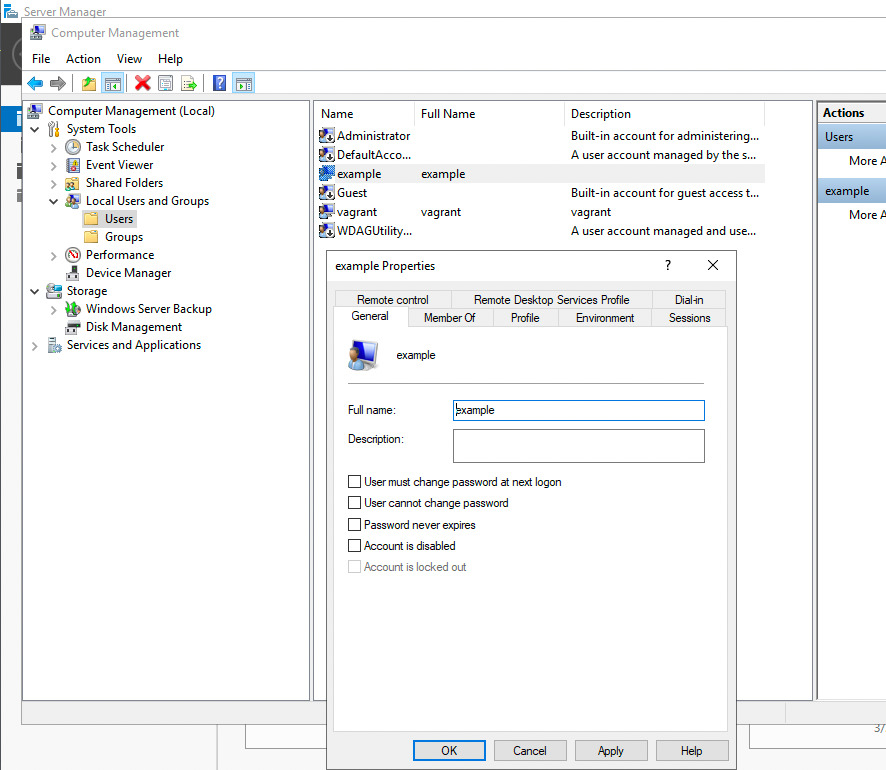
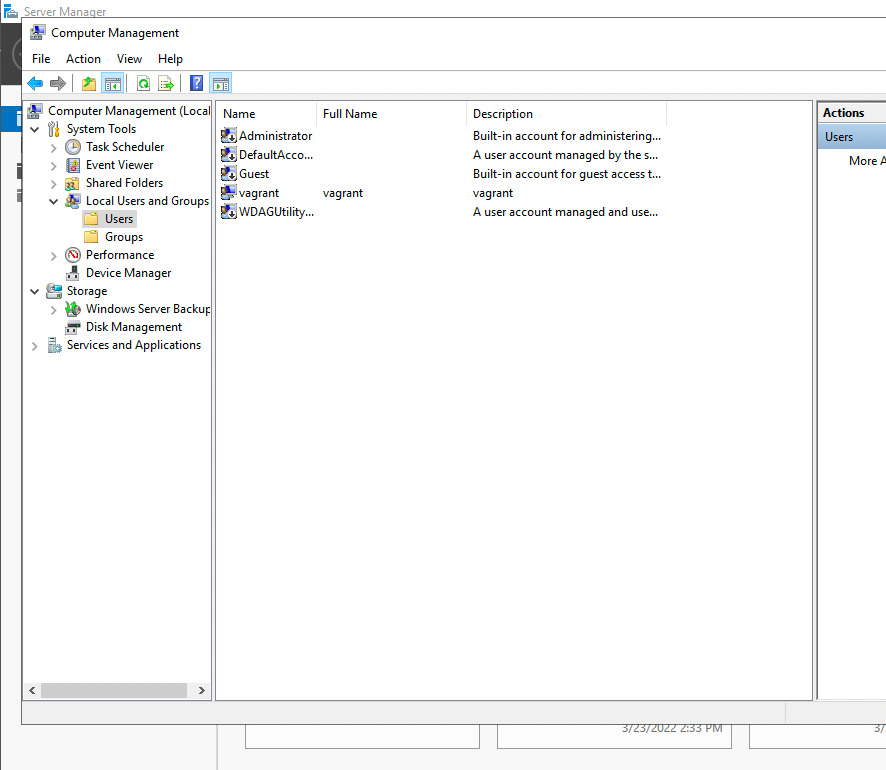
after execution
See also: Ansible Create Windows Local User: win_user Module (Complete Guide)
Conclusion
Now you know how to Remove a local user on Windows-like systems with Ansible.
Remove Windows User Examples
Remove user and their profile
- name: Remove user
  ansible.windows.win_user:
    name: olduser
    state: absent

- name: Remove user profile directory
  ansible.windows.win_file:
    path: C:\Users\olduser
    state: absent
Remove multiple users
- name: Remove decommissioned accounts
  ansible.windows.win_user:
    name: "{{ item }}"
    state: absent
  loop:
    - contractor1
    - temp_user
    - test_account
Safe removal with backup
- name: Backup home before removal
  ansible.windows.win_shell: |
    Compress-Archive -Path "C:\Users\{{ target_user }}" -DestinationPath "C:\Backup\{{ target_user }}.zip"
  ignore_errors: true

- name: Remove user
  ansible.windows.win_user:
    name: "{{ target_user }}"
    state: absent
Disable instead of delete
- name: Disable user account
  ansible.windows.win_user:
    name: suspended_user
    state: present
    account_disabled: true
See also: Create Local Groups on Windows with Ansible Playbooks
win_user vs win_domain_user
| Module | Manages | Requires |
|---|---|---|
win_user | Local accounts | Nothing extra |
win_domain_user | AD domain accounts | Domain controller |
Force Logoff Before Removal
- name: Force logoff user
  ansible.windows.win_shell: |
    query user | Select-String "{{ target_user }}" | ForEach-Object {
      logoff ($_ -split '\s+')[3]
    }
  ignore_errors: true

- name: Remove user
  ansible.windows.win_user:
    name: "{{ target_user }}"
    state: absent
FAQ
Does removing a user delete their files?
win_user with state: absent removes the account but may leave the profile at C:\Users\username. Delete it separately with win_file.
How do I remove a user from LDAP/AD?
Use microsoft.ad.user with state: absent and delegate to a domain controller.
How do I audit user removal?
- name: Log removal
  ansible.windows.win_shell: |
    Add-Content -Path "C:\Logs\audit.log" -Value "$(Get-Date): Removed {{ target_user }}"
Related Articles
Category: troubleshooting
Watch the video: Ansible Remove Windows User: win_user Module state=absent (Examples) — Video Tutorial