Create Kubernetes K8s or OpenShift OCP Pod - nginx - Ansible module k8s
By Luca Berton · Published 2024-01-01 · Category: troubleshooting
How to automate the creation of "nginx" Pod in namespace "example" of Kubernetes K8s or OpenShift OCP with Ansible module k8s.
How to create Kubernetes K8s or OpenShift OCP Pod with Ansible?
See also: Deploy Kubernetes Resources with Ansible Playbook
Ansible create Kubernetes or OpenShift Pod
kubernetes.core.k8s- Manage Kubernetes (K8s) objects
k8s.
The full name is kubernetes.core.k8s, which means that is part of the collection of modules of Ansible to interact with Kubernetes and Red Hat OpenShift clusters.
It manages Kubernetes (K8s) objects.
Parameters
- name _string_ /namespace _string_ - object name / namespace
- api_version _string_ - "v1"
- kind _string_ - object model
- state _string_ - present/absent/patched
- definition _string_ - YAML definition
- src _path_ - path for YAML definition
- template _raw_ - YAML template definition
- validate _dictionary_ - validate resource definition
k8s module. Let me summarize the most used.
Most of the parameters are very generic and allow you to combine them for many use-cases.
The name and namespace specify object name and/or the object namespace. They are useful to create, delete, or discover an object without providing a full resource definition.
The api_version parameter specifies the Kubernetes API version, the default is "v1" for version 1.
The kind parameter specifies an object model.
The state like for other modules determines if an object should be created - present option, patched - patched option, or deleted - absent option.
The definition parameter allows you to provide a valid YAML definition (string, list, or dict) for an object when creating or updating.
If you prefer to specify a file for the YAML definition, the src parameter provides a path to a file containing a valid YAML definition of an object or objects to be created or updated.
You could also specify a YAML definition template with the template parameter.
You might find useful also the validate parameter in order to define how to validate the resource definition against the Kubernetes schema. Please note that requires the kubernetes-validate python module.
See also: Optimize Kubernetes CPU Resources with Ansible Playbooks
Links
## Playbook How to create Kubernetes Pod with Ansible Playbook using the module k8s . Specifically, the following example is going to create the "nginx" Pod in namespace "example" of Kubernetes K8s or OpenShift OCP with Ansible.
code
- ansible_playbook.yml
---
- name: k8s Playbook
  hosts: localhost
  gather_facts: false
  connection: local
  vars:
    myproject: "example"
  tasks:
    - name: create k8s pod
      kubernetes.core.k8s:
        src: mypod.yaml
        namespace: "{{ myproject }}"
state: present- mypod.yaml
---
apiVersion: v1
kind: Pod
metadata:
  name: nginx
spec:
  containers:
  - name: nginx
    image: nginx:1.21.6
    ports:
    - containerPort: 80
execution
ansible-pilot $ ansible-playbook kubernetes/pod.yml
[WARNING]: No inventory was parsed, only implicit localhost is available
[WARNING]: provided hosts list is empty, only localhost is available. Note that the implicit
localhost does not match 'all'
PLAY [k8s Playbook] ***********************************************************************************
TASK [create k8s pod] *****************************************************************************
changed: [localhost]
PLAY RECAP ****************************************************************************************
localhost                  : ok=1    changed=1    unreachable=0    failed=0    skipped=0    rescued=0    ignored=0
ansible-pilot $
idempotency
ansible-pilot $ ansible-playbook kubernetes/pod.yml
[WARNING]: No inventory was parsed, only implicit localhost is available
[WARNING]: provided hosts list is empty, only localhost is available. Note that the implicit
localhost does not match 'all'
PLAY [k8s Playbook] ***********************************************************************************
TASK [create k8s pod] *****************************************************************************
ok: [localhost]
PLAY RECAP ****************************************************************************************
localhost                  : ok=1    changed=0    unreachable=0    failed=0    skipped=0    rescued=0    ignored=0
ansible-pilot $
before execution
- Kubernetes (k8s)
ansible-pilot $ kubectl project example
Already on project "example" on server "https://api.crc.testing:6443".
ansible-pilot $ kubectl get pods
No resources found in example namespace.
ansible-pilot $- OpenShift (OCP)
ansible-pilot $ oc project example
Already on project "example" on server "https://api.crc.testing:6443".
ansible-pilot $ oc get pods
No resources found in example namespace.
ansible-pilot $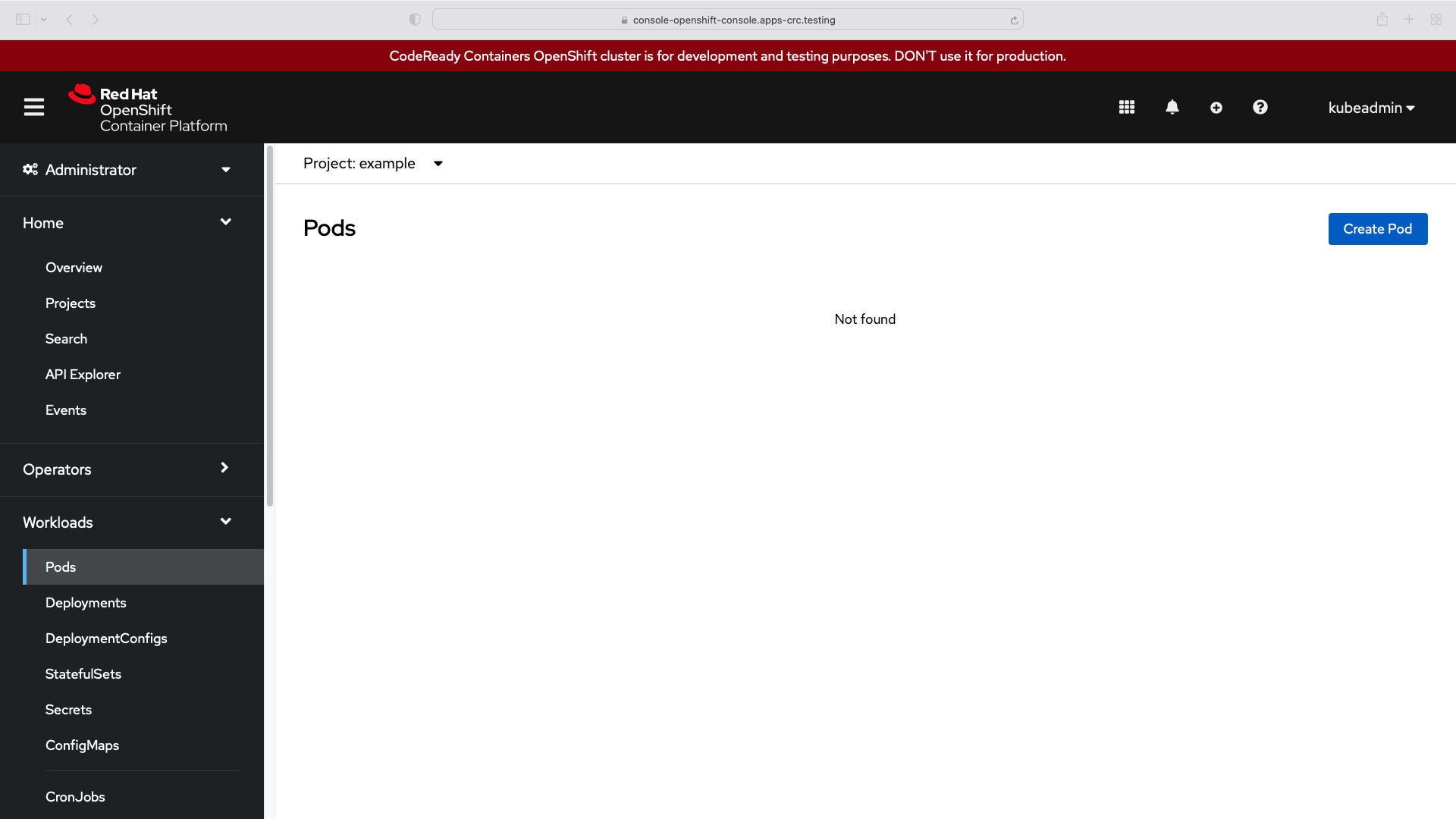
after execution
- Kubernetes (k8s)
ansible-pilot $ kubectl project example
Already on project "example" on server "https://api.crc.testing:6443".
ansible-pilot $ kubectl get pods
NAME    READY   STATUS    RESTARTS   AGE
nginx   1/1     Running   0          5m31s
ansible-pilot $- OpenShift (OCP)
ansible-pilot $ oc project example
Already on project "example" on server "https://api.crc.testing:6443".
ansible-pilot $ oc get pods
NAME    READY   STATUS    RESTARTS   AGE
nginx   1/1     Running   0          5m31s
ansible-pilot $- Kubernets nginx Logs
/docker-entrypoint.sh: /docker-entrypoint.d/ is not empty, will attempt to perform configuration
/docker-entrypoint.sh: Looking for shell scripts in /docker-entrypoint.d/
/docker-entrypoint.sh: Launching /docker-entrypoint.d/10-listen-on-ipv6-by-default.sh
10-listen-on-ipv6-by-default.sh: info: Getting the checksum of /etc/nginx/conf.d/default.conf
10-listen-on-ipv6-by-default.sh: info: Enabled listen on IPv6 in /etc/nginx/conf.d/default.conf
/docker-entrypoint.sh: Launching /docker-entrypoint.d/20-envsubst-on-templates.sh
/docker-entrypoint.sh: Launching /docker-entrypoint.d/30-tune-worker-processes.sh
/docker-entrypoint.sh: Configuration complete; ready for start up
2022/04/12 10:59:16 [notice] 1#1: using the "epoll" event method
2022/04/12 10:59:16 [notice] 1#1: nginx/1.21.6
2022/04/12 10:59:16 [notice] 1#1: built by gcc 10.2.1 20210110 (Debian 10.2.1-6)
2022/04/12 10:59:16 [notice] 1#1: OS: Linux 4.18.0-305.30.1.el8_4.x86_64
2022/04/12 10:59:16 [notice] 1#1: getrlimit(RLIMIT_NOFILE): 1048576:1048576
2022/04/12 10:59:16 [notice] 1#1: start worker processes
2022/04/12 10:59:16 [notice] 1#1: start worker process 33
2022/04/12 10:59:16 [notice] 1#1: start worker process 34
2022/04/12 10:59:16 [notice] 1#1: start worker process 35
2022/04/12 10:59:16 [notice] 1#1: start worker process 36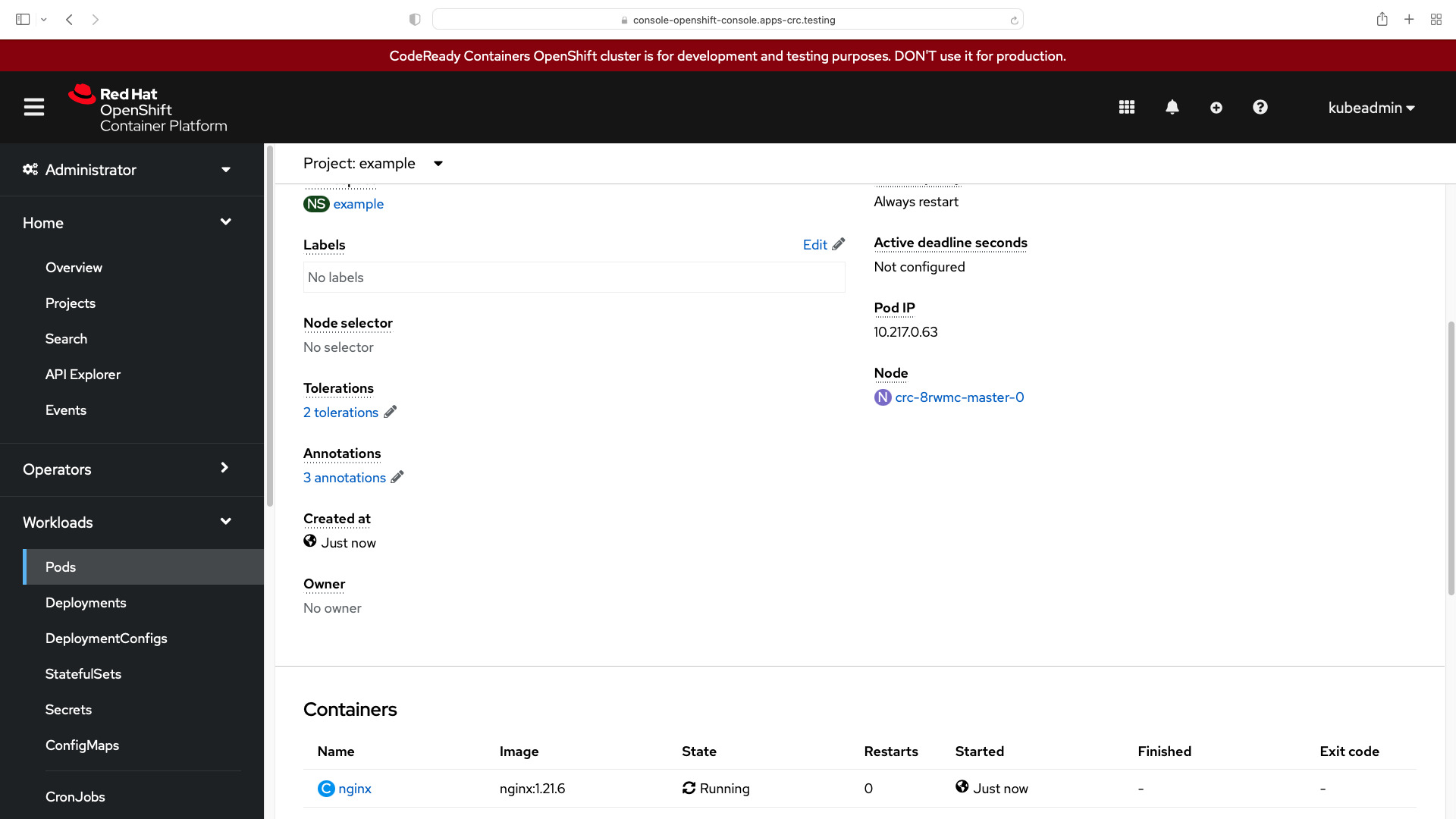
Conclusion
Now you know how to create nginx Kubernetes or OpenShift Pod with Ansible.
See also: Assign Memory to Kubernetes Pods with Ansible
Related Articles
- the Ansible template module reference
- orchestrating containers via Ansible
- how Ansible inventory works
- Nginx deployment with Ansible
Related guide
Related reading: running Ansible against Kubernetes clusters covers this in real-world detail.
Category: troubleshooting
Watch the video: Create Kubernetes K8s or OpenShift OCP Pod - nginx - Ansible module k8s — Video Tutorial