Assign Memory to Kubernetes Pods with Ansible
By Luca Berton · Published 2024-01-01 · Category: troubleshooting
Learn how to assign memory resources to Kubernetes or OpenShift containers and pods using Ansible. Follow our live Playbook and simple code examples.
How to Assign Memory Resources to Kubernetes K8s or OpenShift OCP Containers and Pods with Ansible?
I’m going to show you a live Playbook and some simple Ansible code.Containers cannot use more Memory than the configured limit. Provided the system has Memory time free, a container is guaranteed to be allocated as much Memory as it requests.
To specify a Memory request for a container, include the resources:requests field in the Container resource manifest. To specify a Memory limit, include resources:limits.
See also: Deploy Kubernetes Resources with Ansible Playbook
Ansible creates Kubernetes or OpenShift service
kubernetes.core.k8s- Manage Kubernetes (K8s) objects
k8s.
The full name is kubernetes.core.k8s, which means that is part of the collection of modules of Ansible to interact with Kubernetes and Red Hat OpenShift clusters.
It manages Kubernetes (K8s) objects.
Parameters
name_string_ /namespace _string_ - object name / namespaceapi_version_string_ - "v1"kind_string_ - object modelstate_string_ - present/absent/patcheddefinition_string_ - YAML definitionsrc_path_ - path for YAML definitiontemplate_raw_ - YAML template definitionvalidate_dictionary_ - validate resource definition
k8s module. Let me summarize the most used.
Most of the parameters are very generic and allow you to combine them for many use-cases.
The name and namespace specify object name and/or the object namespace. They are useful to create, delete, or discover an object without providing a full resource definition.
The api_version parameter specifies the Kubernetes API version, the default is "v1" for version 1.
The kind parameter specifies an object model.
The state like for other modules determines if an object should be created - present option, patched - patched option, or deleted - absent option.
The definition parameter allows you to provide a valid YAML definition (string, list, or dict) for an object when creating or updating.
If you prefer to specify a file for the YAML definition, the src parameter provides a path to a file containing a valid YAML definition of an object or objects to be created or updated.
You could also specify a YAML definition template with the template parameter.
You might find useful also the validate parameter in order to define how to validate the resource definition against the Kubernetes schema. Please note that requires the kubernetes-validate python module.
See also: Optimize Kubernetes CPU Resources with Ansible Playbooks
Links
- kubernetes.core.k8s
- Assign Memory Resources to Containers and Pods
- polinux/stress image
- polinux/stress github
Playbook
How to Assign Memory Resources to Kubernetes K8s or OpenShift OCP Containers and Pods with Ansible Playbook. I’m going to create a Pod that has one Container. The Container has set a memory request of 100 MiB and a memory limit of 200 MiB. During the execution, the Container attempted to allocate 150 MiB of memory.
code
- ansible_playbook.yml
---
- name: k8s memory Playbook
  hosts: localhost
  gather_facts: false
  connection: local
  vars:
    myproject: "mem-example"
  tasks:
    - name: create {{ myproject }} namespace
      kubernetes.core.k8s:
        kind: Namespace
        name: "{{ myproject }}"
        state: present
        api_version: v1
    - name: create k8s pod
      kubernetes.core.k8s:
        state: present
        definition:
          apiVersion: v1
          kind: Pod
          metadata:
            name: memory-Playbook
            namespace: "{{ myproject }}"
          spec:
            containers:
              - name: memory-Playbook-ctr
                image: polinux/stress
                resources:
                  requests:
                    memory: "100Mi"
                  limits:
                    memory: "200Mi"
                command: ["stress"]
                args: ["--vm", "1", "--vm-bytes", "500M", "--vm-hang", "1"]
execution
ansible-pilot $ ansible-playbook kubernetes/assign-memory.yml
[WARNING]: No inventory was parsed, only implicit localhost is available
[WARNING]: provided hosts list is empty, only localhost is available. Note that the implicit
localhost does not match 'all'
PLAY [k8s memory Playbook] ****************************************************************************
TASK [create mem-example namespace] ***************************************************************
changed: [localhost]
TASK [create k8s pod] *****************************************************************************
changed: [localhost]
PLAY RECAP ****************************************************************************************
localhost                  : ok=2    changed=2    unreachable=0    failed=0    skipped=0    rescued=0    ignored=0
ansible-pilot $
idempotency
ansible-pilot $ ansible-playbook kubernetes/assign-memory.yml
[WARNING]: No inventory was parsed, only implicit localhost is available
[WARNING]: provided hosts list is empty, only localhost is available. Note that the implicit
localhost does not match 'all'
PLAY [k8s memory Playbook] ****************************************************************************
TASK [create mem-example namespace] ***************************************************************
ok: [localhost]
TASK [create k8s pod] *****************************************************************************
ok: [localhost]
PLAY RECAP ****************************************************************************************
localhost                  : ok=2    changed=0    unreachable=0    failed=0    skipped=0    rescued=0    ignored=0
ansible-pilot $
before execution
- Kubernetes (k8s)
ansible-pilot $ kubect get pod memory-Playbook --namespace=mem-example
Error from server (NotFound): namespaces "mem-example" not found- OpenShift (OCP)
ansible-pilot $ oc project mem-example
error: A project named "mem-example" does not exist on "https://api.crc.testing:6443".
ansible-pilot $ oc get pod memory-Playbook --namespace=mem-example
Error from server (NotFound): namespaces "mem-example" not found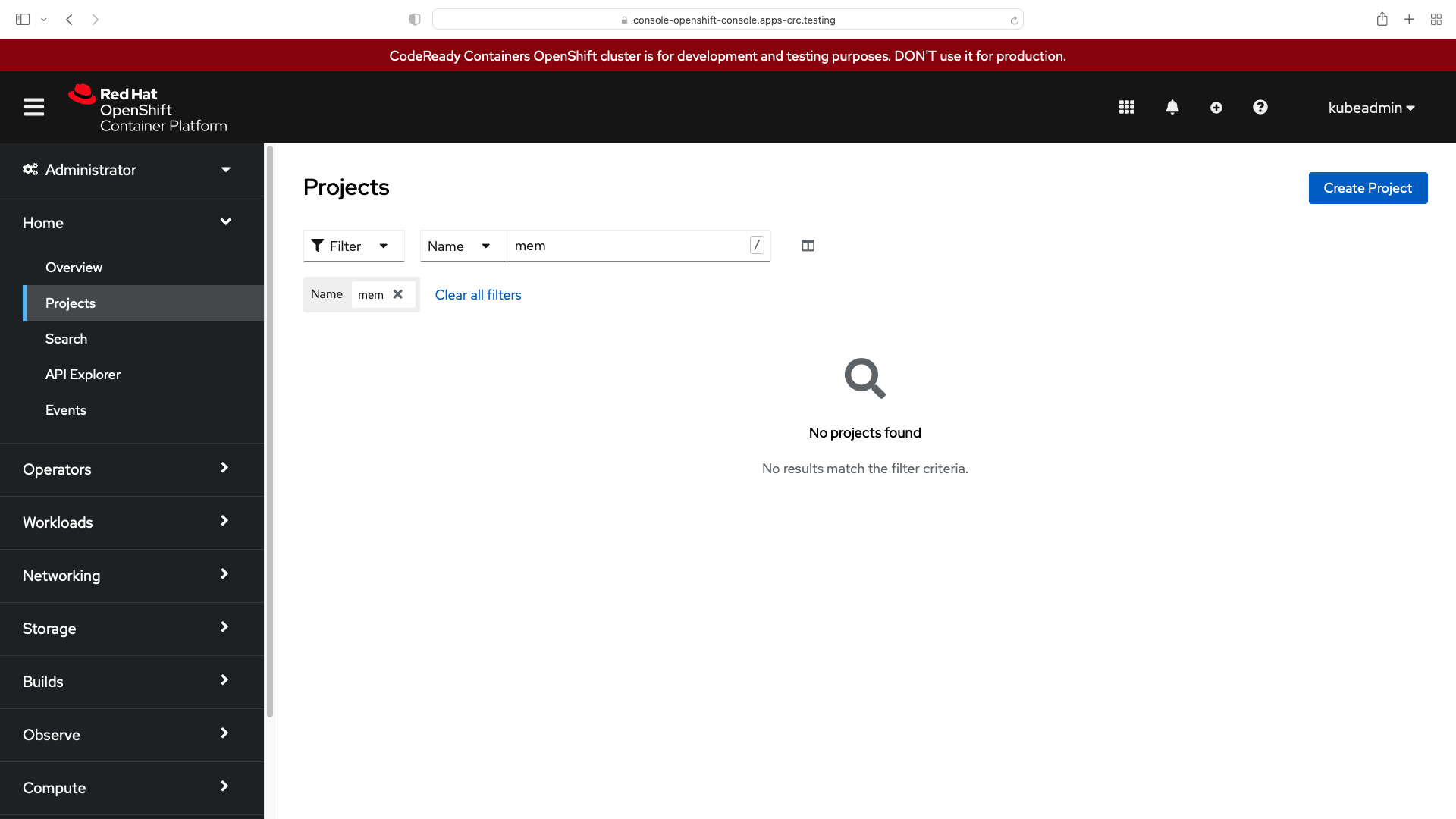
after execution
- Kubernetes (k8s)
ansible-pilot $ kubect get pod memory-Playbook --namespace=mem-example
NAME          READY   STATUS    RESTARTS   AGE
memory-Playbook   1/1     Running   0          39s
ansible-pilot $ kubect get pod memory-Playbook --namespace=mem-example --output=yaml
apiVersion: v1
items:
- apiVersion: v1
  kind: Pod
  metadata:
    annotations:
      k8s.v1.cni.cncf.io/network-status: |-
        [{
            "name": "openshift-sdn",
            "interface": "eth0",
            "ips": [
                "10.217.0.58"
            ],
            "default": true,
            "dns": {}
        }]
      k8s.v1.cni.cncf.io/networks-status: |-
        [{
            "name": "openshift-sdn",
            "interface": "eth0",
            "ips": [
                "10.217.0.58"
            ],
            "default": true,
            "dns": {}
        }]
      openshift.io/scc: anyuid
    creationTimestamp: "2022-04-19T08:24:16Z"
    name: memory-Playbook
    namespace: mem-example
    resourceVersion: "291551"
    uid: bf8972d4-2391-47c4-9793-6185a44ca723
  spec:
    containers:
    - args:
      - --vm
      - "1"
      - --vm-bytes
      - 150M
      - --vm-hang
      - "1"
      command:
      - stress
      image: polinux/stress
      imagePullPolicy: Always
      name: memory-Playbook-ctr
      resources:
        limits:
          memory: 200Mi
        requests:
          memory: 100Mi
      securityContext:
        capabilities:
          drop:
          - MKNOD
      terminationMessagePath: /dev/termination-log
      terminationMessagePolicy: File
      volumeMounts:
      - mountPath: /var/run/secrets/kubernetes.io/serviceaccount
        name: kube-api-access-4df2b
        readOnly: true
    dnsPolicy: ClusterFirst
    enableServiceLinks: true
    imagePullSecrets:
    - name: default-dockercfg-8r66m
    nodeName: crc-8rwmc-master-0
    preemptionPolicy: PreemptLowerPriority
    priority: 0
    restartPolicy: Always
    schedulerName: default-scheduler
    securityContext:
      seLinuxOptions:
        level: s0:c26,c10
    serviceAccount: default
    serviceAccountName: default
    terminationGracePeriodSeconds: 30
    tolerations:
    - effect: NoExecute
      key: node.kubernetes.io/not-ready
      operator: Exists
      tolerationSeconds: 300
    - effect: NoExecute
      key: node.kubernetes.io/unreachable
      operator: Exists
      tolerationSeconds: 300
    - effect: NoSchedule
      key: node.kubernetes.io/memory-pressure
      operator: Exists
    volumes:
    - name: kube-api-access-4df2b
      projected:
        defaultMode: 420
        sources:
        - serviceAccountToken:
            expirationSeconds: 3607
            path: token
        - configMap:
            items:
            - key: ca.crt
              path: ca.crt
            name: kube-root-ca.crt
        - downwardAPI:
            items:
            - fieldRef:
                apiVersion: v1
                fieldPath: metadata.namespace
              path: namespace
        - configMap:
            items:
            - key: service-ca.crt
              path: service-ca.crt
            name: openshift-service-ca.crt
  status:
    conditions:
    - lastProbeTime: null
      lastTransitionTime: "2022-04-19T08:24:16Z"
      status: "True"
      type: Initialized
    - lastProbeTime: null
      lastTransitionTime: "2022-04-19T08:24:23Z"
      status: "True"
      type: Ready
    - lastProbeTime: null
      lastTransitionTime: "2022-04-19T08:24:23Z"
      status: "True"
      type: ContainersReady
    - lastProbeTime: null
      lastTransitionTime: "2022-04-19T08:24:16Z"
      status: "True"
      type: PodScheduled
    containerStatuses:
    - containerID: cri-o://2251689d27911f82a44bc5c4599816f0d00b5afe06f46d347c2df85d7c71f1f7
      image: docker.io/polinux/stress:latest
      imageID: docker.io/polinux/stress@sha256:b6144f84f9c15dac80deb48d3a646b55c7043ab1d83ea0a697c09097aaad21aa
      lastState: {}
      name: memory-Playbook-ctr
      ready: true
      restartCount: 0
      started: true
      state:
        running:
          startedAt: "2022-04-19T08:24:22Z"
    hostIP: 192.168.126.11
    phase: Running
    podIP: 10.217.0.58
    podIPs:
    - ip: 10.217.0.58
    qosClass: Burstable
    startTime: "2022-04-19T08:24:16Z"
kind: List
metadata:
  resourceVersion: ""
  selfLink: ""
ansible-pilot $- OpenShift (OCP)
ansible-pilot $ oc project mem-example
Now using project "mem-example" on server "https://api.crc.testing:6443".
ansible-pilot $ oc get pod
NAME          READY   STATUS    RESTARTS   AGE
memory-Playbook   1/1     Running   0          39s
ansible-pilot $ oc get pod --output=yaml
apiVersion: v1
items:
- apiVersion: v1
  kind: Pod
  metadata:
    annotations:
      k8s.v1.cni.cncf.io/network-status: |-
        [{
            "name": "openshift-sdn",
            "interface": "eth0",
            "ips": [
                "10.217.0.58"
            ],
            "default": true,
            "dns": {}
        }]
      k8s.v1.cni.cncf.io/networks-status: |-
        [{
            "name": "openshift-sdn",
            "interface": "eth0",
            "ips": [
                "10.217.0.58"
            ],
            "default": true,
            "dns": {}
        }]
      openshift.io/scc: anyuid
    creationTimestamp: "2022-04-19T08:24:16Z"
    name: memory-Playbook
    namespace: mem-example
    resourceVersion: "291551"
    uid: bf8972d4-2391-47c4-9793-6185a44ca723
  spec:
    containers:
    - args:
      - --vm
      - "1"
      - --vm-bytes
      - 150M
      - --vm-hang
      - "1"
      command:
      - stress
      image: polinux/stress
      imagePullPolicy: Always
      name: memory-Playbook-ctr
      resources:
        limits:
          memory: 200Mi
        requests:
          memory: 100Mi
      securityContext:
        capabilities:
          drop:
          - MKNOD
      terminationMessagePath: /dev/termination-log
      terminationMessagePolicy: File
      volumeMounts:
      - mountPath: /var/run/secrets/kubernetes.io/serviceaccount
        name: kube-api-access-4df2b
        readOnly: true
    dnsPolicy: ClusterFirst
    enableServiceLinks: true
    imagePullSecrets:
    - name: default-dockercfg-8r66m
    nodeName: crc-8rwmc-master-0
    preemptionPolicy: PreemptLowerPriority
    priority: 0
    restartPolicy: Always
    schedulerName: default-scheduler
    securityContext:
      seLinuxOptions:
        level: s0:c26,c10
    serviceAccount: default
    serviceAccountName: default
    terminationGracePeriodSeconds: 30
    tolerations:
    - effect: NoExecute
      key: node.kubernetes.io/not-ready
      operator: Exists
      tolerationSeconds: 300
    - effect: NoExecute
      key: node.kubernetes.io/unreachable
      operator: Exists
      tolerationSeconds: 300
    - effect: NoSchedule
      key: node.kubernetes.io/memory-pressure
      operator: Exists
    volumes:
    - name: kube-api-access-4df2b
      projected:
        defaultMode: 420
        sources:
        - serviceAccountToken:
            expirationSeconds: 3607
            path: token
        - configMap:
            items:
            - key: ca.crt
              path: ca.crt
            name: kube-root-ca.crt
        - downwardAPI:
            items:
            - fieldRef:
                apiVersion: v1
                fieldPath: metadata.namespace
              path: namespace
        - configMap:
            items:
            - key: service-ca.crt
              path: service-ca.crt
            name: openshift-service-ca.crt
  status:
    conditions:
    - lastProbeTime: null
      lastTransitionTime: "2022-04-19T08:24:16Z"
      status: "True"
      type: Initialized
    - lastProbeTime: null
      lastTransitionTime: "2022-04-19T08:24:23Z"
      status: "True"
      type: Ready
    - lastProbeTime: null
      lastTransitionTime: "2022-04-19T08:24:23Z"
      status: "True"
      type: ContainersReady
    - lastProbeTime: null
      lastTransitionTime: "2022-04-19T08:24:16Z"
      status: "True"
      type: PodScheduled
    containerStatuses:
    - containerID: cri-o://2251689d27911f82a44bc5c4599816f0d00b5afe06f46d347c2df85d7c71f1f7
      image: docker.io/polinux/stress:latest
      imageID: docker.io/polinux/stress@sha256:b6144f84f9c15dac80deb48d3a646b55c7043ab1d83ea0a697c09097aaad21aa
      lastState: {}
      name: memory-Playbook-ctr
      ready: true
      restartCount: 0
      started: true
      state:
        running:
          startedAt: "2022-04-19T08:24:22Z"
    hostIP: 192.168.126.11
    phase: Running
    podIP: 10.217.0.58
    podIPs:
    - ip: 10.217.0.58
    qosClass: Burstable
    startTime: "2022-04-19T08:24:16Z"
kind: List
metadata:
  resourceVersion: ""
  selfLink: ""
ansible-pilot $- Kubernets memory-Playbook Pod Log
stress: info: [1] dispatching hogs: 0 cpu, 0 io, 1 vm, 0 hdd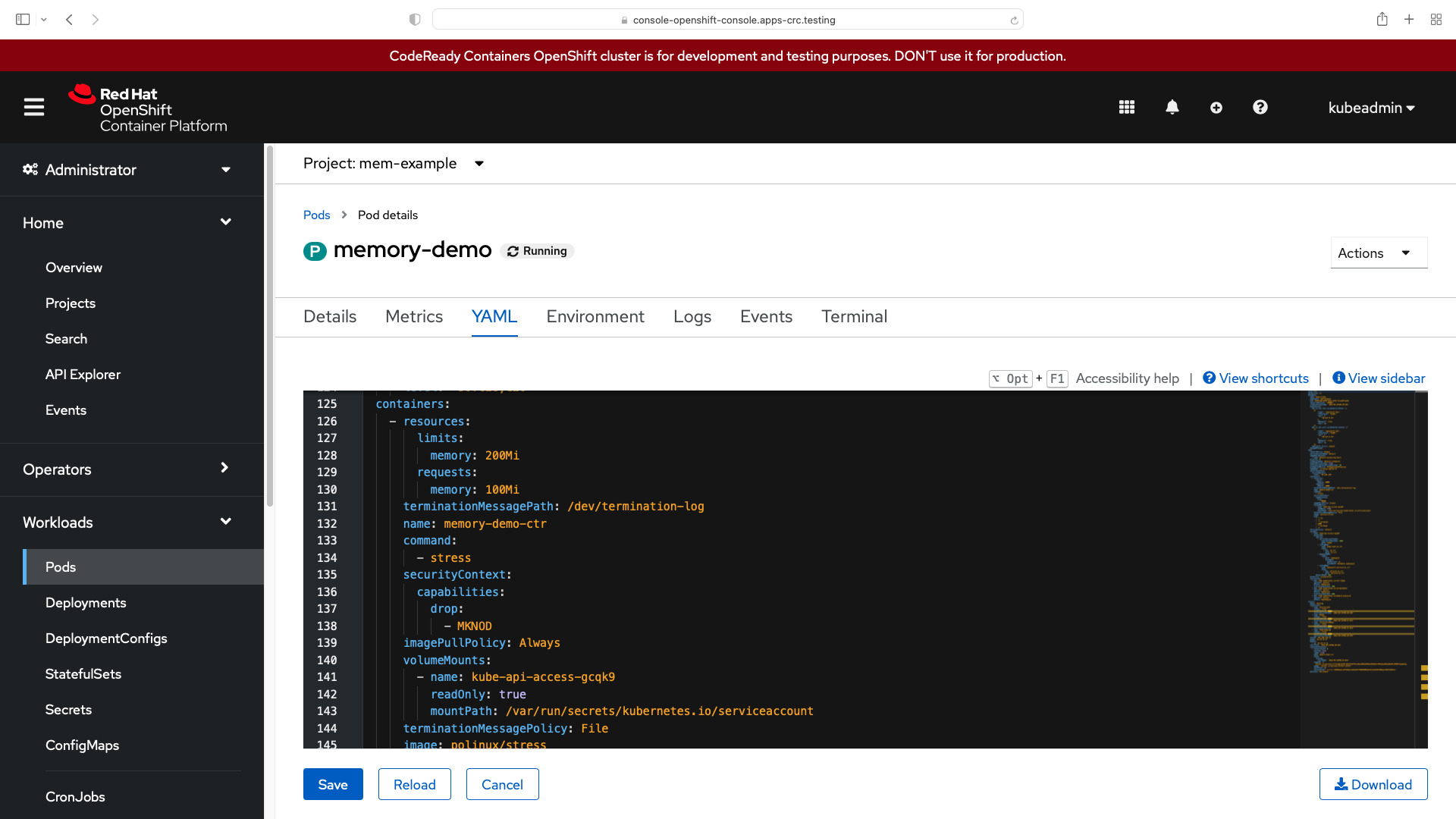
too much memory OOMKilled
In the following example, the Pod tries to allocate more memory than allowed (500MB vs 200MiB limit).
- ansible_playbook.yml
---
- name: k8s memory Playbook
  hosts: localhost
  gather_facts: false
  connection: local
  vars:
    myproject: "mem-example"
  tasks:
    - name: create {{ myproject }} namespace
      kubernetes.core.k8s:
        kind: Namespace
        name: "{{ myproject }}"
        state: present
        api_version: v1
- name: create k8s pod
      kubernetes.core.k8s:
        state: present
        definition:
          apiVersion: v1
          kind: Pod
          metadata:
            name: memory-Playbook
            namespace: "{{ myproject }}"
          spec:
            containers:
              - name: memory-Playbook-ctr
                image: polinux/stress
                resources:
                  requests:
                    memory: "100Mi"
                  limits:
                    memory: "200Mi"
                command: ["stress"]
args: ["--vm", "1", "--vm-bytes", "500M", "--vm-hang", "1"]- Kubernetes (k8s)
ansible-pilot $ kubeadmin get pod memory-Playbook --namespace=mem-example
NAME          READY   STATUS             RESTARTS      AGE
memory-Playbook   0/1     CrashLoopBackOff   1 (16s ago)   27s
ansible-pilot $ oc get pod
NAME          READY   STATUS      RESTARTS      AGE
memory-Playbook   0/1     OOMKilled   2 (22s ago)   33s
ansible-pilot $- OpenShift (OCP)
ansible-pilot $ oc get pod
NAME          READY   STATUS             RESTARTS      AGE
memory-Playbook   0/1     CrashLoopBackOff   1 (16s ago)   27s
ansible-pilot $ oc get pod
NAME          READY   STATUS      RESTARTS      AGE
memory-Playbook   0/1     OOMKilled   2 (22s ago)   33s
ansible-pilot $
See also: Configure a Pod to Use a Volume for Storage on Kubernetes or OpenShift with Ansible
Conclusion
Now you know how to Assign CPU Resources to Kubernetes K8s or OpenShift OCP Containers and Pods with Ansible.
Related Articles
- whitespace control in Jinja2 for Ansible
- managing Docker with Ansible
- inventory configuration in Ansible
- nested loops in Ansible
Related guide
Related reading: Ansible-driven Kubernetes operations covers this in real-world detail.
Category: troubleshooting
Watch the video: Assign Memory to Kubernetes Pods with Ansible — Video Tutorial