Ansible Create Windows Local User: win_user Module (Complete Guide)
By Luca Berton · Published 2024-01-01 · Category: troubleshooting
How to create local user accounts on Windows with Ansible win_user module. Set passwords, groups, permissions, and manage user lifecycle with playbook examples.
How to Create a local user on Windows-like systems with Ansible?
See also: Ansible Change Windows User Password: win_user Module (Examples)
Ansible creates the user account
> ansible.windows.win_user Manages local Windows user accounts
Today we're talking about Ansible module win_user.
The full name is ansible.windows.win_user, which means that is part of the collection of modules specialized to interact with Windows target host.
It's a module pretty stable and out for years.
It works in Windows and Windows Server operating systems.
It manages local Windows user accounts.
For Linux target use the user module instead.
Parameters
name_string_ - user namestate_string_ - present/absentpassword_string_ - cleartext passworddescription_string_ - description of the groupgroups_list_ - list of groups to adds or removesupdate_password_string_ - always / on_createpassword_never_expires_boolean_ - no / yespassword_expired_string_ - yes - change at next login / noaccount_locked/ account_disabled - no /yes
See also: Ansible Remove Windows User: win_user Module state=absent (Examples)
Links
## Playbook
How to create a local user on Windows-like systems with Ansible Playbook.
code
---
- name: windows user add
  hosts: all
  vars:
    usr_name: 'example'
    usr_password: 'EfY#Qs9*BWy9?'
    usr_groups: "Users"
  tasks:
    - name: create local user
      ansible.windows.win_user:
        name: "{{ usr_name }}"
        password: "{{ usr_password }}"
        groups: "{{ usr_groups }}"
        update_password: on_create
        password_expired: true
execution
ansible-pilot $ ansible-playbook -i virtualmachines/win/inventory windows/user_add.yml
PLAY [windows user add] ***************************************************************************
TASK [Gathering Facts] ****************************************************************************
ok: [WindowsServer]
TASK [create local user] **************************************************************************
changed: [WindowsServer]
PLAY RECAP ****************************************************************************************
WindowsServer              : ok=2    changed=1    unreachable=0    failed=0    skipped=0    rescued=0    ignored=0
ansible-pilot $
idempotency
ansible-pilot $ ansible-playbook -i virtualmachines/win/inventory windows/user_add.yml
PLAY [windows user add] ***************************************************************************
TASK [Gathering Facts] ****************************************************************************
ok: [WindowsServer]
TASK [create local user] **************************************************************************
ok: [WindowsServer]
PLAY RECAP ****************************************************************************************
WindowsServer              : ok=2    changed=0    unreachable=0    failed=0    skipped=0    rescued=0    ignored=0
ansible-pilot $
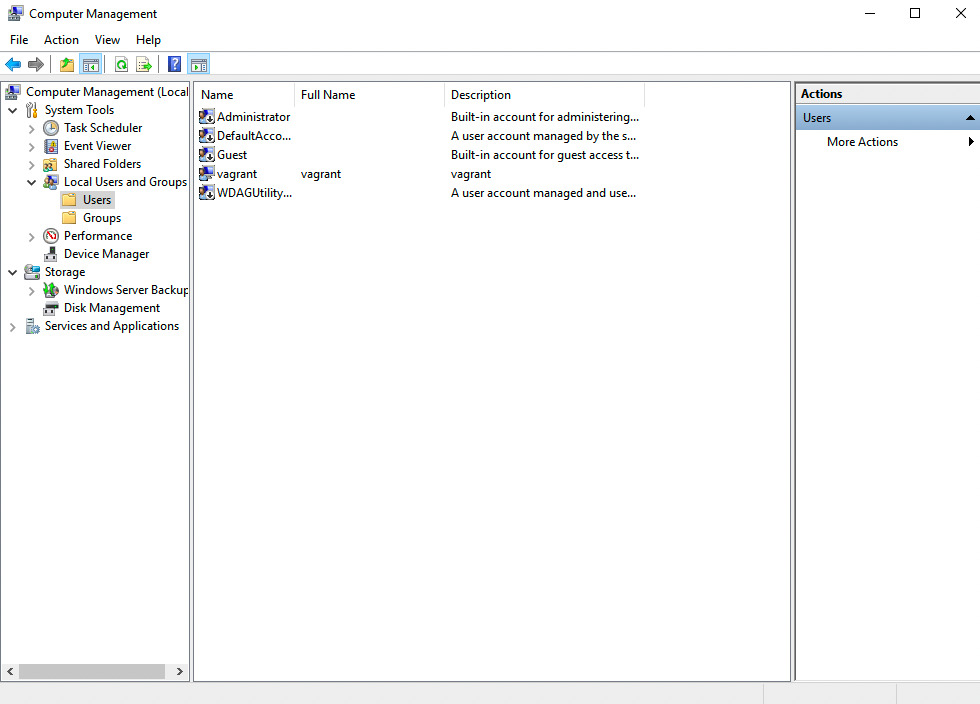
before execution
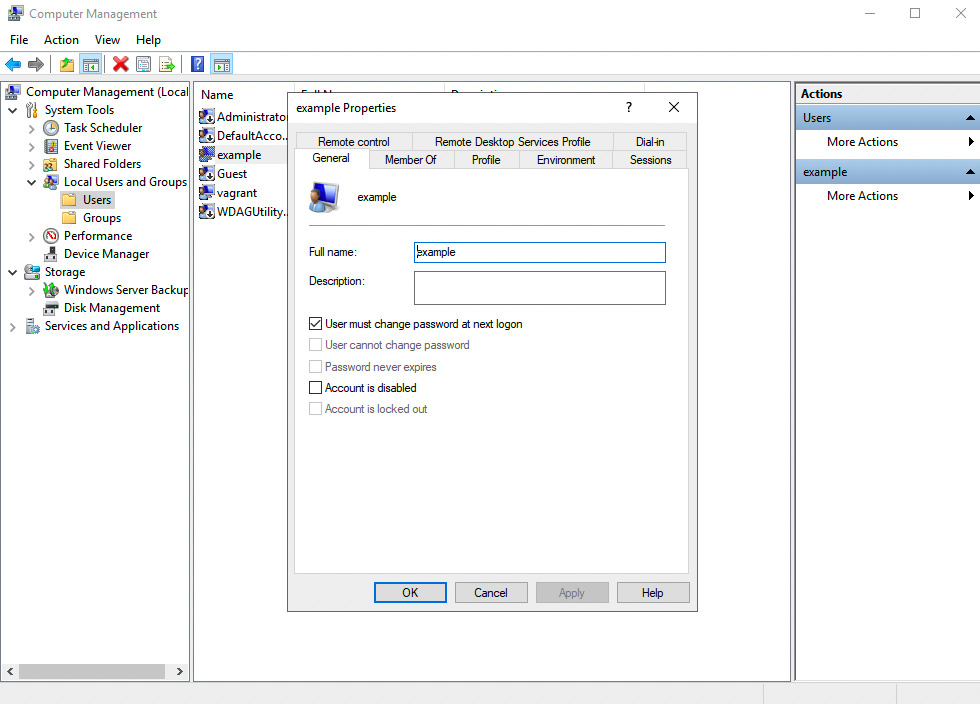
after execution
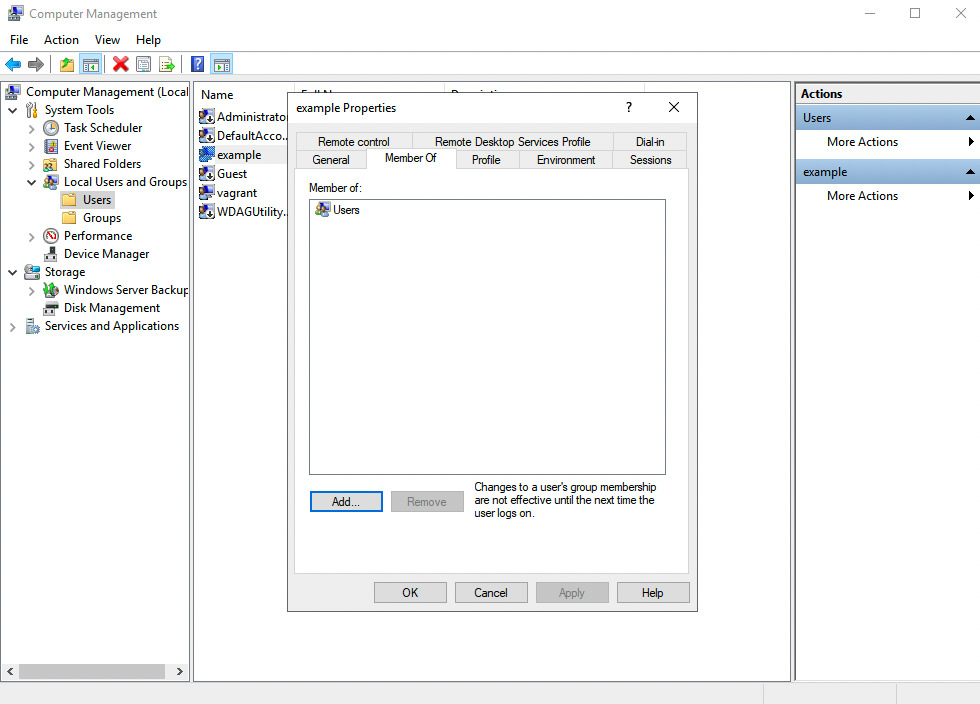
Conclusion
Now you know how to create a local user on Windows-like systems with Ansible.
See also: Create Local Groups on Windows with Ansible Playbooks
Create Basic User
- name: Create local user
  ansible.windows.win_user:
    name: deploy
    password: "{{ vault_user_password }}"
    state: present
    groups:
      - Users
      - Remote Desktop Users
  no_log: true
Create Admin User
- name: Create local admin
  ansible.windows.win_user:
    name: admin_user
    password: "{{ vault_admin_password }}"
    state: present
    groups:
      - Administrators
    password_never_expires: true
  no_log: true
Create Service Account
- name: Create service account
  ansible.windows.win_user:
    name: svc_myapp
    password: "{{ vault_svc_password }}"
    state: present
    groups: []
    description: "Service account for MyApp"
    user_cannot_change_password: true
    password_never_expires: true
  no_log: true
Full User Setup
---
- name: Create user with home and profile
  hosts: windows
  tasks:
    - name: Create user
      ansible.windows.win_user:
        name: "{{ item.name }}"
        fullname: "{{ item.fullname }}"
        password: "{{ item.password }}"
        groups: "{{ item.groups }}"
        state: present
        description: "{{ item.description | default('') }}"
      loop: "{{ vault_users }}"
      loop_control:
        label: "{{ item.name }}"
      no_log: true

    - name: Create user directories
      ansible.windows.win_file:
        path: "C:\\Users\\{{ item.name }}\\Documents\\Work"
        state: directory
      loop: "{{ vault_users }}"
      loop_control:
        label: "{{ item.name }}"
win_user Parameters
| Parameter | Description |
|---|---|
name | Username |
password | Plain text password |
state | present, absent, query |
groups | List of local groups |
groups_action | add, replace, remove |
fullname | Full display name |
description | Account description |
password_expired | Force change at next login |
password_never_expires | Disable expiry |
user_cannot_change_password | Lock password |
account_disabled | Disable account |
account_locked | Lock/unlock account |
update_password | always or on_create |
Disable/Enable User
# Disable
- ansible.windows.win_user:
    name: john
    account_disabled: true

# Enable
- ansible.windows.win_user:
    name: john
    account_disabled: false
Remove User
- ansible.windows.win_user:
    name: old_user
    state: absent
Query User Info
- ansible.windows.win_user:
    name: deploy
    state: query
  register: user_info

- debug:
    msg: |
      Exists: {{ user_info.state == 'present' }}
      Groups: {{ user_info.groups | default([]) }}
      Disabled: {{ user_info.account_disabled | default(false) }}
FAQ
win_user vs microsoft.ad.user?
win_user manages local accounts. microsoft.ad.user manages Active Directory domain accounts.
Can I create a user without a password?
No — Windows requires a password for local accounts (unless Group Policy allows blank passwords, which is insecure).
How do I add a user to a group without removing from others?
- ansible.windows.win_user:
    name: deploy
    groups: [Docker Users]
    groups_action: add  # Don't remove from existing groups
Related Articles
Category: troubleshooting
Watch the video: Ansible Create Windows Local User: win_user Module (Complete Guide) — Video Tutorial