The Red Hat Developer Subscription Renewal Process
By Luca Berton · Published 2024-01-01 · Category: installation
Empowering Red Hat Developers to Seamless Renewal of the Red Hat Developer Subscription.
Introduction
Developers who leverage the Red Hat Developer Subscription for Individuals enjoy a host of benefits, including support, security, updates, and more. While this subscription is provided at no cost to developers, it’s essential to be aware of the one-year term limit and the renewal process. In this article, we’ll explore the key aspects of the Red Hat Developer Subscription, its term length, and the steps to seamlessly renew it.
Understanding the Term Length
The Red Hat Developer Subscription for Individuals (SKU RH00798) comes with a duration of one year. As the expiration date approaches, developers receive email notifications 30 days in advance and on the day of expiration. These notifications serve as reminders to re-register for the subscription, ensuring uninterrupted access to the valuable resources it offers.The following error might appear on the screen:
- No enabled repositories
$ dnf update
Updating Subscription Management repositories.
Error: There are no enabled repositories in "/etc/yum.repos.d", "/etc/yum/repos.d", "/etc/distro.repos.d".- System Status Disabled
$ subscription-manager status
+-------------------------------------------+
   System Status Details
+-------------------------------------------+
Overall Status: Disabled
Content Access Mode is set to Simple Content Access. This host has access to content, regardless of subscription status.

System Purpose Status: Disabled- Auto attach failed
$ subscription-manager attach --auto
Ignoring the request to auto-attach. Attaching subscriptions is disabled for organization "XXXXXXXX" because Simple Content Access (SCA) is enabled.
See also: Red Hat Ansible Automation Platform book by Luca Berton
Renewal Process
To renew the Red Hat Developer Subscription, developers can follow a straightforward process. If the account was created before October 29th, 2022, it’s advisable to enable Simple Content Access for a more seamless experience. This can be done by clicking on the avatar on the right-hand side of the navigation bar, accessing Subscriptions, and toggling the Simple content access switch. The email reminder looks like the following Figure: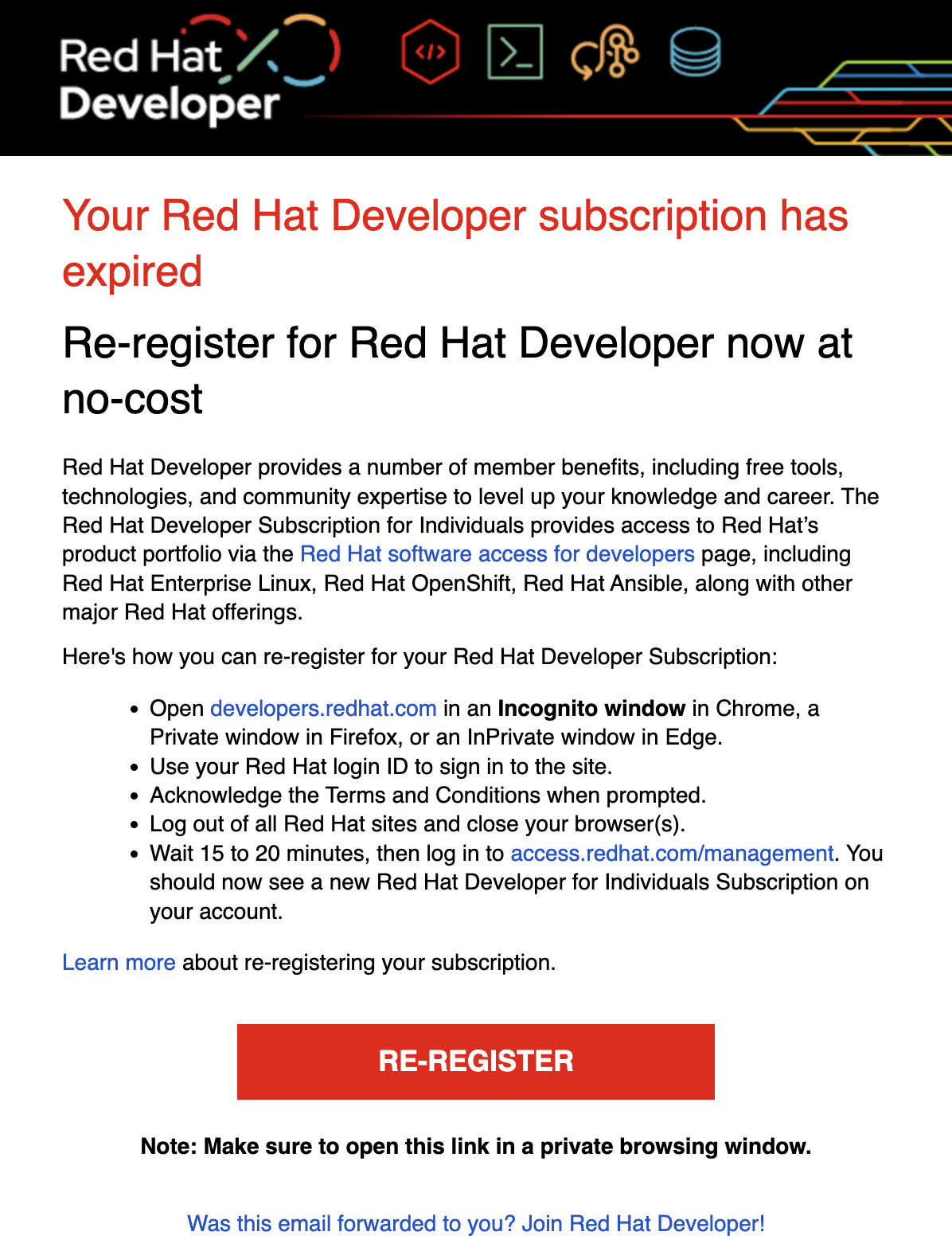
For those who miss the email notifications, the renewal can be initiated manually by visiting access.redhat.com. By logging in with their Red Hat login ID, developers can access the registration form at developers.redhat.com/register. Acknowledging the provided Terms and Conditions is a necessary step in the renewal process.
Seamless Experience with Simple Content Access
Enabling Simple Content Access eliminates the need to remove and reattach subscriptions after re-registering for the developer program. This feature streamlines the renewal process, offering a more convenient experience for developers. It’s a recommended step, whether done before or after renewing the subscription.Step-by-Step Renewal Instructions
To ensure a smooth renewal process, developers can follow these step-by-step instructions:- Open developers.redhat.com in an Incognito window in Chrome, a Private window in Firefox, or an InPrivate window in Edge.
- Sign in using your Red Hat login ID.
- Access the registration form at https://developers.redhat.com/register.
- Acknowledge the provided Terms and Conditions.
- Log out of all Red Hat sites and close your browser(s).
- After 15 to 20 minutes, log in to https://access.redhat.com/management.
- A new Red Hat Developer for Individuals Subscription should now be visible on your account.
- If needed, remove and reattach your license after accepting the new terms and conditions for your system to recognize the renewed subscription using the provided command lines.
$ sudo subscription-manager remove --all
$ sudo subscription-manager unregister
$ sudo subscription-manager clean
$ sudo subscription-manager register
$ sudo subscription-manager refresh
$ sudo subscription-manager attach --auto
Output:
# subscription-manager remove --all
0 subscriptions removed at the server.
# subscription-manager unregister
Unregistering from: subscription.rhsm.redhat.com:443/subscription
System has been unregistered.
# subscription-manager clean
All local data removed
# subscription-manager register
Registering to: subscription.rhsm.redhat.com:443/subscription
Username: luca@ansiblepilot.com
Password:
The system has been registered with ID: XXXXXXXX-XXX-XXXX-XXXX-XXXXXXXXXXXX
The registered system name is: localhost.localdomain
# subscription-manager attach --auto
Ignoring the request to auto-attach. Attaching subscriptions is disabled for organization "XXXXXXXX" because Simple Content Access (SCA) is enabled.
# subscription-manager refresh
All local data refreshed
# dnf update
Updating Subscription Management repositories.
Red Hat Enterprise Linux 9 for ARM 64 - BaseOS (RPMs)    1.4 MB/s |  15 MB     00:10
Red Hat Enterprise Linux 9 for ARM 64 - AppStream (RPMs) 1.4 MB/s |  25 MB     00:17
Last metadata expiration check: 0:00:01 ago on Tue 21 Nov 2023 12:25:50 PM PST.
Dependencies resolved.
[...]
See also: Book Presentation: Red Hat Ansible Automation Platform by Luca Berton
Automating Re-registration with Ansible
The subscription renewal itself (accepting the new one-year term) is a portal action on developers.redhat.com that cannot be automated. But once the term is renewed, re-syncing your systems is exactly the kind of repetitive task Ansible handles well — especially across more than one host. The community.general.redhat_subscription module wraps subscription-manager:
---
- name: Re-register hosts after renewing the developer subscription
  hosts: rhel
  become: true
  tasks:
    - name: Register the system with Red Hat
      community.general.redhat_subscription:
        state: present
        username: "{{ rh_username }}"
        password: "{{ rh_password }}"
        force_register: true
With Simple Content Access (SCA) enabled — the default for accounts created after October 29th, 2022 — registration alone grants content access, so there is no attach step. The module is idempotent: an already-registered host reports ok, and force_register: true forces a clean re-registration when you need to pick up the renewed entitlement.
Store the credentials in an encrypted file with Ansible Vault rather than in plain text. After registration, manage the enabled repositories with the rhsm_repository module — see the RHEL repositories guide below.
Conclusion
See also: Manage Ansible Collection Changelogs with Antsibull-Changelog
Related Articles
Category: installation
Watch the video: The Red Hat Developer Subscription Renewal Process — Video Tutorial