Ansible Private Automation Hub: Host & Manage Collections (Guide)
By Luca Berton · Published 2024-01-01 · Category: installation
Complete guide to Ansible Private Automation Hub. Host internal collections, sync from Galaxy, manage namespaces, and configure RBAC for enterprise teams.
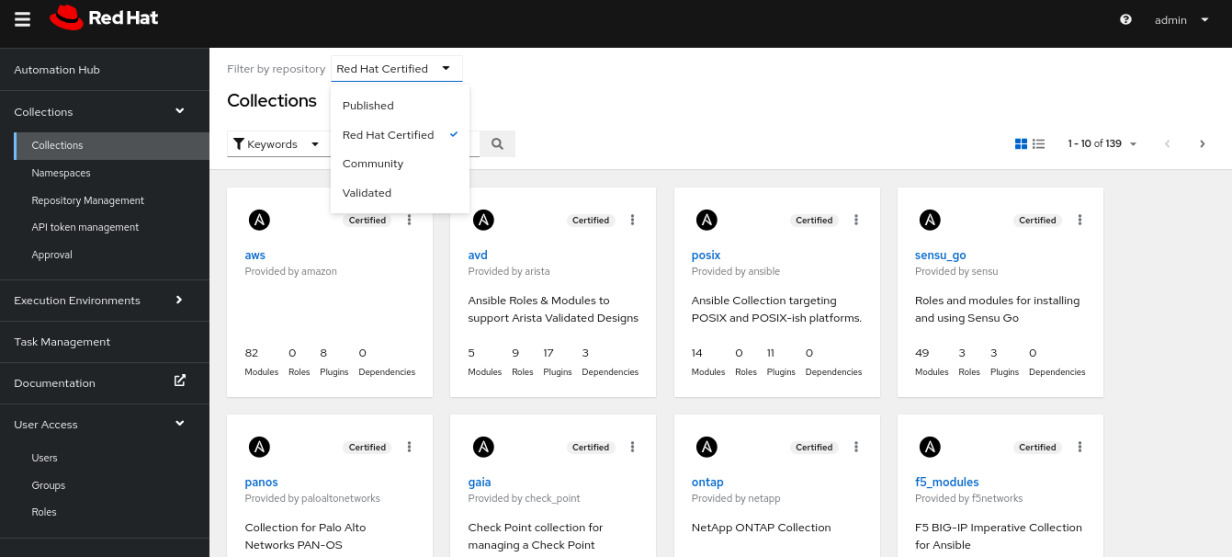
Private Automation Hub: Empowering Secure and Efficient Automation
As organizations continue to embrace automation to streamline their IT operations, the need for secure, efficient, and manageable repositories for automation content becomes paramount. The Private Automation Hub is a key component of the Red Hat Ansible Automation Platform, providing organizations with a powerful solution to manage and distribute Ansible content within their own infrastructure. This article explores the concept, benefits, and practical applications of the Private Automation Hub.
See also: AAP 2.6 Backup, Restore, and Disaster Recovery Guide
What is the Private Automation Hub?
The Private Automation Hub is an on-premises repository that allows organizations to store, manage, and distribute their own Ansible Content Collections. It is designed to work seamlessly with the Red Hat Ansible Automation Platform, ensuring that automation resources are securely available and easily accessible to internal teams.
Key Features and Benefits
- Centralized Repository: The Private Automation Hub provides a centralized platform for storing Ansible Content Collections, which includes roles, modules, and playbooks. This centralization ensures that all team members have access to the most up-to-date and validated content.
- Enhanced Security: By keeping automation content within the organization's infrastructure, the Private Automation Hub enhances security and control over the automation assets. This is particularly crucial for organizations dealing with sensitive data and strict compliance requirements.
- Performance and Reliability: Hosting the automation content locally reduces dependency on external networks, leading to improved performance and reliability. Frequently used content is cached locally, which speeds up access and reduces downtime.
- Integration with Automation Controller: The Private Automation Hub integrates seamlessly with the Ansible Automation Controller, enabling efficient management and deployment of automation resources across the organization. This integration allows for smooth authentication and access to collections and execution environments.
- Scalability: The hub supports scalable content management, making it suitable for both small teams and large enterprises. It allows for the storage and management of a vast number of collections and execution environments, ensuring that the infrastructure can grow with the organization’s needs.
Practical Applications
- Custom Content Management: Organizations can develop and maintain their own Ansible roles, modules, and playbooks tailored to their specific needs and store them in the Private Automation Hub. This ensures that all custom automation content is readily available and version-controlled.
- Hybrid Cloud Deployments: The Private Automation Hub supports hybrid cloud environments by ensuring that automation content is accessible regardless of whether it is deployed on-premises or in the cloud. This flexibility is essential for organizations that operate in diverse IT landscapes.
- Compliance and Governance: By hosting automation content locally, organizations can ensure compliance with internal governance policies and external regulatory requirements. The hub provides detailed tracking and auditing capabilities to manage and monitor the use of automation content.
- Disaster Recovery: The Private Automation Hub can play a critical role in disaster recovery strategies by ensuring that all necessary automation content is available locally. This helps in quickly restoring operations in case of network outages or other disruptions.
Setting Up a Private Automation Hub
Setting up a Private Automation Hub involves the following steps:
- Installation: Install the Private Automation Hub following the official Red Hat documentation. Ensure that the hub URL, database settings, and API token are configured to suit your environment.
- Integration: Connect the Private Automation Hub with the Automation Controller using an API token for authentication. This connection allows seamless access to and management of Ansible collections and execution environments.
- Repository Configuration: Configure the necessary repositories within the Private Automation Hub. This includes syncing community and Red Hat-certified repositories to ensure all required collections are available.
- Publishing Content: Once set up, you can publish custom collections to the hub and manage their distribution across your organization. This ensures that all automation content is up-to-date and readily available for use
Conclusion
The Private Automation Hub is a vital tool for organizations looking to enhance their automation capabilities while maintaining control over their automation content. By providing a secure, scalable, and efficient platform for managing Ansible Content Collections, the Private Automation Hub empowers organizations to achieve greater agility, reliability, and compliance in their automation efforts.
See also: Ansible Automation Platform RBAC: Role-Based Access Control for Enterprise Teams
What is Private Automation Hub?
Private Automation Hub is an on-premise registry for Ansible content — collections, roles, and execution environments. It lets organizations:
- Curate approved collections for internal use
- Sync selected content from Galaxy and Red Hat repositories
- Publish internal collections
- Control access with RBAC
Configure ansible.cfg
[galaxy]
server_list = automation_hub, galaxy

[galaxy_server.automation_hub]
url = https://hub.internal.example.com/api/galaxy/content/published/
token = your-api-token-here

[galaxy_server.galaxy]
url = https://galaxy.ansible.com/
Install from Private Hub
# Install from private hub
ansible-galaxy collection install myorg.internal_tools

# requirements.yml with source
collections:
  - name: myorg.internal_tools
    source: https://hub.internal.example.com/api/galaxy/content/published/
See also: AAP 2.6 Private Automation Hub: Manage Collections and EE Images at Scale
Publish to Private Hub
# Build collection
ansible-galaxy collection build

# Publish
ansible-galaxy collection publish myorg-tools-1.0.0.tar.gz \
  --server automation_hub \
  --api-key your-token
Sync from Galaxy
Configure in the Hub web UI:
- Go to Collections → Repository Management
- Add remote repository (Galaxy or Red Hat Certified)
- Select collections to sync
- Set sync schedule
Namespace Management
# Namespaces organize collections
# myorg.networking
# myorg.security
# myorg.monitoring- Create namespaces in Hub UI → Namespaces
- Assign teams to namespaces for publishing rights
RBAC (Role-Based Access Control)
| Role | Permissions |
|---|---|
| Admin | Full access to all features |
| Content Manager | Publish, approve, sync collections |
| Viewer | Browse and install collections |
| Namespace Owner | Publish to owned namespaces |
Execution Environments
Private Hub also hosts Execution Environments (container images with Ansible + dependencies):
# Pull EE from hub
podman pull hub.internal.example.com/ee-supported-rhel8:latest

# Use with ansible-navigator
ansible-navigator run playbook.yml \
  --eei hub.internal.example.com/ee-custom:1.0
Collection Approval Workflow
- Developer publishes collection to staging repository
- Content manager reviews and tests
- Approved → moved to published repository
- Teams can install from published
API Access
# List collections
curl -H "Authorization: Token YOUR_TOKEN" \
  https://hub.internal/api/galaxy/v3/collections/

# Get collection versions
curl -H "Authorization: Token YOUR_TOKEN" \
  https://hub.internal/api/galaxy/v3/collections/myorg/tools/versions/
FAQ
Private Hub vs Galaxy?
Galaxy is public and community-maintained. Private Hub gives you control over what content your organization uses — security, compliance, and version pinning.
Can I mirror all of Galaxy?
You can sync specific collections. Full mirroring isn't recommended — curate what your teams actually need.
How does it integrate with AAP?
AAP Controller can pull collections and EEs directly from Private Automation Hub, ensuring consistent content across all automation jobs.
Related Articles
Category: installation