Configuring Ansible for AWS: Setup Guide & Playbook — Video Tutorial
Set up Ansible for AWS with IAM credentials, boto3, and the amazon.aws collection. Follow our guide to configure and execute your first AWS playbook.
Watch Video
Watch "Configuring Ansible for AWS: Setup Guide & Playbook" on YouTube
What You'll Learn
- How to configure Ansible for AWS?
- Configure Ansible for AWS
- Links
- Playbook
- Amazon Identity and Access Management (IAM) Access Key
- Install Python boto3 SDK
- Install Ansible amazon.aws collection
- run Ansible Playbook
- Conclusion
- Related Articles
Full Tutorial Content
How to configure Ansible for AWS?
Ansible provides various modules to manage AWS infrastructure, which includes EC2, VPC, Security Groups, etc.
I'll show you step by step how to prepare your Ansible controller to interact with the AWS infrastructure.
This initial configuration sometimes is a roadblock for some AWS users to start using Ansible.
I'm Luca Berton and welcome to today's episode of Ansible Pilot.
Configure Ansible for AWS
- Amazon Identity and Access Management (IAM) Access Key
- Python `boto3` SDK requires 3.6+
- Ansible collection `amazon.aws`
The Ansible modules and plugins support the AWS infrastructure interactions.
First of all, you need to authenticate using AWS Access Key credentials: Access Key ID and Secret Access Key from Identity and Access Management (IAM) dashboard.
Ansible AWS modules are written on top of `boto3`. `boto3` is the Python SDK for the AWS that allows users to interact with AWS infrastructure via API.
This library interacts with the AWS API via the Ansible modules and plugins.
The `boto3` Python library requires Python 3.6+.
The Ansible collection `amazon.aws` of modules and plugins manages various operations related to EC2, VPC, Security Groups, etc.
As the name suggests, this resource is provided by the Ansible Engineer Team.
Links
- [Ansible collection amazon.aws](https://docs.ansible.com/ansible/latest/collections/amazon/aws/index.html)
- [Python boto3](https://aws.amazon.com/it/sdk-for-python/)
Playbook
Configure Ansible for AWS
- Amazon IAM Access Key
- Install Python boto3 SDK
- Install Ansible amazon.aws collection
- Ansible Playbook
How to Configure Ansible for AWS.
First of all, you need to install `boto3` - the AWS API Python SDK.
Second, you need to install the Ansible `amazon.aws` collection.
Once everything is done on the node you could configure the Ansible Controller machine and run your first Ansible Playbook with the `ec2_ami_info` module to search for AMI in EC2 and verify the successful configuration.
Amazon Identity and Access Management (IAM) Access Key
Generate new "Access keys" credential in your Identity and Access Management (IAM) dashboard in your AWS infrastructure account.
You should copy the Access key ID (red below) and Secret access key (green below) for the env.sh shell script.
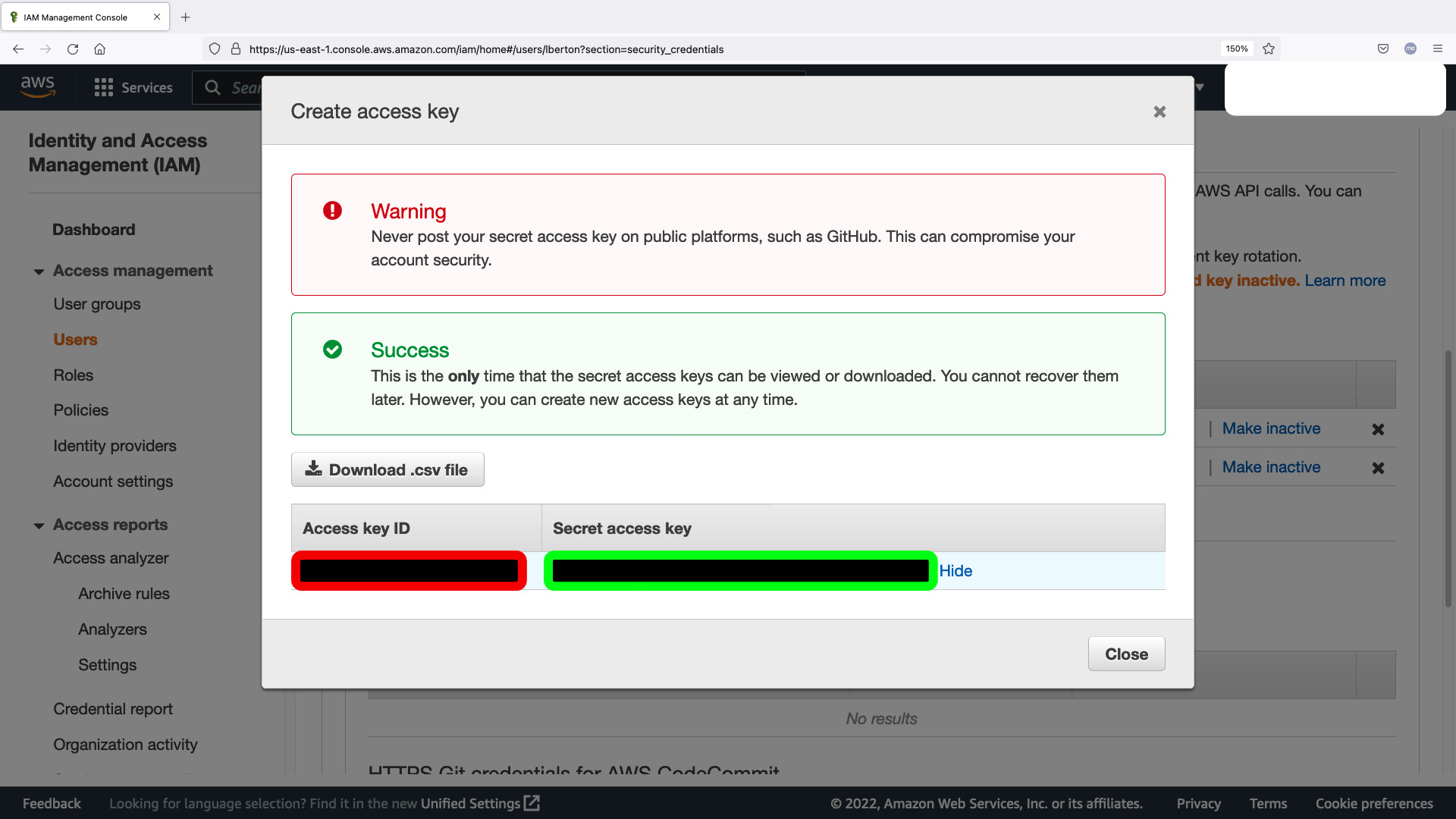
- env.sh
Please substitute with your **Access key ID** (red below) and **Secret access key** (green below) from Amazon Identity and Access Management (IAM) Access Key.
```bash
#!/bin/bash
export AWS_ACCESS_KEY_ID="RED-CODE"
export AWS_SECRET_ACCESS_KEY="GREEN-CODE"
export AWS_DEFAULT_REGION="us-east-1"
```
Install Python boto3 SDK
This example uses Python 3.8 so `pip3.8` tool, adapt to your current configuration.
```bash
[devops@demo aws]$ ansible --version
ansible [core 2.12.2]
config file = /etc/ansible/ansible.cfg
configured module search path = ['/home/devops/.ansible/plugi
About This Tutorial
- Author: Luca Berton
- Difficulty: Beginner
- Read time: 5 min
- Category: installation
Read the full written article: Configuring Ansible for AWS: Setup Guide & Playbook
Topics Covered
Related Video Tutorials
- Configure a Python Virtual Environment for Ansible AWS - ansible collection amazon.aws — Learn to configure a Python Virtual Environment for Ansible AWS amazon.aws collection using the latest Python 3.8 and boto3 library releases.
- Search for AWS EC2 AMI ID by Region - Ansible module ec2_ami_info — How to automate the search of an AWS EC2 machine AMI ID running the operating system RHEL-8.3.0 in the region "us-east-1" using Ansible Playbook and ec2_ami_info module.
- Configure Ansible Dynamic Inventory for VMware in Simple Steps — Discover how to configure Ansible Dynamic Inventory for VMware to automate and manage virtual machines efficiently. Step-by-step guide with Playbook included.
- Configure a Python Virtual Environment for Ansible VMware - ansible collection community.vmware — Learn how to set up a Python Virtual Environment for Ansible VMware, ensuring seamless integration and management of your VMware infrastructure with Ansible community.vmware collection.
- How to Add a Disk to a VMware VM Using Ansible Playbook — Learn how to add a disk to a VMware VM using an Ansible playbook. This guide includes the YAML configuration, variables, and execution steps for easy automation.
- Configuring Ansible for VMware: Complete Setup Guide & Playbook — Learn how to set up Ansible for VMware with pyVmomi and the community.vmware collection. Follow our guide to configure and run your first VMware playbook.